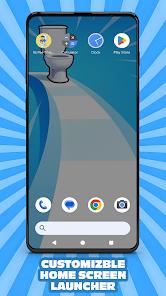
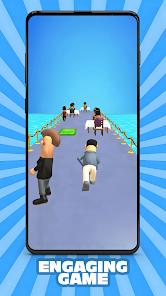
It's Pee Time Home Screen is a unique and unconventional Android "Tool" application that functions as a system launcher while integrating a comedic runner game directly into the user interface. Its primary function is to replace the standard Android home screen with a custom launcher that offers deep personalization—including icon shapes, fonts, and interactive gestures—while featuring a "desperate man racing to the toilet" as its core visual and interactive theme.
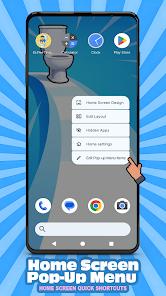
A functional disassembly reveals that this app is a full-featured launcher masquerading as a game. It offers a "Home Screen Pop-Up Menu" for quick shortcuts, extensive "Icon Style" customization (including hiding labels for a minimalist look), and "App Drawer" controls that allow users to adjust column counts, background opacity, and search bar behavior. For the game component, users play as a man dodging obstacles to reach the bathroom, with coins earned in-game used to purchase new "skins" without the need for forced advertisements.
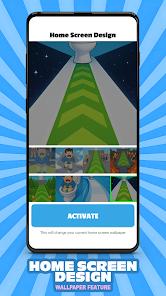
Deep insights into the app's reception show a stark contrast between its high ratings for "comedy and functionality" and significant user frustration regarding system stability. Because the app replaces the "Default Home" setting, some users have reported that it resets their previous phone configurations, causing significant inconvenience. However, for users looking for a humorous and highly customizable way to interact with their device, it provides a "minimalist yet funny" alternative to the standard Android experience, featuring 8 unique wallpapers inspired by the game's universe.
Pros
It offers a completely unique experience that combines a functional, customizable launcher with a funny, addictive game.
The "no forced ads" policy is a significant positive, allowing users to unlock content solely through gameplay rather than intrusive videos.
Extensive icon customization—including the ability to hide labels—allows for a very clean and personalized home screen aesthetic.
Interactive gestures (like double-tap) provide faster and more personal control over the entire Android device.
The "Pop-Up Menu" feature makes it very easy to jump into design settings without digging through the main app drawer.
It provides high-resolution, game-inspired wallpapers that offer a consistent and humorous visual theme.
The search bar is highly customizable, allowing users to define exactly what results (apps, contacts, settings) are shown.
Cons
Installing it as the "Default Launcher" can reset existing phone layouts and settings, which may be difficult for casual users to restore.
As a launcher, it requires deep system permissions (like location and app activity), which may raise privacy concerns.
The "desperate runner" game is relatively simple and can become repetitive once the initial novelty of the humor wears off.
FAQs
A launcher is the part of your phone's software that handles your home screen and app icons. This app replaces your standard one.
According to users, there are no forced ads; you only watch ads if you choose to for extra coins or skins.
You must go to Settings > Apps > Default Apps > Home App and switch back to your original launcher before uninstalling.
As a tools app, it uses system resources. Modern phones (Android 8.0+) should handle it easily, but older devices may see a slight impact.
Yes, the launcher comes with 8 different wallpapers, and you can also use your own personal photos.
Hot Reviews
A launcher is the part of your phone's software that handles your home screen and app icons. This app replaces your standard one.
According to users, there are no forced ads; you only watch ads if you choose to for extra coins or skins.
You must go to Settings > Apps > Default Apps > Home App and switch back to your original launcher before uninstalling.
As a tools app, it uses system resources. Modern phones (Android 8.0+) should handle it easily, but older devices may see a slight impact.
Yes, the launcher comes with 8 different wallpapers, and you can also use your own personal photos.