
Move to iOS
Overview
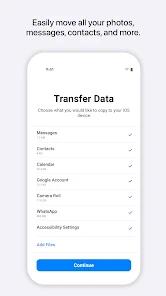
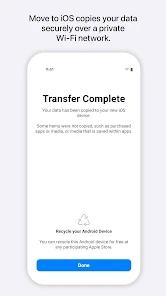
Move to iOS is perhaps the most scrutinized app in the Google Play Store, serving as the official digital bridge for the millions of users who switch from Android to iPhone every year. In 2026, the stakes for this app are higher than ever, as modern digital lives are inextricably tied to years of accumulated photos, message threads, and app data. The app's primary function is to facilitate a secure, peer-to-peer transfer of essential data—contacts, message history, camera photos and videos, mail accounts, and calendars—from an Android device to a new iPhone or iPad during the initial setup process.
A technical breakdown of the 2026 version reveals several major advancements over its predecessors. Most notably, the inclusion of 'Cabled Transfer' support has changed the game. While the app originally relied solely on a private Wi-Fi network that was prone to interference and disconnection, users can now connect a USB-C to USB-C cable (standard on modern iPhones and Androids) to create a high-speed data pipe. This has reduced the failure rate significantly and allowed for the transfer of massive photo libraries (100GB+) in a fraction of the time. Additionally, the app now handles the migration of WhatsApp chat history natively, a process that previously required third-party tools or complex workarounds.
Despite these improvements, a deep insight into the user journey reveals a psychological and technical 'barrier to entry.' Move to iOS only works on a factory-new or recently wiped iPhone. This means that if a user sets up their iPhone 'just to see how it looks' and then decides they want to move their Android data, they must erase everything and start over. This 'all or nothing' approach is a classic Apple design philosophy that prioritizes a clean system state over convenience. Move to iOS feels more rigid - it does not allow users to easily pick and choose specific folders or data types; it is designed to move the 'whole person' from one ecosystem to the other. For users coming from highly customized Android skins like MIUI or ColorOS, the app also attempts to map their free Android apps to iOS versions, but it can struggle with niche utilities or regional apps. Ultimately, while Move to iOS has become significantly more reliable in 2026, it remains a high-friction experience that underscores the deep competitive divide between the two most dominant mobile operating systems.
Pros & Cons
Official and secure method to transfer data to iOS.
Maps Android apps to iOS versions automatically.
New support for cabled transfers for higher reliability.
- ✕
Highly sensitive to background activity; often fails if the screen turns off.
- ✕
Requires a factory-reset iPhone to initiate.
- ✕
Doesn't transfer WhatsApp data as seamlessly as other native tools in some regions.
Download
 Get it on Google Play
  Get it on App Store
 FAQs
Will it transfer my WhatsApp chats?
Yes, but it requires specific steps during the setup process on the iPhone.
Can I use it after I've already set up my iPhone?
No, it must be used during the 'Out of Box' setup phase or after a factory reset.
What if the transfer gets stuck at 99%?
This is usually due to a large file error; try disabling 'Power Saving' mode on the Android device.
Hot Reviews
Moved all my photos and contacts in 20 minutes with the cable. No issues at all.
Tried three times via Wi-Fi and it failed every time. Use a cable if you can.
I wish I could select just one album to move. It tries to move everything and crashes when it hits a corrupt file.