

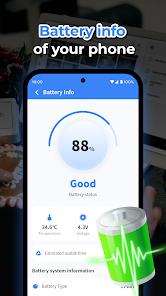
Cleaner Toolbox, developed by the SELBY TEAM, represents a high-volume entry in the system utility category with over 10 million downloads and a strong 4.45-star rating. Unlike the newer entries in this space, Cleaner Toolbox has established a substantial user community by focusing on four primary system maintenance pillars: Junk Cleaner, Battery Information, App Uninstallation, and Background Process Management.
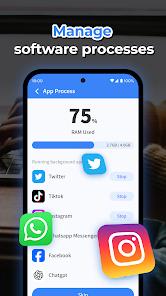
Technically, the "Junk Cleaner" module operates by auditing the device's temporary directories and application cache paths. It is particularly proficient at identifying "residual files"—data fragments that remain in the /data/user/0/ directory after an application has been uninstalled. In the 2026 Android environment, where apps often reach sizes of several hundred megabytes, these "ghost" files can significantly degrade system performance over time. The background process manager provides a real-time monitor of RAM usage, offering users the ability to terminate non-essential processes that may be contributing to battery drain or UI lag.
A deep analytical insight into Cleaner Toolbox reveals a developer philosophy that prioritizes transparency regarding its monetization. The SELBY TEAM has openly stated that advertisements are the "only source of revenue" required to maintain the app as a free service. However, this transparency is met with mixed user sentiment. Security audits by firms like NowSecure have noted that the app requests a wide array of "dangerous" permissions, including broad access to external storage and the ability to read or write system settings. Furthermore, the app has been observed collecting sensitive telemetry such as Wi-Fi IP addresses and build fingerprints. While these permissions are often technically necessary for deep-level cleaning, they present a significant privacy surface area that users must weigh against the benefits of storage optimization. The app's longevity in the top charts suggests that for many users, the trade-off of "obnoxious" notifications and data collection is acceptable in exchange for a tangible increase in available storage.
Pros
The application consistently recovers significant amounts of storage by successfully targeting deep-seated residual files that standard system tools miss.
An exceptionally small installation footprint (under 17 MB) ensures the tool itself does not contribute to the storage saturation it aims to resolve.
The App Uninstallation interface allows for efficient batch removal of unwanted software, identifying "zombie" apps that have not been used for extended periods.
Provides real-time visibility into background RAM allocation, allowing users to manually intervene when system performance begins to degrade.
The developer maintains an active update cycle, with the most recent version released in late 2025 to maintain compatibility with new Android versions.
Cons
The application push-notification system is highly aggressive, frequently alerting users to "urgent" cleaning needs every few minutes.
Security audits have flagged the collection of sensitive device identifiers and Wi-Fi IP addresses that may pose privacy risks.
The interface often pressures users to install secondary "booster" applications from partner developers, which can lead to further bloatware on the device.
FAQs
Yes, the application is entirely free to download and use, though it is heavily supported by advertisements.
It requests access to system settings and storage to perform deep cleaning of cache and residual files that are otherwise protected by the OS.
The developer utilizes frequent alerts as a way to remind users to optimize their devices, which is also a primary driver for their ad-revenue model.
Due to Android security restrictions, the app can only uninstall user-installed applications and cannot remove pre-installed system apps without root access.
The app accesses storage to scan for large files and junk, but its privacy policy states it does not collect user-generated content for external storage.
Hot Reviews
Yes, the application is entirely free to download and use, though it is heavily supported by advertisements.
It requests access to system settings and storage to perform deep cleaning of cache and residual files that are otherwise protected by the OS.
The developer utilizes frequent alerts as a way to remind users to optimize their devices, which is also a primary driver for their ad-revenue model.
Due to Android security restrictions, the app can only uninstall user-installed applications and cannot remove pre-installed system apps without root access.
The app accesses storage to scan for large files and junk, but its privacy policy states it does not collect user-generated content for external storage.