Sketchbook
One of the few phone drawing apps that genuinely feels pro-grade, thanks to a disappearing interface and convincing brush physics — just know the full brush library sits behind a subscription and the tooling stops short of desktop-style photo editing.
- Sketchers and concept artists who want a distraction-free canvas on a phone or tablet
- Illustrators leaning on natural pencils, watercolor bleed, and reliable perspective guides
- Anyone who needs vector brushes or Photoshop-grade photo filters and post-processing
- Beginners who want every tool visible on screen and get lost when the UI hides itself
Overview
The short version
If you want a drawing app that gets out of your way, Sketchbook is one of the strongest picks on Android, and it earns that reputation more through restraint than through feature-count bragging. This is the app formerly known as Autodesk SketchBook, now free to start with a premium tier, and its whole personality is built around one idea the store keeps returning to: the “Pure Act of Drawing.” We found that framing genuinely reflected in the design decisions rather than being marketing gloss. The menus vanish the moment a stylus touches the screen, the brush engine leans hard into simulating physical media, and the tooling is tuned for people making art rather than people compositing photos. That focus is also the honest limit — Sketchbook deliberately doesn’t try to be Photoshop, and if you need what Photoshop does, this is the wrong tool.
The UI-Free experience is the real draw
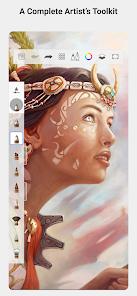
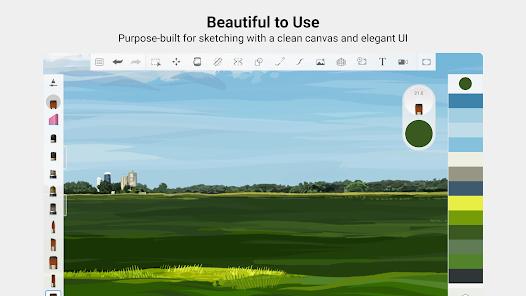
The single most important thing about Sketchbook is what it hides. The interface is designed to disappear: menus recede the instant your stylus meets the glass, leaving you with the canvas. It’s a small mechanic that shapes the entire feel of the app, and it’s the strength users mention most. One review sums it up as “clean workspace — I love that the UI disappears, just me and my art.” Another calls it flatly “the best for drawing,” singling out how natural the pencils feel. On a phone, where screen real estate is scarce, this matters more than it would on a 27-inch monitor, and Sketchbook clearly knows it.
The recent updates lean further into small-screen usability with an “Advanced Brush History” and a “Brush Panel” reworked for phone displays, which the store positions as making the app viable for concept artists working on the go. That’s not an idle claim in the reviews. One user describes doing “a professional storyboard on my phone during a flight,” and that phrase — pro-grade on a phone — recurs enough across the feedback to be a genuine pattern rather than a one-off. For a category where most apps feel like a compromise on a small screen, that’s a meaningful reputation to have earned.
The flip side, and Sketchbook’s own database entry admits it, is that the hidden interface can be too hidden for some. If you’re new to digital art and expect every tool visible and labeled, an interface that melts away on contact can feel disorienting rather than freeing. The learning curve here isn’t steep so much as invisible, and a few users will bounce off that. It’s a deliberate trade — clean canvas in exchange for discoverability — and it won’t suit everyone.
Brushes, watercolor physics, and the small details
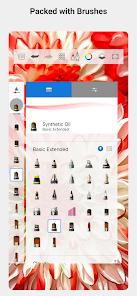
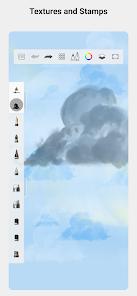
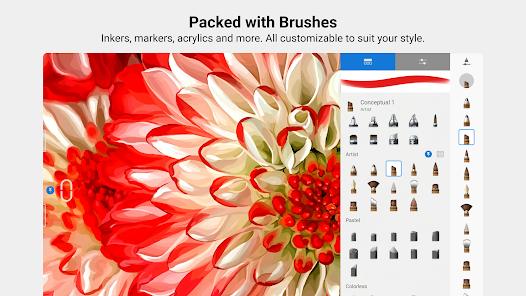
The brush engine is where Sketchbook spends its effort. It’s described as highly optimized and built to simulate physical media, and the watercolor tooling is the clearest example: “Edge Darkening” and “Wet-on-Wet” bleeding that react to tilt and pressure. On a capable stylus — the app is optimized for the S-Pen and other high-end pens — that translates into strokes that behave more like real pigment than a flat digital fill. The natural-media feel of the pencils in particular is the most praised part of the app in user reviews, which is a strong signal given how subjective brush feel usually is.
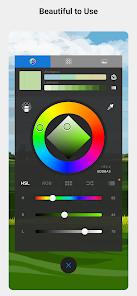
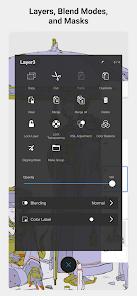
A few quality-of-life touches round this out. Long-pressing any color activates the picker, clipping masks and alpha lock are both supported for non-destructive shading and masking, and you can export transparent PNGs when you need clean layers to drop into other work. None of these are headline features, but together they’re the kind of workflow plumbing that separates a serious tool from a toy.
The honest gap here is vector support: there are no vector brushes. Everything is raster. For most sketching and painting that’s a non-issue, but if your work depends on infinitely scalable line art or logo-style precision, Sketchbook won’t cover it, and you’d be better served elsewhere.
Perspective guides and the AI line cleaning
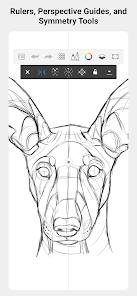
Two features stand out for people doing structured or production work. The perspective guide system supports 1-point, 2-point, and 3-point vanishing points that lock strokes to the grid, which is aimed squarely at architectural and industrial designers. Users back this up — one calls the 3-point perspective tool “a lifesaver for my city sketches” — and reliability is the operative word; the guides do what they promise without fighting you.
The more novel addition is “Scan Sketch,” now upgraded with AI-driven “Line Cleaning.” You photograph a messy pencil sketch and the app converts it into a clean, transparent, vector-like line-art layer. In the reviews this is the feature that reads closest to delight: “AI line cleaning is magic — messy ink sketches look like clean digital art in seconds.” For anyone who prefers to rough out ideas on paper and finish digitally, this bridges a workflow that usually involves a lot of manual tracing. Worth noting the output is described as “vector-like,” not true vector — consistent with the app’s raster-only nature — so treat it as a clean raster line layer rather than editable paths.
Animation, PSD, and layers
Sketchbook reaches a little beyond still images with a “Flipbook” animation mode that supports 4K output, pitched for storyboarding. It’s not a full animation suite, but for frame-by-frame roughs and storyboards it’s a reasonable inclusion, and it pairs naturally with the on-the-go concept-art use case.
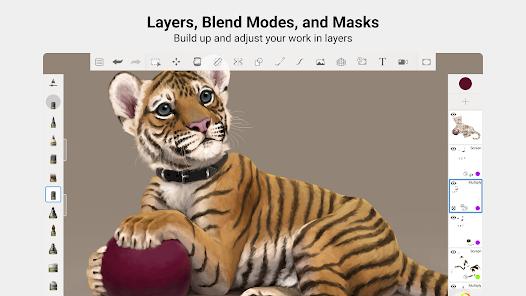
On the interoperability side, the app fully supports importing and exporting layered PSD files, which is the detail that lets it fit into a pipeline that also involves desktop Photoshop or other PSD-aware tools. Layers themselves are unlimited — with the important caveat that this is RAM-dependent, so a heavily layered piece on a modest phone will hit real limits. That ties into another honest con from the database: occasional lag on very large canvases. Sketchbook is efficient, but it isn’t immune to the hardware it runs on.
The monetization reality
Here’s the part to be clear-eyed about. Sketchbook is free to use, and a lot of it is genuinely usable for free — but the full brush library is gated. The “Premium Bundle” subscription is what unlocks all brushes, and the database lists “subscription required for Pro” as its first con. If your work depends on the complete brush set, budget for the ongoing cost rather than assuming the free tier covers everything. This is a subscription, not a one-time unlock, which is a different long-term commitment than some rivals ask for. The store isn’t coy about this, and neither should a prospective user be: the free experience is real, but “all brushes” has a price tag.
How it compares
Sketchbook’s own store description names its benchmarks, which makes comparison easy. It positions recent additions like clipping masks and alpha lock as bringing it “closer to Procreate’s feature set” — so Procreate is the yardstick it measures itself against, and Sketchbook is essentially making the case for being the top choice for artists on Android, where Procreate famously doesn’t play. If you’re on iPad, Procreate’s one-time purchase and deeper ecosystem remain the obvious comparison; on Android, Sketchbook is the more natural fit.
The other named comparison is Photoshop, and here Sketchbook draws its own boundary. It explicitly lacks the complex post-processing filters of desktop apps like Photoshop, by design, focusing on drawing rather than photo manipulation. The text tool is also still basic. So the honest division of labor is: draw and paint in Sketchbook, then move to a desktop editor via PSD if you need heavy filters, compositing, or typography.
Recency note
This isn’t an abandoned app. Play shows it last updated December 9, 2025, with 100M+ installs and a 4.0 rating across roughly 594,000 ratings — a large, stable base with a broadly positive but not flawless consensus. The phone-oriented brush panel and the AI line-cleaning work suggest active, ongoing development rather than coasting. A 4.0 aggregate is the right way to read this: well-liked and widely used, with real friction points (the hidden UI, the subscription, large-canvas lag) keeping it from a near-perfect score.
Who it’s not for
Skip Sketchbook if you need vector brushes or scalable path-based art, if your workflow depends on Photoshop-grade filters, compositing, or serious typography, or if you want a beginner-friendly interface where every tool stays visible — the disappearing UI that experienced artists love can leave newcomers hunting. And if you’re unwilling to pay a recurring subscription, be aware you’ll be working within a limited brush set.
Our take
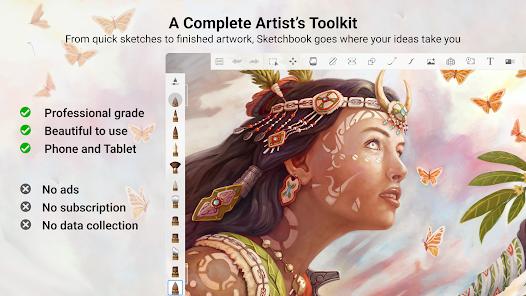
Sketchbook is one of the most credible pro-grade drawing apps you can run on an Android phone, and its disappearing interface, convincing brush physics, and reliable perspective guides back that up in the reviews rather than just the marketing. The caveats are equally clear: the full brush library needs an ongoing subscription, there’s no vector support, and it deliberately stops short of desktop-style photo editing. For sketchers and concept artists who want to draw without clutter, it’s an easy recommendation; for anyone chasing vectors or Photoshop-level post-processing, it’s the wrong tool by design.
How We Evaluate
We did not hands-on test this app. This review is a desk assessment grounded in Sketchbook's Play Store listing and description, its stated feature set, the pros and cons in our app database, its public reputation as a long-standing digital drawing tool (formerly Autodesk SketchBook), and recurring themes across its user reviews and its 4.0 aggregate rating from roughly 594,000 ratings. Where we describe strengths or limits, we trace them to those signals rather than to personal use, and we flag the monetization model as plainly as the store does.
Pros & Cons
Minimalist, focused UI
Realistic brush physics
Advanced perspective tools
AI-driven line cleaning
Unlimited layers (RAM dependent)
4K Flipbook animation
- ✕
Subscription required for Pro
- ✕
No vector brush support
- ✕
Lacks complex photo filters
- ✕
Interface can be too hidden for some
- ✕
Occasional lag on huge canvases
- ✕
Text tool is still basic
Download


FAQs
Is it free?
There is a free version, but the Premium Bundle unlocks all brushes.
Does it support PSD?
Yes, it fully supports importing and exporting layered PSD files.
Can I use a stylus?
Yes, it is optimized for S-Pen and high-end styluses.
Is there a color picker?
Yes, a long-press on any color will activate the picker.
Does it have masks?
Yes, it now supports clipping masks and alpha lock.
Can I export as PNG?
Yes, including transparent PNGs.
Hot Reviews
I’ve tried them all, and nothing feels as natural as Sketchbook’s pencils.
I love that the UI disappears. It's just me and my art.
I did a professional storyboard on my phone during a flight. Unbeatable.
My messy ink sketches look like clean digital art in seconds.
The 3-point perspective tool is a lifesaver for my city sketches.