HiPaint: Sketch & Draw art
Overview
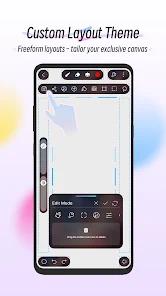
HiPaint operates as a professional-grade, multi-platform digital illustration and animation application designed to deliver desktop-level performance on mobile devices and tablets. Developed by Aige, the software has established itself as an essential tool for creators who require an illustration pipeline structurally and visually analogous to Apple's iPad-exclusive application, Procreate. By implementing a minimalist, canvas-first interface, HiPaint prioritizes physical screen real estate, allowing artists to focus on spatial execution rather than menu navigation.
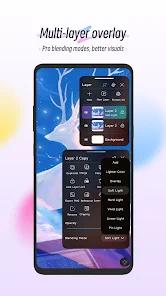
Underneath its streamlined user interface, HiPaint features a robust raster graphics rendering engine capable of supporting ultra-high-resolution canvases and managing thousands of layered assets. This level of processing is governed directly by the host device's random-access memory (RAM), ensuring that complex, multi-layered artwork maintains spatial rendering integrity without latency or micro-stutters. The layer architecture is highly sophisticated, offering twenty-eight industry-standard blending modes, clipping masks, alpha locking, and layer grouping to facilitate non-destructive image editing and professional compositing.
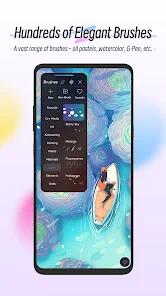
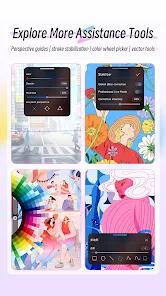
This raster-centric pipeline is augmented by an expansive brush engine containing over one hundred pre-loaded digital media presets, ranging from graphite pencils and markers to watercolor brushes and airbrushes. Creators seeking deeper customization can utilize the built-in Brush Studio, which boasts over ninety individual parameter settings, or import external brush sets and custom textures directly. To minimize hand tremors and clean up erratic line work, HiPaint integrates an advanced stroke stabilization parameter.
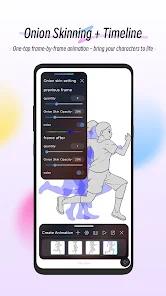
Beyond static illustration, HiPaint integrates an Animation Assist module. This frame-by-frame utility incorporates customizable onion skinning, adjustable frame rates, and storyboarding workflows, allowing animators to export their creations directly in high-definition formats such as MP4 and GIF. The software supports full pressure and tilt sensitivity mapping for physical styluses, including specific optimization for the Apple Pencil Pro and native compatibility with the SonarPen via the device's headphone jack. Interoperability is achieved through the support of multiple export extensions, including PNG, JPEG, layered PSD, and HiPaint's proprietary HSD format, enabling seamless project transfers between phones, tablets, and distinct operating systems without loss of fidelity.
Pros & Cons
Intuitive and Uncluttered Canvas Workspace: The minimal interface maximizes active drawing space, mimicking high-end digital illustration setups.
Deep Brush Customization Suite: The Brush Studio enables precise tuning of over ninety parameters, allowing artists to create highly personalized tools.
Professional Animation Assist Pipeline: Facilitates fluid frame-by-frame 2D animation with adjustable onion-skin transparency and high-definition exports.
Cross-Platform HSD/PSD Portability: Simplifies workflows by allowing creators to seamlessly transfer raw layered projects between Android and iOS.
Advanced Mathematical Perspective Guides: Features robust 2D, isometric, and symmetry guides that assist in the creation of complex environments.
- ✕
Imitative Brand Interface: The visual design is heavily derived from iPad-exclusive apps, which can make it feel like a clone rather than a unique platform.
- ✕
No Audio Support in Animation: The Animation Assist module lacks an audio import function, making precise sound-to-visual synchronization impossible.
- ✕
Paywalled Features and In-App Purchases: Key advanced features, such as the text tool, selection layers, and liquify modifiers, require individual payments or a membership.
- ✕
Hardware-Dependent Layer Capacities: The maximum number of layers is limited by the host device's RAM, which can constrain complex workflows on budget mobile devices.
Download
 Get it on Google Play
  Get it on App Store
 FAQs
Does HiPaint allow project transfers between different operating systems?
Yes. HiPaint features a proprietary HSD format and layered PSD support, allowing artists to export active projects from an Android phone and import them to an iPad without losing layer data or blending parameters.
Which styluses are supported by HiPaint?
The application is fully compatible with standard active styluses, featuring specific optimization for the Apple Pencil Pro and native pressure sensitivity mapping for the SonarPen connected through the device's audio jack.
How does the stroke stabilization feature work?
HiPaint's stroke stabilization functions as a mathematical smoothing algorithm, dampening hand tremors and jitter to produce clean, sharp vector-like curves, which is highly beneficial for linework and building muscle memory.
Can I design and import custom brushes in HiPaint?
Yes. The Brush Studio contains over ninety parameters to customize brush dynamics, hardness, and textures. Additionally, users can import custom PNG files to design unique brush patterns and tips.
Does HiPaint support time-lapse video recording?
Yes. The application automatically records the painting process, allowing artists to export high-definition MP4 videos of their creative progression for sharing on social media.
Hot Reviews
The stabilization engine is highly responsive, turning shaky hand movements into smooth, continuous strokes. The customizable radial menu allows for rapid color selection and tool switching without disrupting the creative process.
Being able to draw a quick sketch on an Android phone during a commute, save it as an HSD file, and immediately load it on an iPad with all layers intact is a massive boost to productivity.
The built-in pencils and watercolor simulators feel natural and responsive to tilt and pressure sensitivity. Creating custom lash and texture brushes by importing transparent PNGs is incredibly straightforward.