Sketchar AR Drawing Sketchpad


Overview
The integration of educational instruction with augmented reality requires precise spatial calibration and low-latency tracking. Sketchar, registered under the Google Play package ktech.sketchar, is a highly developed application in this category. Having debuted across iOS, Android, and Microsoft HoloLens, the platform combines AR projection guidelines with a comprehensive digital canvas and structured, interactive lessons.
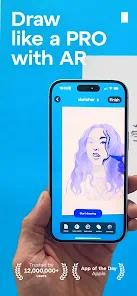
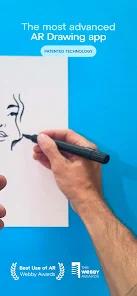
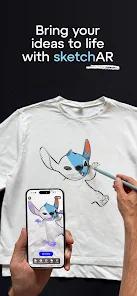
Historically, Sketchar pioneered solutions to one of the most difficult challenges in mobile computer vision: maintaining stable image projection on blank, featureless physical paper under variable lighting conditions. By developing dedicated optical anchor tracking, the application projects virtual design outlines onto real-world paper through the smartphone camera feed, helping users transfer proportions to physical sheets accurately.
A key differentiator for Sketchar is its emphasis on gamified education. Rather than acting as a simple tracing utility, the app provides structured step-by-step courses covering fundamental topics like anatomy, perspective, cartooning, and portraiture. This systematic curriculum guides users stroke-by-stroke, assessing their accuracy and helping them build consistent drawing habits.
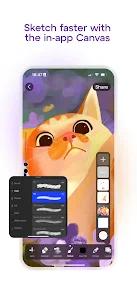
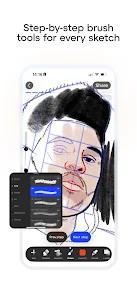
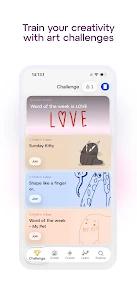
Beyond its physical tracking tools, Sketchar hosts a complete, layered in-app digital canvas, allowing users to paint digitally with custom brushes or join global creative challenges. While the system provides a selection of free templates, complete access to its advanced educational paths and tracking tools requires a premium monthly or annual subscription, presenting a clear divide between basic use and advanced learning.
Pros & Cons
Pioneering Spatial AR Tracking: Features highly stabilized flat-surface projection technology, minimizing line drift when drawing on blank physical paper.
Structured, Interactive Lessons: The curriculum covers everything from beginner basics to complex anatomical illustrations and celebrity portrait courses.
Gamified Progress Tracking: Integrates progress tracking and personalized rewards to keep learners motivated and build consistent practice habits.
Dual Physical-Digital Canvas Operations: Functions as both a physical AR tracing helper and a fully-featured digital sketching canvas with layers and custom brushes.
Active Collaborative Challenges: Connects users to a global community where they can participate in creative contests and share template designs.
- ✕
High Premium Subscription Fees: Access to premium templates and advanced courses requires a subscription ($9.99/month or up to $49.99/year), which can be a high entry barrier.
- ✕
Occasional Calibration Issues on Older Devices: The camera tracking algorithm relies heavily on device processor power, which can lead to alignment drift on older devices.
- ✕
Surface and Contrast Sensitivity: The AR camera tracking can struggle to stay aligned on blank paper under uneven lighting, requiring manual resets.
- ✕
Mandatory Personal Data Sharing: Data safety policies show the app may share personal info and app activity with third parties, which may concern privacy-conscious users.
Download
 Get it on Google Play
  Get it on App Store
 FAQs
What physical equipment is required to use Sketchar?
You will need a pencil, physical paper, and a stable smartphone stand or clamp to keep the device aligned with the drawing surface.
Does the app support large-scale drawing projects?
Yes, Sketchar has been adapted for large-scale physical projects. By scaling the AR projection, artists can layout proportions for large murals without traditional gridding.
Is Sketchar suitable for kids and absolute beginners?
Yes, the app features structured step-by-step drawing courses and gamified exercises specifically designed to help beginners and kids build confidence.
Are all lessons locked behind a paywall?
While the app features a selection of free sketches (such as basic animals and specific artist profiles) , full access to the complete, advanced curriculum requires a monthly or annual subscription.
Can I share my completed drawings with others?
Yes, Sketchar includes an integrated social feed where users can upload their digital drawings, comment on others' work, and participate in community design challenges.
Hot Reviews
Reviewers highly commend the structured tracing guides, noting that the physical and digital overlay is a highly effective way to train hand-eye coordination.
Some users criticize the app's monetization, noting that while the technology is excellent, they feel repeatedly pushed toward expensive subscription tiers.
Muralists and professional creators praise the app's scaling stability, sharing how it saves hours of tedious gridding on walls and canvases.