
Da Vinci Eye: AR Art Projector
Overview
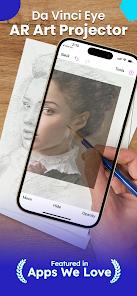
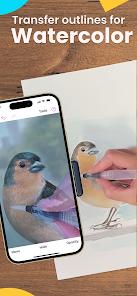
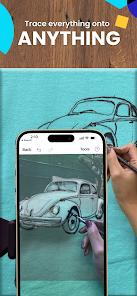
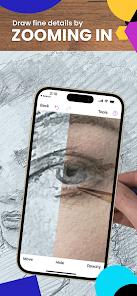
Da Vinci Eye: AR Art Projector represents a modern computational adaptation of the classic Camera Lucida, an optical device patented in 1806 that utilized prisms to superimpose a reference image onto a drawing surface. Developed by Da Vinci Eye LLC, the application bridges the gap between digital imaging systems and physical media drawing, painting, baking, and wall-scale drafting. The primary technological innovation of the application lies in its dual-mode engine: Augmented Reality (AR) Mode and Classic Mode.
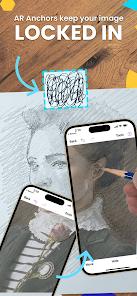
AR Mode utilizes the mobile device's camera feed coupled with real-time computer vision tracking to anchor a digital reference image directly onto a physical drawing surface. To achieve spatial locking, the app maps physical anchor coordinates on a drawing plane using the device's internal inertial measurement units (IMUs) and optical flow tracking. When an artist repositions the drawing canvas or shifts the camera angle slightly, the software dynamically recalculates the affine transformation matrices to keep the digital projection aligned with the physical lines.
Classic Mode serves as a streamlined, low-latency alternative where the reference image remains statically overlaid on the viewfinder feed. This mode is highly efficient for flat, controlled workspaces where the device is suspended rigidly above the medium using a stand or clamp.
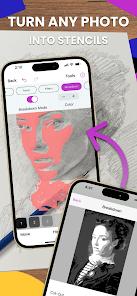
To assist in value studies and complex shading tasks, the application incorporates a proprietary color-value layer separation algorithm. This tool dissects any photographic reference into segmented monochromatic stencils according to localized luminosity boundaries, enabling users to isolate highlights, mid-tones, and shadow thresholds.
Additionally, the integrated real-time Strobe function allows artists to alternate the screen opacity of the reference image rapidly. This rapid alternation triggers a psychological comparison of proportions, allowing the human eye to instantly identify spatial discrepancies between the drawing and the source template.
Pros & Cons
Robust Spatial Anchoring: AR Mode provides exceptional spatial lock stability under optimal lighting conditions, allowing free-moving canvas adjustments without alignment loss.
Algorithmic Value Separation: The color-value stencil tool effectively deconstructs complex portraits into simple tonal values, streamlining the shading stage.
Proportion Verification: The dynamic Strobe feature serves as an immediate diagnostic tool for detecting errors in perspective and proportions.
High-Quality Time-Lapse Generation: The application directly records the raw drawing process through the viewfinder, generating professional progression videos.
Cross-Disciplinary Versatility: The projection paradigm easily adapts to diverse workflows, from standard fine arts and micro-detailing to cake decoration.
- ✕
High Hardware Constraints: AR Mode requires high-tier mobile processors, causing noticeable frame rate drops and thermal throttling on budget devices.
- ✕
Physical Setup Dependencies: Achieving optimal tracing results demands a separate physical mounting arm or tripod stand, adding secondary hardware costs.
- ✕
Restricted Free Version Utility: Aggressive paywalls lock core features, such as custom gallery importing, behind a recurring yearly fee.
- ✕
Potential Calibration Drift: Changes in ambient workspace lighting or tracking markers can cause the AR projection anchor to drift.
Download
 Get it on Google Play
  Get it on App Store
 FAQs
How does AR Mode maintain alignment when the physical drawing canvas is moved?
AR Mode relies on real-time computer vision tracking to establish visual anchor points on the canvas. The application dynamically recalculates the projection matrix based on real-time optical tracking, compensating for physical movement.
Which mobile devices support the demanding requirements of AR tracking?
The developer recommends utilizing high-end mobile chipsets running modern Android operating systems (typically Android 10 or newer) with robust AR-Core compatibility.
Is an active internet connection required to execute tracing functions?
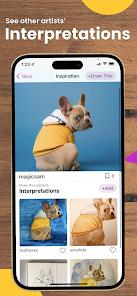
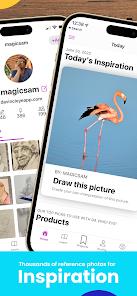
No. Basic projection mechanics, local camera tracking, time-lapse recording, and calibration modules work entirely offline. However, downloading community lessons or accessing the global feed requires cloud access.
What is the practical distinction between Classic Mode and AR Mode?
Classic Mode superimposes the reference image at a fixed position on the mobile screen without spatial mapping. AR Mode binds the image virtual data to physical coordinates, allowing the camera to move freely.
How does the color breakdown tool assist in realistic shading?
It processes the selected image through a multi-step luminosity filter, splitting it into separate layers based on light intensity. Artists can trace these specific outlines step-by-step to achieve high shading accuracy.
Hot Reviews
The software slashes the time required to establish baseline geometric coordinates in complex portraiture, allowing artists to focus entirely on manual shading and rendering techniques.
Rather than functioning as a passive tracing utility, the application actively trains muscle memory and relative distance estimation by letting artists check their freehand sketches against reference overlays.
The combination of the strobe comparison mechanic and the automated step-by-step shading breakdown tools provides unparalleled feedback on shading depth and micro-detail placement.
Without a highly rigid desktop arm or tripod mount, maintaining alignment is difficult due to camera shake and minor shifts in device angles.