AR Drawing Paint Sketch Trace

Overview
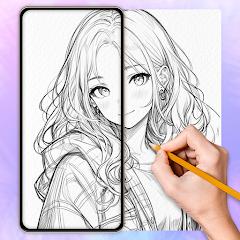
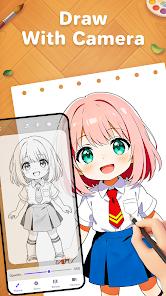
The intersection of augmented reality and traditional physical art instruction has created a unique category of utility applications designed to build manual drawing skills. AR Drawing Paint Sketch Trace, published by developer ideaFun, functions as a digital camera lucida. This utility helps users transition from observation to proportional line placement by overlaying semi-transparent digital guides onto a physical canvas through the device's camera feed.
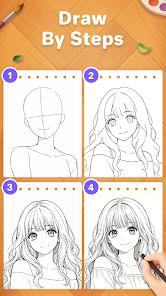
At its core, the application addresses a fundamental challenge in hand-eye coordination: learning to map proportional landmarks without relying on grid systems or physical lightboxes. Peer-reviewed studies on educational applications highlight that interactive visual overlays can keep learners highly motivated while building fundamental muscle memory. Peering through the screen, the user can see both their physical drawing utensil and the digital template, allowing for precise hand tracking. Step-by-step outline tutorials are designed to help beginners master basic shapes.
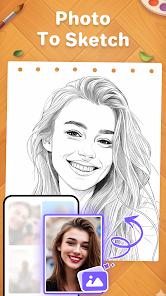
To use the app effectively, the mobile device must be secured parallel to the drawing surface using an elevated stand or holder. The user can then adjust the digital image's transparency, scale, rotation, and mirror settings. Additionally, a built-in AI edge-detection filter converts standard photographs into clear line art, allowing users to trace custom portraits or physical environments.
The application supports Android devices running version 5.0 and higher, with a package download size of approximately 89.9 megabytes. While it is a highly capable learning tool, its free-to-download structure relies heavily on ad monetization. The user flow is frequently punctuated by full-screen video ads during menu transitions and template selection, which can disrupt the focus required for precise artistic execution.
Pros & Cons
Effective Proportional Aid: The camera-based overlay acts as a reliable guide, helping beginners capture precise proportions without complex grid measurements.
Intuitive Photo-to-Sketch AI: The integrated edge-detection engine seamlessly converts custom device photographs into high-contrast tracing stencils.
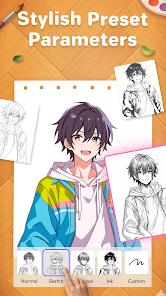
Highly Adjustable Overlay Controls: Creators can easily adjust transparency, rotation, scale, and mirror flips to accommodate different workspace arrangements.
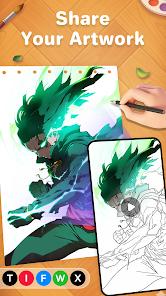
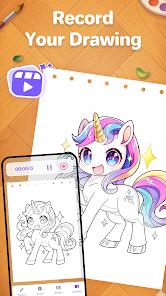
Integrated Time-Lapse Recording: The built-in recording tool captures the physical drawing process, allowing artists to export and share their work as speed-paint videos.
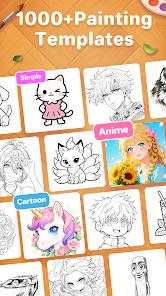
Vast Pre-loaded Stencil Library: Includes a comprehensive library of categorized stencils, including popular anime and cartoon characters, animals, and landscapes.
- ✕
High Advertisement Frequency: The user experience is heavily interrupted by mandatory full-screen video ads when opening or closing design templates.
- ✕
Dependency on External Mounting Hardware: Achieving tracking accuracy requires a secure stand or clamp; hand-holding the device makes tracing almost impossible.
- ✕
Inability to Request Data Deletion: The developer’s privacy policy states that collected device identifiers cannot be requested for deletion, which may raise privacy concerns.
- ✕
Lack of Native Vector Editing: The application does not support path manipulation or layered vector adjustments, acting strictly as a tracing projector.
Download
 Get it on Google Play
  Get it on App Store
 FAQs
What physical equipment is required to use this application?
Users will need a steady phone stand, clamp, or holder to keep the camera parallel to the drawing surface, along with physical paper and drawing utensils.
Can the app convert personal portraits into tracing stencils?
Yes, the application features an image import tool that applies edge-detection filters to photos from the device gallery, converting them into high-contrast outlines.
How do I prevent the projected image from shifting out of alignment?
Alignment is maintained by keeping both the phone stand and the paper surface completely static. Any movement of either element will require manual realignment of scale and position.
Is an active internet connection required to use the app?
While basic offline tracing is supported, loading online templates, utilizing certain AI features, and processing specific assets require a stable network connection.
Does this app support direct digital drawing on the screen?
No, this utility is designed strictly as a camera lucida projector for physical drawing; it does not feature an active digital canvas with brush tools.
Hot Reviews
Reviewers consistently note that the transparent camera guides make drawing complex characters approachable, helping younger users build hand-eye coordination.
Many users express frustration with the high volume of ads, noting that navigating menus and selecting reference images triggers frequent unskippable videos.
Users frequently praise the photo import tool, highlighting how easily it converts custom photos of pets or scenery into clean stencils.