
YouTube



Overview
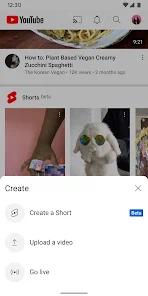
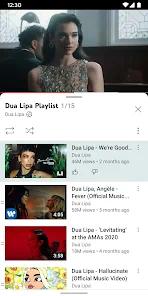
The YouTube mobile application represents the quintessential evolution of a video-sharing platform into a comprehensive media ecosystem. Since its inception, the application has transitioned from a basic playback interface to a multi-modal hub encompassing long-form video, vertical short-form content (Shorts), live broadcasting, and specialized music streaming. It also offers personal recommendations so users can discover more content they are interested in. Architecturally, the app leverages Google's sophisticated recommendation engine to curate a "Home" feed that is unique to every user, utilizing behavioral data to predict engagement patterns with high precision.
A functional decomposition of the YouTube package reveals a highly modular structure. The "Library" and "Subscriptions" tabs serve as the primary organizational pillars, allowing users to archive history and monitor creator activity. Deep insights into the platform's current trajectory suggest a strategic pivot toward "Shorts" to combat the rise of competitors like TikTok. This is not merely a feature addition but a fundamental shift in the app's navigation logic, where the bottom navigation bar now prioritizes vertical scrolling. Furthermore, the integration of "YouTube Kids" and parent-supervised experiences highlights a commitment to safety-first engineering, providing granular controls for the younger demographic.
From a product strategy perspective, the "YouTube Premium" tier is the linchpin of the app's monetization. It offers an ad-free experience, background play—crucial for mobile multi-tasking—and the ability to download content for offline viewing, which addresses the needs of commuters and travelers. However, the platform's recent increase in non-skippable advertisements for free users has created a palpable tension between monetization and user satisfaction. Technical analysis of recent updates indicates that while the app is feature-rich, it faces optimization hurdles, with some users reporting account-access freezes and navigational crashes on modern hardware.
Pros & Cons
Access to the world’s most extensive and diverse library of video content, ranging from academic lectures to entertainment.
Exceptional cross-device synchronization, allowing a seamless transition from mobile playback to desktop or smart TV.
Integrated "Shorts" platform provides high-velocity content discovery for mobile-first users.
Highly robust parental control suite via YouTube Kids and supervised account modes.
Direct creator tools facilitate the immediate upload and basic editing of high-definition video from a smartphone.
Comprehensive background play and offline viewing capabilities through the Premium subscription model.
Frequent security audits and data encryption ensure a high standard of user privacy and information safety.
- ✕
Increasing frequency of non-skippable advertisements significantly disrupts the viewing flow for non-paying users.
- ✕
Algorithmic echo chambers can occasionally lead to repetitive content suggestions in the Shorts feed.
- ✕
Intermittent stability issues, including crashes when accessing the "Account" section or switching between profiles.
Download


FAQs
How does YouTube manage my privacy and viewing history?
Users have granular control via the "Data in YouTube" settings, where they can pause or delete their search and watch history.
What are the primary benefits of the YouTube Premium subscription?
Premium removes all advertisements, enables background playback while using other apps, and includes YouTube Music Premium.
Can I limit the content my child sees on the YouTube app?
Yes, through parent-supervised experiences or by using the dedicated YouTube Kids app for age-appropriate filtering.
Does the app support offline viewing without a data connection?
This feature is exclusive to YouTube Premium, allowing users to download videos for playback in areas without internet access.
What is the "Shorts" feature and how does it differ from regular videos?
Shorts are vertical videos of 60 seconds or less, designed for quick consumption and created using a built-in mobile camera tool.
Hot Reviews
Reports from users on various Android devices suggest that recent updates have introduced "lag" and "freezing," particularly when navigating the account settings or utilizing the music features. This technical friction necessitates frequent reboots of the application.
While the short-form content is popular, users have noted that the recommendation algorithm often serves "Shorts" that have already been watched. This leads to a repetitive browsing experience that diminishes the sense of discovery the feature was intended to provide.
A growing segment of users has voiced frustration over the current advertising density. Feedback indicates that what was once a single-ad experience has evolved into multiple mid-roll interruptions that occur every few minutes, making long-form content difficult to enjoy without a subscription.