


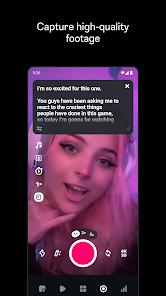

The introduction of Edits: Video Editor, identified by the package name com.instagram.basel, represents a pivotal strategic move by Meta Platforms, Inc. to consolidate its dominance in the short-form video sector. In an era where the creator economy is valued at hundreds of billions of dollars, Meta has identified a critical bottleneck: the friction between high-quality video production and mobile-first publishing. By launching a standalone, precision-focused editor, Meta aims to provide a native alternative to dominant third-party tools like CapCut, ensuring that creators within the Instagram ecosystem have access to professional-grade tools without ever leaving the company's software sphere.
Functional Disassembly and Deep Insights
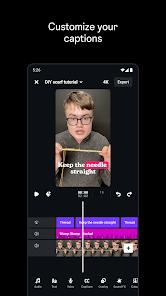
The functional architecture of Edits is built around three core pillars: precision editing, AI-enhanced creativity, and platform-integrated analytics. At its most fundamental level, the app offers a high-fidelity timeline that supports single-frame precision editing, a feature typically reserved for desktop-class software. This allows creators to synchronize visual cuts with audio beats—a necessity for viral success in the algorithmic landscape of Reels and TikTok. The app supports 4K exports at high frame rates with zero watermarking, which is a significant competitive advantage over freemium models that often gate high-resolution output behind subscription paywalls.
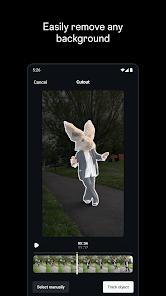
The application's deep integration of Artificial Intelligence is perhaps its most significant technological differentiator. The AI animation tools can transform static images into dynamic assets, while the "cutout" and green screen features utilize advanced computer vision to isolate subjects with a degree of accuracy that was previously difficult to achieve on mobile devices. Furthermore, the automatic caption generation tool, powered by Meta's linguistic models, significantly reduces the post-production burden for creators seeking to improve accessibility and engagement in sound-off environments.
From a strategic perspective, the inclusion of a live insights dashboard directly within the editor interface is a masterstroke. By providing creators with real-time feedback on their Reels' performance, engagement metrics, and audience retention, Meta has created a closed-loop system where editing decisions are informed by empirical data rather than creative intuition alone. This data-driven approach to creativity is indicative of the broader industry trend toward "quantifiable content," where the success of a video is engineered through a combination of technical precision and algorithmic alignment.
Edits offers a more streamlined, "clean" experience that prioritizes output quality and professional standards. It positions itself as a tool for the "prosumer"—the creator who values 4K clarity, 10-minute clip support, and precise audio enhancement over pre-made stickers.
Pros
Professional Output Fidelity: The ability to export in 4K resolution without watermarks is a premier feature that democratizes high-definition content creation for independent creators.
Direct Platform Synergy: The integrated Instagram insights dashboard allows creators to optimize their edits based on real-time engagement data, creating a more effective content strategy.
Advanced Audio Cleanup: AI-powered voice enhancement and background noise removal effectively solve one of the most persistent issues in mobile "on-the-go" recording.
Precision Editing Workflow: The timeline's support for single-frame precision allows for a level of synchronization and polish that is often missing from mobile-first editors.
Streamlined AI Assets: Automatic captioning and AI-driven background cutouts provide high-utility time-saving features that don't compromise the professional look of the video.
Cons
Hardware-Intensive Stability: Many users report significant performance drops and occasional "black screen" bugs on mid-range devices when working with 4K assets.
Multi-Layering Constraints: The current build limits the overlapping of text, stickers, and effects, which can stifle the creative freedom of more advanced mobile artists.
Linguistic Limitations: The AI captioning tool is currently restricted to the English language, presenting a barrier for Meta's vast international user base.
FAQs
Yes, the core features, including 4K export and watermark removal, are currently provided at no cost to the user.
Users can capture high-quality clips up to 10 minutes long directly through the app's integrated camera.
Yes, the app is designed to handle multiple aspect ratios, although its primary optimization is for vertical Reels and Stories.
After sharing a video to Instagram, the app tracks its performance and displays engagement metrics within a dedicated dashboard in the editor.
While the app is available on the Play Store, smooth 4K editing generally requires a modern device with a powerful GPU and significant RAM.
Hot Reviews
Yes, the core features, including 4K export and watermark removal, are currently provided at no cost to the user.
Users can capture high-quality clips up to 10 minutes long directly through the app's integrated camera.
Yes, the app is designed to handle multiple aspect ratios, although its primary optimization is for vertical Reels and Stories.
After sharing a video to Instagram, the app tracks its performance and displays engagement metrics within a dedicated dashboard in the editor.
While the app is available on the Play Store, smooth 4K editing generally requires a modern device with a powerful GPU and significant RAM.