
Vimeo

Overview
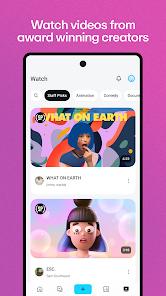
The Vimeo app, developed by Vimeo.com, Inc., is a professional video hosting, creation, and sharing platform. Unlike consumer networks like YouTube that rely on ad monetization, Vimeo focuses on providing high-fidelity, ad-free video presentation and collaborative tools for creative professionals, filmmakers, and business teams.
The application supports high-resolution video files, offering upload and playback at resolutions up to 8K with HDR10 and Dolby Vision on compatible screens. Its processing pipeline handles advanced video containers and professional codecs, including H.264, H.265 (HEVC), and Apple ProRes. This provides content creators with high-quality compression that preserves the fine details of their films, avoiding the aggressive compression typical of social video networks.
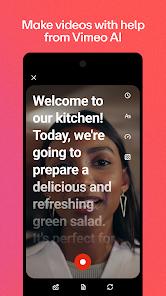
A key aspect of Vimeo's current mobile platform is its integrated, AI-powered creation suite designed for single-take video production. This feature set contains three primary components:
- AI Script Generator: This tool utilizes natural language processing (NLP) to generate scripts from user-inputted prompts in seconds, providing a starting point for video creation.
- Built-in Teleprompter Overlay: During recording with the device’s front-facing camera, a custom scrolling teleprompter overlays the script on-screen, helping the presenter maintain direct eye contact with the lens while reading.
- Text-Based Video Transcript Editor: This system automatically transcribes captured video clips, allowing users to edit video edits by modifying the text transcript. For example, deleting a transcribed word or filler pause (like "um") automatically trims the corresponding video segment.
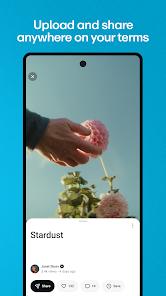
Beyond video creation, the Vimeo app is designed for team collaboration and corporate asset management. Enterprise teams can utilize secure video libraries, search internal company databases using spoken-word transcription indexing, and manage access permissions on a user-by-user basis. For distribution, the application offers granular control over video privacy, allowing creators to protect videos with passwords and generate restricted links that control where the video can be embedded. This design ensures corporate presentations and creative portfolios remain secure and professional.
Pros & Cons
Ad-Free Playback: Offers a clean viewing experience with no pre-roll or mid-roll advertisements.
Advanced AI Editing Tools: Features an AI script generator, teleprompter overlay, and text-based transcript editing.
High-Fidelity Codec Support: Retains high video quality during uploads, supporting resolutions up to 8K with HDR.
Granular Privacy Controls: Allows users to protect videos with passwords and set domain-level embed permissions.
Enterprise Collaboration Features: Includes team folder permissions, shared workspaces, and spoken-word search indexing.
Offline Project Management: Supports video downloads for offline viewing and editing workflows.
- ✕
Subscription Barriers: Accessing higher upload storage limits and advanced collaborative tools requires a paid plan.
- ✕
Rental Authentication Failures: Occasional client-side sync bugs can prevent users from accessing purchased or rented titles.
- ✕
Occasional Mobile Playback Glitches: Certain hardware and network configurations experience freeze frames or audio desync.
- ✕
Limited Organic Reach: Focuses on professional hosting rather than algorithm-driven discovery, making it harder to build organic audiences than on consumer networks.
Download


FAQs
Is Vimeo free, or is a subscription required?
Vimeo offers a basic free tier with limited storage. Advanced privacy options, enterprise tools, and larger uploads require a paid plan.
How does the text-based video editor work?
The application automatically transcribes spoken audio into text; deleting words or sections within this transcript trims the corresponding video frames.
Can videos be downloaded to mobile storage for offline viewing?
Yes. Videos can be downloaded directly within the application to allow playback when offline.
Can Vimeo videos be cast to larger screens?
Yes. The app includes casting support, allowing users to play ad-free video streams directly on compatible televisions.
What are the main differences between Vimeo and YouTube?
Vimeo focuses on ad-free, high-fidelity presentation, advanced privacy options, and creative collaboration tools, whereas YouTube emphasizes ad monetization, social engagement, and algorithm-driven discovery.
Hot Reviews
The transcription and text-based editor are highly effective for editing presentations, allowing users to remove filler words easily.
Some users report errors where they are charged for video rentals but the mobile application fails to sync the access entitlements, blocking playback.
The absence of advertisements and high playback quality make it a preferred option for presenting professional portfolios and corporate work.