

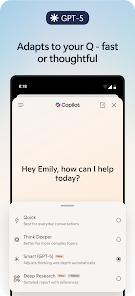
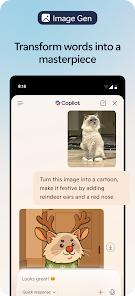
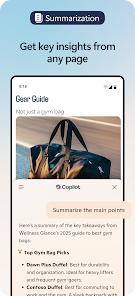
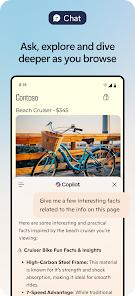
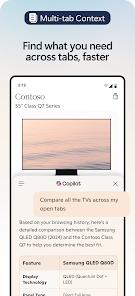
Microsoft Edge for Android is not merely a web browser; it is an AI-powered hub designed to maximize productivity and security. Built on the Chromium engine, it ensures total compatibility with the modern web, but its true functional depth comes from the built-in Copilot integration. Functionally, the app allows users to summarize lengthy web pages, PDFs, and even YouTube videos directly from the browser interface. This deconstructs the traditional reading experience, allowing users to find key insights in seconds without endless scrolling.
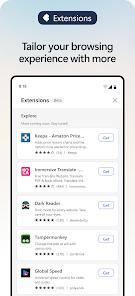
A deep insight into Edge mobile reveals its "Desktop-Parity" strategy. Unlike many mobile browsers that offer a "lite" experience, Edge supports powerful Extensions, which are searchable via the "Extension Hub." This includes high-demand tools like uBlock Origin for ad-blocking and specialized theme customizers. The browser also features a high-performance "Read Aloud" function that uses AI to read webpages in natural-sounding voices, effectively converting any article into a high-quality audiobook. For security, the app integrates "Microsoft Defender SmartScreen" to block phishing and malware, alongside a specialized "Password Monitor" that scans the dark web for leaked user credentials. It also has a InPrivate Mode that allows for anonymous browsing without history/Bing association
From a technical perspective, Edge leverages the GPT-5 model within its Copilot button to provide expert-level results with minimal effort. Users can long-press text to "Ask Copilot" for context-aware definitions or translations. The cross-device synchronization is a major differentiator; your "Collections," "Favorites," and open tabs sync seamlessly between your Android phone, Windows PC, and Mac, providing a unified browsing experience that is increasingly vital in a multi-device world.
Pros
The built-in Copilot (GPT-5) assistant allows for high-speed summarization and content generation directly within the browser.
It is one of the very few mobile browsers that supports powerful third-party extensions like uBlock Origin for superior ad-blocking.
The AI "Read Aloud" feature offers some of the most natural voices in the industry, making it an excellent tool for multi-taskers.
Seamless cross-platform synchronization ensures that your tabs, passwords, and history are always with you on any device.
Advanced security features like Microsoft Defender SmartScreen provide enterprise-grade protection against web threats.
Cons
The application has a significantly larger footprint and file size.
Some users find the interface to be "cluttered" with too many Microsoft services and a busy news feed that can be distracting.
Occasional bugs have been reported where "Collections" or "Favorites" fail to sync properly after an update, leading to temporary data invisibility.
FAQs
Open the menu (three dots), find the "Extensions" or "Extension Hub" icon, and search for the tools you want to install.
Yes, Edge has a robust "Dark Mode" feature that can force all websites to use a dark theme, which users find works better than many competitors.
Yes, while Edge defaults to Bing, you can change your search engine to Google or DuckDuckGo in the browser settings.
"InPrivate" ensures your history, cookies, and search data are not saved to your account or device after you close the session.
While watching the video, tap the Copilot icon and ask it to "Summarize this video." It will provide a breakdown of the key chapters and content.
Hot Reviews
Open the menu (three dots), find the "Extensions" or "Extension Hub" icon, and search for the tools you want to install.
Yes, Edge has a robust "Dark Mode" feature that can force all websites to use a dark theme, which users find works better than many competitors.
Yes, while Edge defaults to Bing, you can change your search engine to Google or DuckDuckGo in the browser settings.
"InPrivate" ensures your history, cookies, and search data are not saved to your account or device after you close the session.
While watching the video, tap the Copilot icon and ask it to "Summarize this video." It will provide a breakdown of the key chapters and content.