Ink AI – Tattoo design maker
Overview
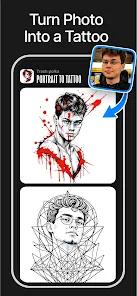
The application designated as Ink AI – Tattoo design maker, represents a significant shift in how people approach permanent body art. Historically, choosing a tattoo was a high-friction process. Customers had to choose from standardized, physical design catalogs or rely on manual drawings, often leading to visual mismatch and post-ink dissatisfaction. This application addresses those challenges by combining a personalized text-to-image generative engine with an augmented reality virtual try-on system.
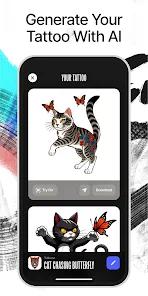
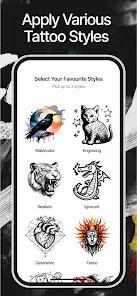
The generative engine is built to convert abstract descriptions into structured tattoo templates. Users input their design concepts via natural language prompts, specifying elements like composition, subject matter, and style. The platform offers a variety of style pre-sets, including realistic, old school, tribal, surrealistic, pointillist, Victorian, and minimalistic styles. Rather than outputting a generic image, the app is tuned to generate clean, high-contrast stencils. This focus on high-contrast linework makes the outputs highly compatible with thermal transfer printers used in professional tattoo studios.
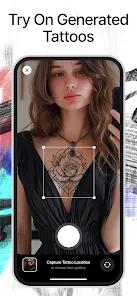
To complement the stencil generator, the app features a "Virtual Tattoo Try-On" tool. This system acts as an interactive testing environment, allowing users to preview how a design will look on their own skin. Users upload a high-quality, unobstructed photo of the target body part. The local processing engine then performs perspective warping to project the flat 2D stencil onto the curved 3D surface of the limb or torso. This process accounts for ambient lighting and skin tone, creating a realistic preview that helps users confidently select the right size and placement.
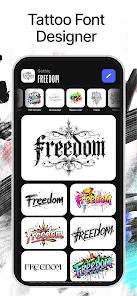
Additionally, a dedicated "Tattoo Font Designer" generates customized typography for text-based tattoos. Users enter phrases, names, or quotes and choose from several script styles—such as bold, elegant, or handwritten. The system instantly converts the text into a stencil that can be projected onto the body via the virtual try-on tool.
The application's monetization balance has drawn some criticism. The free tier provides five daily generations, but the watermarked files are difficult to use as physical stencil transfers. The premium "Pro" tier removes these watermarks, provides access to exclusive high-fidelity styles, increases processing speed, and removes advertisements. However, the user interface suffers from a frustrating file deletion system. When a user deletes an item, the app places deletion markers over all folders, making it easy to accidentally delete entire albums with a single misclick, as there is no confirmation prompt or trash folder.
Pros & Cons
Accurate Curved Mapping: The virtual try-on tool uses perspective-warping algorithms to accurately project flat stencils onto complex body curves, giving a realistic preview of scale and placement.
Dedicated Custom Typography: The built-in font designer makes it easy to generate clean, print-ready script tattoos without requiring external graphic design software.
Clean Stencil Output: Generates high-contrast stencils with sharp outlines, making the files easy to transfer directly onto stencil paper.
Broad Style Directory: Offers a diverse library of over 30 styles—including realistic, Victorian, pointillist, and tribal—allowing users to explore many artistic directions.
Practical Free Trial: The free tier provides five daily generations, allowing users to test the core generator before committing to a paid plan.
- ✕
Unsecured Deletion Controls: The folder management system lacks a confirmation prompt or trash bin, making it easy to permanently lose saved designs with a single accidental click.
- ✕
Aggressive Subscription Billing: Users frequently report being billed continuously even after canceling their trial subscriptions.
- ✕
Heavy Free-Tier Watermarking: Stencils generated on the free plan are heavily watermarked, requiring a paid subscription to export clean reference files.
- ✕
Inconsistent Complex Prompts: The generative model can struggle to resolve highly intricate prompts with multiple design elements, occasionally producing muddy or blurred results.
Download


FAQs
How does the Virtual Try-On tool adjust for body curvature?
The app uses edge-detection and mapping algorithms to evaluate body contours in uploaded photos, warping the 2D stencil to fit realistic skin folds and anatomical curves.
What are the limits of the free tier compared to the Pro version?
The free tier allows five image generations per day with watermarked outputs. The Pro version unlocks unlimited generations, removes watermarks, offers faster processing, and provides full style access.
Can a user upload their own sketch to test skin placement?
Yes, users can upload their own images or sketches to the try-on tool to evaluate how they look on different parts of the body.
How can a user cancel an active trial subscription to avoid recurring fees?
Subscriptions must be managed directly through the Google Play Store account settings under "Payments & subscriptions" to prevent automatic weekly or monthly renewals.
Is the output format suitable for professional tattoo stencil printers?
The stencils are designed for high contrast and clean lines, making them highly compatible with professional thermal transfer printers used in studios.
Hot Reviews
Users praise the try-on tool's ability to overlay stencils onto skin photos, noting it provides a helpful, realistic preview of placement and sizing.
Many reviews express frustration with the folder system, citing cases where weeks of saved work were lost because the delete button lacked a confirmation prompt.
Several users report ongoing charges after canceling their trial subscription, describing customer support as unhelpful in resolving billing issues.
Tattoo enthusiasts appreciate the app as an "idea board," allowing them to mix and match styles before settling on a final concept.