
Mattermost


Overview
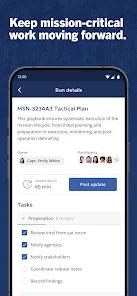
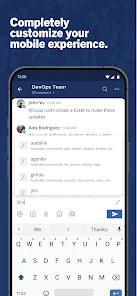
In the landscape of modern enterprise collaboration, organizations with stringent security mandates require absolute control over communication channels, data custody, and messaging metadata. The application serves as the mobile portal for the Mattermost secure workplace messaging suite. Unlike commercial software-as-a-service platforms, the Mattermost architecture is built around a self-hosted server model, enabling organizations to deploy communication nodes entirely behind their private firewalls, on secure cloud nodes, or inside on-premises data centers. To establish an active session, the mobile application requires a validated connection handshake with Mattermost Server version 10.11.0 or higher, ensuring compatibility across protocol revisions and preventing client-side crashes.
The client utilizes a React Native framework (signified by the .rn suffix) to deploy a unified codebase across mobile operating systems. While hybrid frameworks streamline the development pipeline, they introduce specific performance challenges. Users have documented noticeable latency during initial workspace synchronization, slow loading times for large channel directories, and high memory utilization on mid-range hardware. Security, however, remains the primary justification for this model. Mattermost integrates natively with enterprise directory services—including LDAP, Active Directory, and OpenID Connect (OIDC)—enabling administrators to manage user access and permissions at a centralized organizational level. It ensures the safety and privacy when you chat one-to-one or in a group. And it allows you to view and share files with ease.
Furthermore, setting up a secure connection on mobile requires a valid certificate path. The application systematically rejects connections to servers using self-signed, expired, or invalid SSL certificates, necessitating the implementation of automated certificate managers like Let’s Encrypt. This design ensures that all data in transit remains encrypted and protected against man-in-the-middle attacks, though it increases the setup complexity for self-hosted instances. Recent developments in the Mattermost ecosystem have introduced integrated support for AI agents directly within the mobile workspace. This features a dedicated AI agent chat interface, thread summary panels, and custom bot selectors with individual profile pictures, transforming the communication client into a terminal for automated team workflows.
Conversely, the mobile application is restricted by significant functional limitations. A primary limitation is the lack of native multi-server workspace switching; the client only supports a single active server URL, forcing users who interact with multiple organizations to run web wrappers or use separate beta builds. Additionally, persistent authentication bugs on modern Android releases cause random session invalidations, forcing users into repeating sign-in loops despite active server-side caching.
Pros & Cons
Uncompromised Data Sovereignty: Restores complete control over message histories and metadata through self-hosted configurations.
Enterprise Identity Management: Syncs natively with corporate standard directories including LDAP, Active Directory, and OIDC.
Native AI Agent Hub: Houses a specialized mobile interface for running, querying, and managing localized AI agents.
Developer-First Architecture: Connects seamlessly with external webhooks and developmental workflows on GitHub and GitLab.
Transparent Open-Source Code: Facilitates deep code auditing and customization via an active public repository.
- ✕
React Native Performance Constraints: Suffers from high sync latency, sluggish channel changes, and delayed messaging sweeps.
- ✕
Single Server Limitation: Restricts active mobile sessions to one server URL, blocking fast multi-organizational switching.
- ✕
Frequent Session Invalidations: Susceptible to authentication crashes and recurring log-out loops on updated mobile systems.
- ✕
High Infrastructure Barrier: Demands complex server setups and trusted SSL certification paths to establish connections.
Download


FAQs
Why does the client experience disconnection issues?
The mobile application requires connecting to Mattermost Server version 10.11.0 or higher. Older backend releases may fail to process incoming mobile API requests, resulting in dropped sessions.
Can self-signed security certificates be used on mobile?
No. For data protection, modern mobile operating systems and Mattermost reject self-signed certificates. Administrators must deploy a public certificate authority like Let’s Encrypt.
How does Mattermost handle multi-server management?
The standard application supports only one server connection. To manage multiple workspaces, users must utilize separate browser tabs or concurrently install the developer beta build of the app.
What capabilities are introduced with the AI agent module?
The app features a dedicated chat interface, thread summary banners, and an interactive bot selector to run custom AI agents directly within channels.
Is a commercial license required for basic push notifications?
Standard notification relay functions are available to open-source users, though commercial licenses unlock advanced directory mapping and administrative controls.
Hot Reviews
The mobile React Native client is extremely slow to load messages compared to its highly polished desktop counterpart, making real-time communication on cellular connections highly frustrating.
The app frequently logs users out, creating a cycle of crashes and authentication loops that require a complete uninstall and reinstall of the app to recover access.
For organizations operating under high-stakes security regulations, this self-hosted chat client offers unmatched privacy, deep developer webhook integrations, and complete ownership of metadata.
The addition of native UI features supporting on-device and local AI agents, including interactive bot lists and thread banners, makes collaborating with custom scripts incredibly streamlined.