ADP Mobile Solutions
ADP Mobile Solutions is the best possible version of an app you never chose to install — a solid, secure pocket paystub for the tens of millions whose employer runs payroll on ADP. But it's of no use to anyone whose employer doesn't use ADP, half its 2026 marketing features depend on what your company switched on, and sign-in reliability is its most common complaint.
- Employees whose company already runs payroll through ADP
- People who want paystubs, W-2s, and 401(k) info in one secure app
- Workers who need fast time-off requests and paycheck notifications
- Freelancers, contractors, or anyone whose employer doesn't use ADP
- People expecting a personal finance app they can just download and use
- Anyone on an older Android phone prone to login and authentication headaches
Overview
You don’t really review ADP Mobile Solutions the way you review a game or a budgeting app, because you don’t choose it — your employer does. That single fact defines everything about this app, and it’s the honest lens we’ll keep coming back to. If your company runs payroll through ADP, this is a genuinely good, secure, quietly useful tool that turns “where’s my paystub” and “how much PTO do I have left” into ten-second lookups. If your company doesn’t, there’s nothing here you can reach — it’s a sign-in screen for an account you don’t have. Its 4.5-star average across more than 785,000 ratings is real and earned, but it reflects a required tool rated by the people who must use it, rather than a product chosen out of enthusiasm.
What it actually is (and the employer gate)
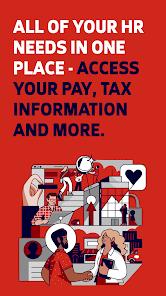
ADP is the biggest payroll and human capital management company in the US, and this app is the employee-facing front end to that machine. Think of it as the mobile window into whatever ADP services your employer already pays for: pay statements, tax documents, direct deposit details, benefits, retirement contributions, and time-and-attendance.
The defining constraint, which ADP’s own FAQ states plainly, is that you cannot use this app unless your employer is an ADP client. There’s no consumer sign-up, no “try it yourself” mode. If you’re a freelancer, a 1099 contractor, or you work somewhere that uses Gusto, Paychex, Workday, or an in-house system, this app does nothing for you. That’s not a flaw exactly — it’s the entire business model — but it means the app’s usefulness is almost entirely inherited from decisions made above your pay grade.
It also means your experience varies wildly with what your company enabled. Two people can install the identical app and see completely different feature sets — one gets GPS clock-in and wellness surveys, the other a bare paystub viewer — because the employer controls the configuration. Keep that in mind every time you read a glowing or furious review; half the time people are reacting to their employer’s setup, not ADP’s software.
The UX walkthrough
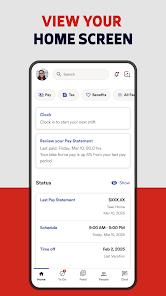
The interface is competent and corporate, which is both praise and criticism. It’s clean, legible, and organized around the tasks you actually came for — but nobody has ever called it delightful. “Corporate, dry UI” is on our own cons list, and that’s fair; this is enterprise software wearing a mobile app’s clothes.
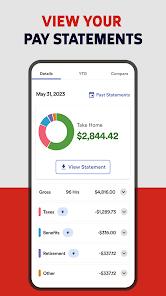
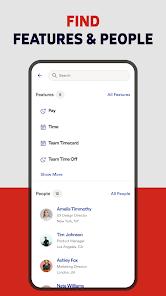
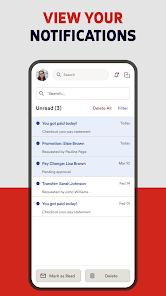
Pay. The core loop works well. Pay statements live under the Pay section, and users consistently praise the notification that fires the moment a paycheck is processed — one reviewer summed it up as loving “the notification the second my paycheck is processed.” Five years of pay history in your pocket, as another put it, genuinely does replace the shoebox of paper stubs.
Tax documents. Your W-2 is found under Pay > Tax Statements, and you update withholdings under Profile > Tax Withholdings. This works, though users note tax forms carry “heavy data requirements” — pulling and rendering official documents can be sluggish, and it’s the kind of thing you don’t want to be fighting with on April 14th.
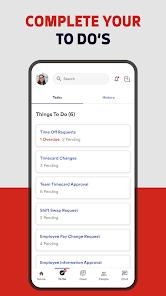
Time off. This is where the app quietly shines. “Requesting vacation takes 10 seconds, manager sees instantly,” one user reported, and that instant-visibility loop between employee and manager is exactly what a mobile HR app should nail. If your employer enabled geofencing, clock-in can be GPS-based — convenient for some, and something others may find intrusive, and again entirely at your employer’s discretion.
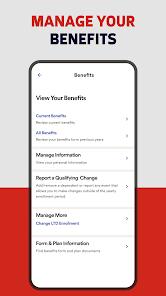
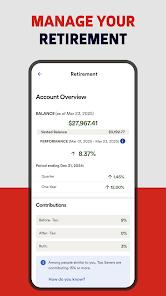
Benefits and 401(k). Retirement lives in the benefits tab, and enrollment is reasonably smooth. ADP markets “seamless benefits enrollment,” and while we’d temper “seamless,” the plumbing to see and adjust your 401(k) contributions is there and functional.
What real users report
The 5-star reviews cluster around a few honest themes, and they’re worth taking at face value: security they trust (“safe and reliable — trust it with sensitive data, palm scan is cool”), paycheck visibility they value, fast time-off, and the sheer relief of no more paper stubs. One reviewer even reported a financial nudge — a suggestion to bump their 401(k) by 1% — as a moment the app earned its keep. Read that as a data point, not a promise: ADP markets AI-driven contribution and withholding suggestions (“Smart Deduction”) as a headline 2026 feature, but it’s something the company advertises, not something the app is guaranteed to do for you.
That’s the app at its best: a secure, everyday utility that removes small frictions from working life. ADP leans hard on security in its pitch — bank-level encryption plus biometric sign-in, and for 2026 it advertises palm-print scanning and facial recognition for tax documents. Encryption and biometric login are believable table stakes for an app holding financial data; the exotic palm-print claim is ADP’s own marketing, and we’d wait to see it working before crediting it. Either way, a serious security posture is the right expectation for an app holding your W-2s and direct-deposit details.
Where it frustrates
Now the honest part. ADP’s most persistent pain point is login and authentication. Registration, password resets, multi-factor prompts, and account lockouts generate real frustration, and it’s disproportionately bad on older Android devices — a recurring theme in public reputation. When the app works, it’s invisible; when authentication breaks, you’re locked out of your own paystubs, and that’s a genuinely stressful place to be.
Contractors and non-standard workers get confused. The app is built around the traditional employee-employer relationship, and people in gig, contract, or multi-employer situations regularly find it doesn’t map cleanly to how they get paid.
Notifications can lag. “Delayed notifications sometimes” is a known issue — ironic, given the on-time paycheck alert is one of the app’s most-loved features.
And a specific caution on the 2026 marketing. ADP’s store copy pitches the app as a “Personal Wealth and Career Hub” and promises AI-driven “Smart Deduction” 401(k)/withholding suggestions, an “ADP Roll” conversational assistant that explains why your net pay dropped, palm-print and facial biometrics, “Multi-Jurisdictional Compliance” location tracking for remote workers, and manager-facing tools like a “Real-Time Workforce Analytics” dashboard and an “Employee Wellness Index.” We can’t confirm any of these actually work as advertised — they’re ADP’s own forward-looking claims, and we treat them that way. Read them as the store pitch, not verified fact. Even if some ship, they may stay dark until your employer licenses and enables them — so don’t install this expecting a conversational AI financial coach and be disappointed when you get a paystub viewer.
A note on version and recency
The app was last updated April 1, 2026, so it’s actively maintained — no small thing for enterprise software, and reassuring on the security and compliance front, which is exactly where an app holding this kind of data needs to stay current. It also means those ambitious 2026 features may be rolling out, though availability stays uneven across employers and, again, none of it is guaranteed to reach your particular login.
How it compares
Its real competitors — Workday, Gusto, Paychex, Paycom — all share the same fundamental constraint: you use whichever one your employer picked, not the one you’d choose. So a head-to-head is somewhat academic. That said, ADP is the incumbent giant, and its app is generally regarded as more feature-complete than most, if stiffer and more corporate than a friendlier Gusto. And the honest baseline it beats isn’t a rival app at all — it’s the shoebox of paper stubs and the “email HR for my W-2” era. Against that, five years of pay history and your tax documents in your pocket is a real upgrade, whatever you think of the UI. If you’re comparing apps at all, it’s usually because you’re job-hunting and noticing your next employer uses a different system.
Who it’s NOT for
Be clear-eyed here. This app is not for freelancers, independent contractors, or anyone whose employer doesn’t run payroll on ADP — for you it’s a non-starter. It’s not for people expecting a downloadable personal-finance app — there’s no consumer path in. And it’s not a great fit if you’re on an older Android phone with a history of login and authentication trouble, because that’s precisely where ADP’s weakest link shows.
The verdict
For its intended audience — employees at ADP-client companies — this is a genuinely useful, secure, well-maintained utility that earns a place on your home screen and most of its 4.5 stars. It puts pay, taxes, time off, and retirement in one trustworthy place, and its encryption-plus-biometric-login security story is a real strength (its flashier palm-print claim you can treat as marketing for now). But it’s an app you inherit, not one you choose, its feature set is only as good as your employer’s configuration, some of its flashiest 2026 promises are marketing until proven otherwise, and its login experience is the recurring sore spot you should expect. Situational, not universal — indispensable to the right person, invisible to everyone else.
How We Evaluate
We did not hands-on test this app — it's gated behind employer sponsorship and real corporate credentials we don't have. This review is built from ADP's store listing, its documented feature set, its 4.5-star aggregate across 785K+ ratings, recurring themes in public user reviews, and ADP's long-standing reputation as the dominant US payroll provider. Where ADP makes forward-looking 2026 feature claims, we flag them as the company's own marketing rather than verified fact.
Pros & Cons
Biometric palm-print security
Predictive financial coaching
Auto-compliance for remote work
Conversational AI support
Real-time payroll tracking
Seamless benefits enrollment
- ✕
Corporate, dry UI
- ✕
Delayed notifications sometimes
- ✕
Requires employer sponsorship
- ✕
Login issues on older Androids
- ✕
Can be confusing for contractors
- ✕
Heavy data requirements for tax forms
Download


FAQs
How do I find my W-2?
Navigate to the 'Pay' tab and select 'Tax Statements'.
Can I use the app without my employer?
No, your company must use ADP for you to log in.
Is my data secure?
ADP uses bank-level encryption and biometric authentication.
Can I clock in via GPS?
Yes, if your employer has enabled geofencing.
How do I update my tax info?
Go to 'Profile' > 'Tax Withholdings' to make changes.
Can I see my 401k?
Yes, retirement accounts are integrated into the benefits tab.
Hot Reviews
I trust this app with my most sensitive data. The new palm scan is cool.
I love getting a notification the second my paycheck is processed.
The app suggested I increase my 401k by 1% and showed me the long-term benefit.
Requesting vacation takes 10 seconds and my manager sees it instantly.
Having 5 years of pay history in my pocket is a huge relief.