
DashCommand (OBD ELM App)
Overview
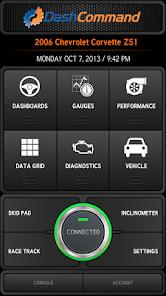
DashCommand represents a highly functional, performance-focused On-Board Diagnostics (OBD-II) and virtual dashboard application designed for vehicle owners, DIY mechanics, and automotive enthusiasts. Since 1996, light vehicles sold in the United States and other international regions have been required to feature standardized $OBD\text{-II}$ ports to track engine health and emissions parameters. DashCommand connects directly to these systems via Bluetooth, Wi-Fi, or hardwired ELM327-compatible hardware adapters, transforming standard Android devices into real-time mechanical telemetry monitors.
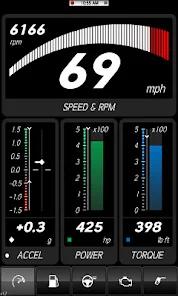
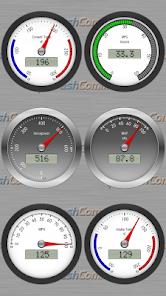
DashCommand reads real-time Parameter IDs (PIDs) directly from the vehicle’s Engine Control Unit (ECU). This raw data is mapped to customizable virtual dashboard displays that track parameters such as engine RPM, coolant temperature, boost pressure, fuel trims, and intake air temperatures. Beyond functioning as a supplemental dashboard, DashCommand serves as a diagnostic scan tool. It can scan, interpret, and clear Diagnostic Trouble Codes (DTCs), allowing users to identify check engine light issues and reset warning lights after repairs. It also captures freeze-frame data, which provides a snapshot of sensor metrics at the exact millisecond a fault code was triggered—a vital feature for diagnosing intermittent failures.
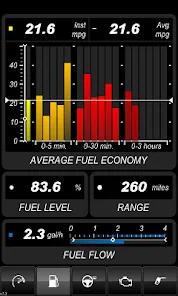
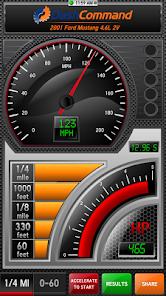
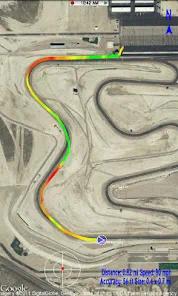
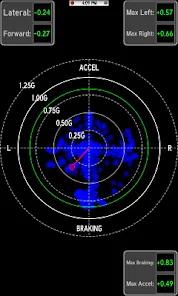
A key feature of DashCommand is its focus on performance calculations and racetrack telemetry. Utilizing the mobile device's GPS alongside vehicle speed sensors, the software calculates $0 \rightarrow 60\text{ mph}$ times, quarter-mile runs, and real-time fuel efficiency. It also includes a virtual dynamometer that estimates engine horsepower and torque based on vehicle weight and driveline parameters.
Additionally, the software evaluates $OBD\text{-II}$ emissions readiness monitors to determine if a vehicle is prepared to pass state inspections, saving users from potential re-testing fees.
For vehicle owners, the application represents a cost-effective alternative to professional handheld scanners, which can cost hundreds of dollars. A one-time software purchase of $9.99 combined with a standard adapter allows DIY mechanics to execute diagnostics from their own driveway. However, because the application is built to accommodate extensive customization, configuring dashboard layouts and entering custom PID equations can be technically challenging for beginner users.
Pros & Cons
Customizable Dashboard Layouts: Allows creation of custom virtual instrument clusters to track multiple mechanical sensors in real-time.
Fault Diagnosis and Code Clearing: Scans and interprets generic and manufacturer-specific trouble codes, clears warnings, and resets check engine lights.
Emissions Readiness Evaluation: Monitors onboard emissions sensors to verify compliance before state-mandated inspections.
Comprehensive Performance Calculation: Estimates horsepower and torque output, real-time fuel economy, and acceleration times.
Data Logging and Export: Records and exports full driving sessions for diagnostic troubleshooting or racing analysis.
- ✕
Expensive Proprietary Hardware: While compatible with cheap generic adapters, the developer's proprietary scanners cost between $200 and $250.
- ✕
Complex Vehicle Calibration: Calculating accurate horsepower and torque requires inputting precise parameters like vehicle weight, drag coefficients, and tire size.
- ✕
Legacy Visual Interface: The graphical styling of the built-in skins and dashboard widgets looks dated compared to modern material-designed software.
- ✕
Upfront Software Cost: Unlike freemium alternatives, DashCommand requires an upfront purchase of $9.99 to access full utility.
Download


FAQs
Can DashCommand read codes from all vehicle control modules?
DashCommand reads and clears standard emissions-related diagnostic codes; manufacturer-specific modules like ABS, SRS airbags, or transmission systems may require specific hardware compatibility.
Does DashCommand work with cheap generic ELM327 adapters?
Yes, the application is compatible with standard ELM327 Bluetooth and Wi-Fi hardware, though high-quality adapters are recommended to avoid connection dropouts.
How does the virtual dynamometer estimate engine power?
The software utilizes physical formulas combining real-time vehicle speed, RPM, and user-provided inputs like curb weight and aerodynamic drag.
Is internet access required to use the app in a vehicle?
No, the application connects to the OBD-II adapter via local Bluetooth or Wi-Fi; internet access is only needed to look up specific code definitions online.
Can leaving the adapter plugged in drain the vehicle battery?
The software itself does not consume power when inactive, but some OBD-II adapters draw continuous power from the vehicle port even when the engine is turned off.
Hot Reviews
The dashboard customization is highly functional, allowing drivers to track exact transmission temperatures and intake metrics omitted by standard dashboards.
The app offers great value, allowing car owners to avoid diagnostic fees by pinpointing issues like failing oxygen sensors in minutes.
The logging features are highly accurate, but reconnecting to Bluetooth adapters after restarting the vehicle engine can occasionally require multiple attempts.