
UKG Ready
Overview
UKG Ready is an enterprise human capital management system developed by UKG, Inc.. Designed for small and medium-sized organizations that require scaling capabilities, this platform unifies HR records, payroll data, shift scheduling, and talent tracking into a single application. The framework is engineered to automate compliance-heavy operational workflows, making it particularly useful for organizations featuring shift-based structures, unionized labor, and multi-department rules. It leverages central databases to minimize discrepancies between time-card entry and payroll disbursements.
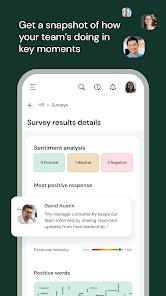
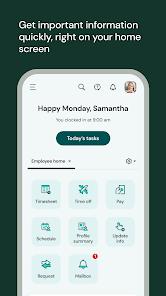
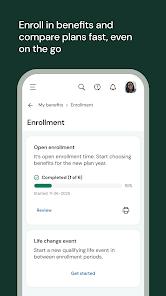
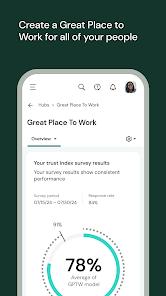
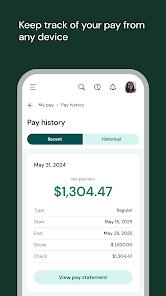
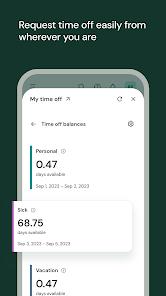
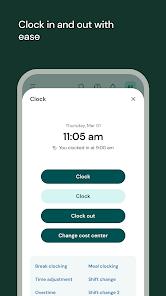
For standard employees, the app provides a consolidated interface to clock in or out, review current schedules, sign up for available shifts, request PTO, and review benefits. The mobile layout supports optimized grid tables to ensure complex data layouts remain legible on smaller smartphone screens. For supervisors and HR practitioners, the mobile environment provides a robust set of control features, such as approving timesheets, resolving scheduling conflicts in real time, and editing employee records. Advanced metrics are also presented to managers, including organizational sentiment analytics and predictive turnover trends.
Despite its robust feature set, the application exhibits noticeable performance inconsistencies. A common point of concern is its slow launch times and tendency to freeze during the initial boot sequence. Users frequently encounter a static green startup screen that fails to resolve even under high-bandwidth environments, forcing repeated device restarts and cache clearing. Curiously, some diagnostic observations reveal that the app fails to load under specific local enterprise Wi-Fi routers but connects successfully via external cellular data networks. These synchronization failures suggest underlying protocol challenges in matching localized network firewalls with UKG's cloud endpoints.
To initiate connection, the app requires users to manually input a unique 7-digit company shortname supplied by their system administrator. The operational permissions are tightly regulated by client companies, meaning that feature availability is dynamically restricted based on user roles and enterprise tiers. While UKG has deployed its Bryte AI system to automate shift management and draft job outlines , setting up the backend remains a demanding project. Misconfigured fields during implementation can quickly propagate errors into live payroll calculations. Consequently, while the platform offers robust compliance frameworks, it demands diligent administrative oversight.
Pros & Cons
Integrated Workday Ecosystem: Unifies timecard tracking, payroll sheets, benefit catalogs, and scheduling metrics under one dashboard.
Predictive Management Insights: Utilizes Bryte AI algorithms to monitor team sentiment patterns and pinpoint potential staffing gaps.
Mobile-Optimized Data Layout Grids: Converts dense, complex data tables into responsive layouts built for smaller smartphone screens.
Strong Labor Compliance Automation: Helps enforce complex pay rules, union labor laws, and custom shift schedules to minimize payroll errors.
Comprehensive Manager Portal: Enables on-the-go managers to adjust schedules, evaluate candidates, and approve PTO requests instantly.
- ✕
System Launch Instability: Prone to freezing during startup, often requiring users to force-stop or reinstall the application.
- ✕
Demanding Verification Requirements: Requires manual entry of a 7-digit organization code during initial setup, complicating onboarding.
- ✕
Intrusive Rating Prompts: Triggers persistent prompts asking users to rate the app, which can disrupt daily clock-in/out routines.
- ✕
High Backend Complexity: Customizing workflows, database fields, and rate tables requires advanced administrative training.
Download


FAQs
Where can users locate the required 7-digit company shortname to sign in?
This code is a unique identifier assigned to each company's UKG database, and it must be provided by the organization's HR or IT department.
Does the application support automatic PTO balance projections for future dates?
No, the mobile version displays current accruals but lacks the option to simulate PTO balances for future dates, requiring users to log in to the web platform for projections.
Can employees swap scheduled shifts with coworkers directly inside the application?
Yes, provided the employer has enabled the feature, workers can view open shifts, request swaps, and select additional hours from the dashboard.
Are timesheet approvals synced instantly with central payroll databases?
Yes, approvals submitted on the mobile client sync in real time, reducing the processing latency that often leads to payroll delays.
How does the application secure personal data on shared or lost devices?
The app does not store employee databases on the device itself; instead, it relies on encrypted cloud transmissions and supports biometric access keys.
Hot Reviews
The mobile client frequently hangs on the launch screen, forcing users to rely on the desktop web portal to complete daily clock-ins.
The application triggers app store review prompts during daily clock-out routines, interrupting workflows without offering a permanent opt-out setting.
While the desktop version is fast and reliable, the mobile app often fails to load over office Wi-Fi, highlighting inconsistencies in how the app handles network handshakes.