
Google NotebookLM
The rare AI app that won't make things up — because it can only talk about documents you feed it. The 'Audio Overview' that turns your notes into a two-host podcast is the genuine killer feature; the note-taking wrapped around it is still half-built.
- Students and researchers who want to interrogate their OWN sources — PDFs, lecture slides, papers — with citations they can click and verify
- Auditory learners who'd rather listen to a 10-minute explainer of a dense chapter than re-read it
- Anyone wanting a general-purpose chatbot — it deliberately refuses to answer beyond the files you give it
- People who need a real note editor: there's no built-in word processor, so you'll still write somewhere else
Overview
Most AI apps have the same problem: they sound confident whether or not they’re right. Google NotebookLM is built to solve exactly that, and it does it with one deliberate constraint — it will only answer using documents you upload. Drop in a folder of PDFs, lecture slides, a messy set of meeting notes, even a YouTube link, and NotebookLM becomes a research assistant that can summarise, connect, and answer questions about that material and nothing else. Ask it something your sources don’t cover and it tells you so instead of inventing an answer. For anyone who has been burned by a chatbot hallucinating a citation, that restraint is the feature.
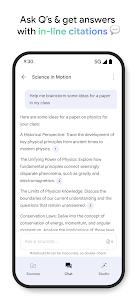
The reason it works is architectural, not magic: NotebookLM pulls answers straight out of your uploaded text rather than from the open internet, and every claim it makes comes with an inline, clickable citation that jumps you to the exact passage it used. In practice that’s the difference between “an AI told me” and “here’s the sentence on page 14.” Reviewers writing academically single this out repeatedly — being able to verify a generated line against the source in one tap is what makes the output trustworthy enough to actually use.
How it works in practice
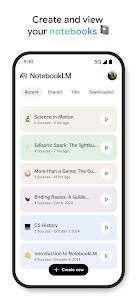
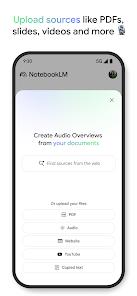
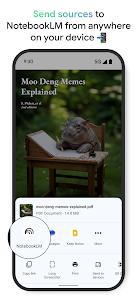
The organising unit is the “notebook” — an isolated container you fill with sources. Upload PDFs, plain text, Google Drive files, public web pages, a local audio recording, or a YouTube URL, and NotebookLM parses and indexes the lot, after which the chat, the summaries, and every tool operate strictly inside that walled garden. It’s a genuinely different mental model from a chatbot: you’re not asking an AI what it knows, you’re asking it what your documents say. That constraint is also its ceiling on power — the app is only ever as good as the sources you give it — but it’s what makes the output dependable.
On top of the Q&A sit the study tools, and they punch above their weight because they’re built from your own material rather than a generic bank: NotebookLM will spin your uploaded notes into interactive quizzes, flashcard sets, and structured study guides automatically. For exam prep against a specific syllabus, that’s the difference between practising the actual content and practising something adjacent to it.
The Audio Overview is the reason to install it
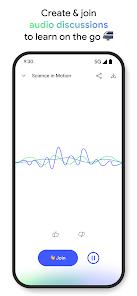
If NotebookLM only did grounded Q&A it would be a solid utility. What lifts it above that is Audio Overview: point it at your sources and it generates a podcast-style conversation between two synthetic hosts who explain, debate, and simplify the material. The voices are unnervingly natural — pauses, interruptions, the occasional laugh — and you can even interject mid-episode to steer the discussion toward a subtopic you’re stuck on.
This sounds like a gimmick until you use it on something you’re genuinely trying to learn. Turning a dry twenty-page chapter into a ten-minute discussion you can listen to on a commute is a real change in how you study, and it’s the feature Play reviewers mention more than any other — one called it “a game-changer for study prep.” The episodes download for offline and background playback, so it slots into the gaps in a day — the walk, the gym, the dishes — where reading isn’t an option. For auditory learners specifically, this is close to a superpower.
Where the mobile app still feels unfinished
Here’s the honest part, and it’s the same story the more clear-eyed reviewers tell: the intelligence is excellent and the app wrapped around it is not yet. Three rough edges stood out.
The audio player is genuinely annoying. It doesn’t remember your position — close the app mid-episode and it resets to the start, which is maddening for the exact long-form listening the feature is designed for. As one reviewer put it, the AI is impressive “but the basic audio player needs improvement.” For a feature this good, shipping it with a player this basic is a real miss.
There’s no built-in editor. NotebookLM reads and analyses your notes beautifully but gives you nowhere to write them — no word processor, not even a scratchpad — so you’ll keep drafting in Docs or Notion and treating NotebookLM as a read-only lens over your material. That’s a defensible design choice, but it means the app is an analysis layer, not a home for your notes.
And organisation gets messy at scale. Everything lives in flat notebooks with no sub-folders, so once you’ve got twenty or thirty of them the dashboard becomes a wall of tiles you scroll to find things in. There’s also a hard 20-minute cap on generated audio, which is usually plenty for a chapter but forces you to split anything book-length into chunks.
How it compares
Don’t line NotebookLM up against ChatGPT or standalone Gemini — they’re different tools. A general chatbot will brainstorm, write, and range across everything it was trained on, and it will occasionally invent a source while doing it. NotebookLM trades all of that breadth for trustworthiness inside your own documents. Nor is it a Notion or Obsidian replacement: those are where you keep and write knowledge; NotebookLM is where you interrogate a fixed set of it. The closest comparison is simply reading your sources yourself — and against that baseline, the citations and the Audio Overview genuinely save time. It’s also worth noting the app is actively developed (last updated late June 2026), so the rough edges are the kind that get sanded down.
The privacy question, and the honest limits
For anyone uploading sensitive material — unpublished research, a company’s internal documents, a client’s files — the obvious worry is where that data goes. Google’s answer here is unusually clean: under standard settings, files you upload to NotebookLM stay private and are not used to train Google’s public models, and the app doesn’t hand your data to third parties. That’s not a small thing. It’s the difference between “I can put my dissertation drafts in here” and “I absolutely cannot,” and it’s a big part of why NotebookLM is usable for real academic and professional work rather than just casual curiosity.
The capacity is generous, too. The underlying Gemini model carries a very large context window, comfortably indexing hundreds of thousands of words across multiple files in a single notebook — so you can throw an entire semester’s readings or a stack of related papers at one notebook and still get coherent, cross-source answers. In practice this is where the “connect the dots” promise pays off: ask how two of your uploaded papers disagree, and it will actually reason across both and cite each.
Picture the concrete use. A law student loads a statute, three case PDFs, and their own lecture notes into one notebook, then asks how the cases interpret a particular clause — and gets an answer with a clickable citation to the exact paragraph in each source, plus an Audio Overview to review on the walk home. That’s the app at its best, and it’s a genuinely new way to work through dense material.
The limits are the flip side of the same design. Because it only knows your sources, a thin or one-sided notebook produces thin or one-sided answers — garbage in, grounded garbage out. And it won’t fact-check your documents against the wider world; if your source is wrong, NotebookLM will faithfully explain the wrong thing. Knowing that is part of using it well.
Is it worth it?
Yes — and the fact that it’s free makes that easy to say. NotebookLM is one of the few AI products where the constraint is the value: by refusing to wander beyond your sources, it earns a kind of trust that open-ended chatbots simply can’t. The Audio Overview feature alone justifies the install for anyone who studies or reviews documents regularly, and the grounded citations make it safe to lean on for real work.
Just go in understanding what it is. This is a tool for understanding material you already have, not a creative assistant and not a place to keep your notes. If you want an AI that brainstorms, drafts copy, or chats about anything under the sun, NotebookLM will feel frustratingly locked-down — that’s the wrong tool, not a flaw. But if you have a stack of dense sources and you want to actually absorb them, nothing else on Android does it this cleanly. Fix the audio player and add basic note editing, and this jumps from “very good” to “essential.”
How We Evaluate
We judge every app on the same checklist: what problem it actually solves, how honestly it's priced, where it frustrates real users, and who should skip it. For NotebookLM we read across recent Play Store reviews, worked through the published feature set, and paid particular attention to how its "grounded" model differs from a normal chatbot — because that difference is the whole point of the app.
Pros & Cons
Grounded AI Generation: Restricting the AI's source pool to user-provided documents significantly reduces the risk of incorrect or hallucinated information.
High-Quality Synthetic Podcasts: The natural-sounding Audio Overviews effectively translate dry textual documents into engaging verbal debates.
Interactive Podcast Guidance: Users can actively participate in and redirect the AI-generated podcasts toward specific topics.
Clickable Inline Citations: Every text output includes direct citations linked to the source files, enabling fast verification.
Automated Study Aids: Automatically generates interactive study guides, flashcards, and diagnostic quizzes from uploaded materials.
Robust Data Privacy: The application does not share user-uploaded data with third parties, maintaining a secure research environment.
- ✕
Length Limits on Audio Generation: The synthetic podcast generator caps audio discussions at a maximum length of 20 minutes.
- ✕
No Audio Player Position Retention: The media player lacks position tracking, resetting to the beginning of the audio track if the app is closed.
- ✕
Lack of Local Editing Tools: The app does not include a basic built-in word processor, requiring users to edit their notes on external platforms.
- ✕
Limited Organizational Folder Features: The dashboard lacks sub-folder grouping options, making it difficult to organize large numbers of notebooks.
Download
 Get it on Google Play
  Get it on App Store
 FAQs
How does NotebookLM limit AI hallucinations?
The system uses a Grounded Retrieval architecture that forces the LLM to pull answers exclusively from the user's uploaded documents.
What types of files can be uploaded as sources?
The app supports PDF files, plain text documents, local audio files, public websites, Google Drive files, and YouTube URLs.
Can synthetic podcasts be accessed offline?
Yes. Users can download Audio Overviews directly to local storage for offline and background playback.
Is there a size limit on the source files?
The underlying Gemini model features a massive context window capable of indexing hundreds of thousands of words across multiple files.
Is uploaded data used to train public Google models?
No. Under standard privacy settings, files uploaded to NotebookLM remain private and are not used to train Google's public models.
Hot Reviews
The podcast generation feature is a game-changer for study prep, making it easy to absorb complex textbook chapters and lecture slides during daily commutes.
The inline citation tool is incredibly reliable for academic writing. Being able to click on a citation to verify the exact source passage saves a significant amount of research time.
The AI capabilities are impressive, but the basic audio player needs improvement. It frequently resets to the beginning of a file if the app is closed, and the lack of a built-in text editor is a noticeable limitation.