
PhotoVerse AI Photo Editor




Overview
The application PhotoVerse AI Photo Editor, exemplifies the transition from simple utility tools to AI-powered creative studios. Originally specialized in background removal, the software now leverages sophisticated generative models to perform complex tasks such as "AI Video Generation" from static photos and "AI Face Swap" transformations. This app is targeted at the "prosumer" market—individuals who require high-quality social media assets without the technical overhead of professional desktop suites.
Technically, the application employs advanced neural networks for semantic segmentation, allowing it to isolate subjects (people, pets, or products) with high precision even against cluttered backgrounds. Its "AI Background Remover" can instantly replace environments with cinematic or professional alternatives, making it an essential tool for e-commerce sellers and influencers. However, the application's business model is characterized by an aggressive ad-supported framework. Many users report that the editing process is frequently interrupted by unskippable video advertisements and prompts to install unrelated third-party software, which significantly degrades the creative workflow.
PhotoVerse AI prioritizes "one-tap" artistic effects over granular manual control. Features like "Neon Spirals," "Drip Art," and "Double Exposure" are designed for immediate visual impact rather than professional color grading. While it offers high accessibility for older Android devices (supporting versions as low as 4.4), the lack of data deletion options and the high frequency of intrusive ads suggest a monetization strategy that prioritizes short-term volume over long-term user trust.
Pros & Cons
The AI-driven background removal is highly accurate, handling complex edges like hair or transparent fabrics better than legacy tools.
Innovative photo-to-video synthesis allows users to create dynamic social media reels from single static images with minimal effort.
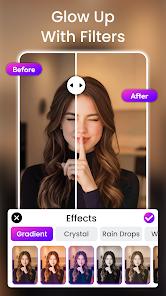
A vast library of trendy artistic filters, including drip art and neon glows, keeps the application relevant for social media trends.
The application is highly accessible, featuring a low technical learning curve and compatibility with older smartphone hardware.
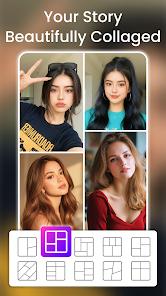
Robust collage-making tools support up to nine photos with various thematic frames (anniversary, fashion, travel).
"Smart Face Enhancer" tools allow for quick portrait retouching, providing sharper details with a single tap.
- ✕
The user experience is heavily saturated with intrusive advertisements that can be difficult to exit.
- ✕
Frequent "bait-and-switch" prompts attempt to redirect users to download other apps, creating a fragmented and frustrating experience.
- ✕
The application lacks a data deletion policy, meaning users cannot request the removal of their uploaded images or personal info.
Download
 Get it on Google Play
  Get it on App Store
 FAQs
Is PhotoVerse AI completely free?
Yes, the app is free to download and use, but it is monetized through a high frequency of in-app advertisements.
What is the maximum resolution for exported photos?
While it supports HD exports, the specific pixel dimensions depend on the user's device and whether they have watched a reward ad.
Can I create videos from multiple photos?
The AI Video Creator primarily animates a single static photo, but the collage tool allows for multi-image static compositions.
Can I remove objects from my photos?
Yes, the app includes an "Object Remover" tool that uses generative fill to erase unwanted elements from a picture.
Does the app work offline?
Many of the advanced AI features require an internet connection to process images on the developer's cloud servers.
Hot Reviews
Users frequently note that the app’s background removal is "magic," but complain that the sheer number of ads makes using it feel like a "chore".
Positive feedback often highlights how quickly one can create a profile picture or a social media reel that looks "professional" without any design skills.
Some users report that the app frequently "hangs" or freezes when trying to load an advertisement, requiring a complete force stop of the application.