The Palace Project
Overview
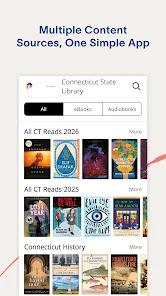
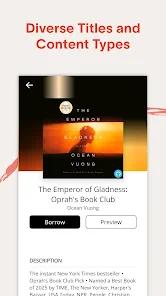
The Palace Project, developed by Lyrasis in collaboration with the Digital Public Library of America (DPLA), is a civic-minded, non-profit mobile e-reading application. This initiative is funded by the John S. and James L. Knight Foundation, with the primary goal of helping public libraries maintain digital autonomy. The application serves as an open-source aggregator, allowing patrons to access all of their local library's digital collections in one unified interface.
Rather than requiring library patrons to toggle between various proprietary vendor platforms—such as OverDrive, Libby, and BiblioBoard—The Palace Project consolidates these resources into a single system. Using their barcode and library card PIN, users can log in to discover, check out, read, or listen to digital materials directly within the application.
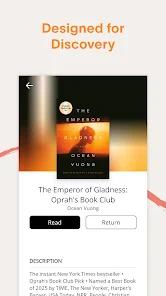
Even if a user's local library is not yet a participating partner, the application provides free access to the "Palace Bookshelf". This public domain repository contains over ten thousand free, high-quality classic titles, children's books, and foreign-language publications.
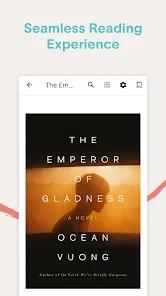
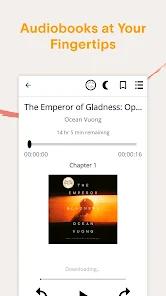
From a technical perspective, the application includes standard reader customizers: adjustable font dimensions, selectable background lighting modes (day, night, sepia), bookmarking systems, and progressive media buffering for offline use. However, user feedback reveals significant software execution challenges.
The application currently has a low rating of 2.06 on Google Play, primarily due to technical instability. Key software flaws include frequent database crashes, memory leaks during audiobook play, and a lack of playback coordination. For example, when an audiobook is paused, the player often loses the current timestamp and reverts to the start of the previous chapter.
Additionally, the media player lacks integrations with systems like Android Auto, making hands-free driving playback impossible. Users are also unable to perform cross-catalog searches across multiple libraries simultaneously, requiring them to log out of one account before querying another.
Pros & Cons
Unified Digital Catalog Access: Successfully aggregates distinct digital collections (such as Libby and BiblioBoard) into one interface.
Civic Non-Profit Structure: Free of advertisement interruptions and commercial data monetization practices.
Free Public Bookshelf Access: Direct, permanent access to over ten thousand open-access and public-domain classics.
Simplified Access Validation: Fast authentication process that only requires a user's standard public library card and PIN.
Customizable Reading Interfaces: Standard typesetting options, night reading modes, and bookmarking mechanics.
- ✕
Frequent App Crashes: Highly unstable database performance, leading to recurrent freezing and crash loops.
- ✕
Inconsistent Audio Playback: Audiobook playback regularly fails when screens lock, and the app often loses the reader's current location.
- ✕
Opaque Cross-Library Queries: Absence of multi-library search utilities, requiring users to log out to search different library networks.
- ✕
Lack of Smart Integrations: No compatibility with Android Auto or desktop systems, limiting playback utility.
Download


FAQs
Why does the Palace audiobook player stop playing when my device's screen locks?
This is caused by Android's strict background battery optimization policies. To resolve this, users must go to their system settings, select "Apps," locate "Palace," and set the battery management settings to "Unrestricted".
Does this application support digital transfers to my Amazon Kindle?
No, unlike commercial competitors, The Palace Project does not support digital handshakes with Amazon's Kindle ecosystem. It is explicitly designed to render books natively on standard Android or iOS tablets and smartphones.
Can I use The Palace Project on E-Ink readers?
The app is designed for Android and iOS systems, but it does not support dedicated E-Ink readers, such as older Nook devices (Nook HD, Nook Color) or specialized E-Ink reading screens.
What is the checkout limit for borrowing digital materials?
The borrow limits, loan durations, and hold reservation parameters are determined by the user's specific local library system. Most participating networks support up to ten active loans and ten holds.
Where do I seek technical assistance if my library barcode fails to authenticate?
Because user accounts are managed directly by municipal library systems, authentication failures must be resolved by local library staff. For systemic app crashes, users can contact technical support via email.
Hot Reviews
The design concept of unifying library books into a single portal is outstanding, but the execution is plagued by bugs. The app frequently freezes and fails to save the user's reading position.
The audiobook interface is highly frustrating. It stops playing every few minutes, lacks fine speed control increments, and regularly jumps backward or forward when reopened.
Navigating catalogs across different library cards is tedious. The app should allow users to search all of their libraries at once instead of forcing them to manually switch accounts.
The lack of a desktop browser interface and complete omission of Android Auto support makes this highly inconvenient for daily commuters who listen to audiobooks.