
Sora, by OverDrive Education
Overview
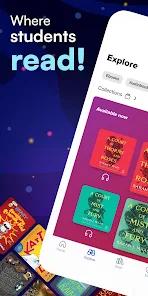
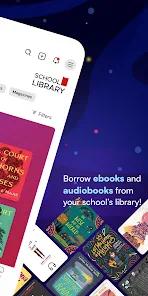
Sora is a student reading app developed by OverDrive Inc. for K-12 educational institutions. Designed to foster a love of reading and support digital literacy, Sora connects students to their school district's curated e-book and audiobook collections. It is engineered to streamline digital reading programs, operating as a dedicated, academic companion to OverDrive's broader public library app, Libby.
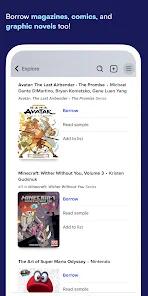
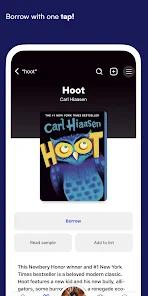
The core mechanics of Sora prioritize simplicity and ease of access. Using school-issued credentials, students can quickly log into their institution's custom digital catalog with minimal onboarding friction. Once authenticated, users can borrow, read, or listen to both assigned curriculum texts and independent reading choices with a single tap.
A key feature of the application is its multi-library integration, allowing students to link their academic profiles to local public library databases to search multiple catalogs simultaneously and access a wider selection of reading materials.
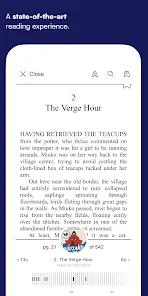
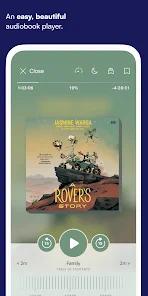
Sora features a highly customizable reading and listening interface. The built-in e-book reader supports adjusting visual parameters, including font sizes, contrast levels, and specialized dyslexic fonts to assist readers.
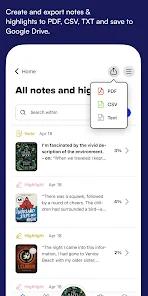
An integrated dictionary allows users to define unfamiliar terms instantly, automatically building a running vocabulary list for subsequent study. The audio player is equally robust, offering adjustable playback speeds (ranging from 0.6x to 3.0x and offline sleep timers. Additionally, the app supports active study workflows by allowing students to highlight key passages, draft digital annotations, and export notes directly to Google Drive or local device storage.
To motivate young readers, Sora incorporates gamified engagement features, tracking overall reading duration, noting books completed, and awarding custom achievements for hitting milestones.
All user data, reading progress, notes, and hold queues automatically sync across multiple linked devices, ensuring a consistent reading experience.
As an institutional app, Sora is entirely free to download, contains zero commercial advertising, and operates under strict student data privacy protections.
Pros & Cons
Streamlined School Authentication: Provides quick access to library materials using students' existing school credentials.
Unified Public Library Integration: Allows students to link their public library cards to search and borrow from a wider selection of catalogs.
Excellent Accessibility Features: Built-in support for dyslexic fonts, high-contrast visual filters, and adjustable text sizes.
Interactive Highlights and Study Tools: Students can highlight key passages, write annotations, and export study materials to external apps.
Engaging Gamified Achievements: Encourages regular reading habits by tracking milestones and awarding custom badges.
Safe, Ad-Free Environment: Operates without commercial ads, in-app purchases, or behavioral tracking.
- ✕
Publisher-Enforced Hold Limits: Digital copy limits can lead to long wait lists for popular titles, similar to physical library holds.
- ✕
Incomplete or Fragmented Series: Due to library budget limits, some series may lack foundational books while holding later volumes.
- ✕
Occasional Mobile Login Glitches: Users report infrequent authentication errors and setup crashes on mobile.
- ✕
School-Restricted Material Settings: Students' available content is restricted by their school district's age-appropriateness filters.
Download
 Get it on Google Play
  Get it on App Store
 FAQs
How does Sora differ from Libby by OverDrive?
Libby is designed for general public library cardholders, while Sora is tailored for K-12 students, integrating directly with school curricula, assignments, and school logins.
Can students access books from multiple libraries?
Yes, students can link local public library systems to their school accounts to search and check out titles from both networks.
Does Sora support offline reading and listening?
Yes, books can be downloaded directly to mobile devices while connected to Wi-Fi, allowing students to read and study offline.
Are there specialized accessibility tools for struggling readers?
The built-in reader features adjustable text sizing, customizable contrast themes, dyslexic-friendly fonts, and integrated screen-reader support to assist diverse learners.
Can e-books be sent to Kindle devices?
Yes, students in the United States can send borrowed e-books to their registered Kindle devices directly from the app.
Hot Reviews
The app is excellent for school reading. It connects directly with school logins, making it easy to access assigned texts and sync progress across devices.
Even though the catalog is digital, the limited number of copies is frustrating. Students often have to wait on long hold lists for popular titles, which can disrupt class assignments.
The built-in dyslexic font and contrast settings are very helpful. They make reading much more comfortable and accessible for students who struggle with standard text layouts.