
Canvas
Overview
Canvas is the mobile embodiment of Instructure's Learning Management System (LMS), which has become the global standard for higher education and K-12 institutions. In 2026, the application serves not just as a viewer for course materials but as a critical operational hub for student life. The move toward "learning on the go" has necessitated a shift in the app's design from a complex administrative portal to a high-utility notification and interaction center.
Functional Disassembly and Deep Insights
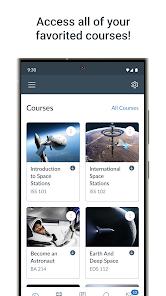
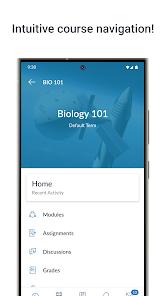
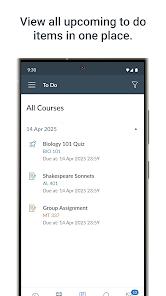
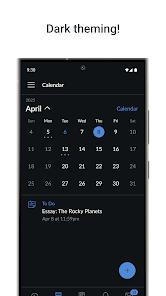
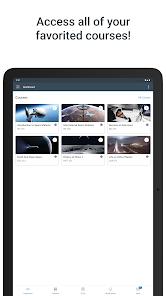
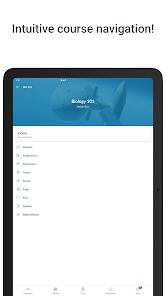
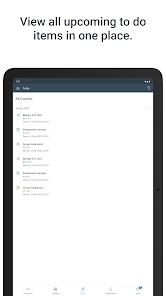
The core architecture of Canvas is built on three pillars: course navigation, communication, and submission management. The Dashboard serves as the central nervous system, providing a color-coded overview of current courses, grades, and a prioritized To-Do list that pulls deadlines from all active modules. This unified view is essential for students managing the cognitive load of multiple subjects, as it provides a singular source of truth for all impending academic obligations.
A deep insight into the app's success lies in its sophisticated notification logic. Unlike generic social apps, Canvas uses "nudges" to drive academic performance. When a grade is posted or an assignment deadline approaches, the app delivers a push notification that can be customized to include specific scoring data or instructor feedback. This real-time feedback loop is proven to increase student engagement and reduce "deadline anxiety." Furthermore, the app's support for "What-If" scores allows students to model their potential final grades by entering hypothetical scores on upcoming assignments—a feature that encourages strategic studying.
The submission workflow within the app has been significantly enhanced to handle the realities of mobile usage. The integrated "Device Scanner" allows students to capture high-quality PDF scans of handwritten homework directly from the app, automatically optimizing the image for instructor legibility. This is a critical bridge for subjects like mathematics or chemistry where physical handwriting remains a core part of the pedagogical process.
Pros & Cons
Seamless Offline Access: The ability to download course content for offline viewing is a vital tool for students with inconsistent internet access or those studying during commutes.
High-Utility Submission Tools: The integrated document scanner and support for various file types make it easy to turn in homework without needing a secondary computer.
Proactive Academic Feedback: Real-time grade notifications and the "What-If" score calculator empower students to stay informed and strategic about their academic progress.
Personalized Organization: Features like course nicknaming, color-coding, and dashboard layout customization allow students to create a workspace that matches their cognitive style.
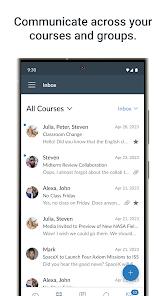
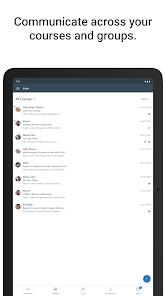
Unified Communication Hub: The integrated Inbox and discussion boards ensure that students can interact with teachers and peers without needing a separate email client.
- ✕
Administrative Feature Gaps: The inability to join groups or use the appointment scheduler directly in-app can be frustrating for students who use mobile as their primary device.
- ✕
Webview Dependency: Several features, such as Pages and some External Tools (LTI), open in a webview rather than a native interface, leading to a fragmented UI experience.
- ✕
OS-Level Barriers: The application requires a relatively modern version of Android (8.0+), which can be an issue for students on legacy hardware in developing markets.
Download


FAQs
Can I take quizzes on the Canvas Student app?
Yes, the app supports most quiz types, though instructors may sometimes restrict certain quizzes to a desktop browser for security reasons.
How do I download my course for offline use?
In the course settings menu, you can select "Offline Content" to download files, pages, and module information.
Why can't I see my final grade?
Some instructors choose to hide the total grade until the end of the term. If it is hidden on the web, it will also be hidden in the app.
Can I use multiple accounts on one device?
Yes, the app supports "Switch Users," allowing you to stay logged into different institutions simultaneously.
Is there a separate app for my parents?
Yes, parents should use the "Canvas Parent" app (com.instructure.canparent) to observe their child's progress without participating in the course.
Hot Reviews
Many students have specifically mentioned the built-in document scanner as the app's best feature, noting that it produces much cleaner files than simply taking a photo of their homework.
Reviews frequently highlight the "heart-pounding" but useful nature of grade notifications, with students appreciating the ability to see their scores the second they are published.
Some critical feedback centers on the difficulty of navigating deeply nested "Modules," with students suggesting that the web version is still superior for finding specific files buried in complex course structures.