Brightspace Pulse
Overview
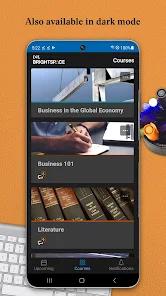
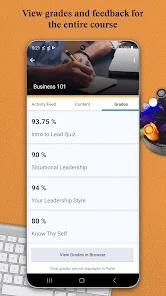
Brightspace Pulse is a mobile companion app developed by D2L Corporation to help students keep track of their courses. It is designed to work with the core Brightspace learning management system (LMS), which is widely used by universities, secondary schools, and professional training programs. Instead of trying to replicate the entire web interface, Pulse is built as a time management and planning hub. It aggregates course milestones, timelines, grades, and announcements into a single dashboard.
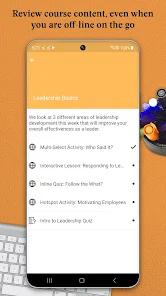
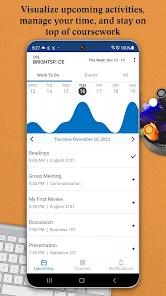
The app's design is centered around its workload visualization engine. This feature uses a multi-colored graph on the home screen to display upcoming assignments, quizzes, and projects. It helps students see which weeks have the heaviest workloads at a glance, allowing them to plan their study time more effectively. Additionally, users can read cached PDFs, documents, and video guides offline.
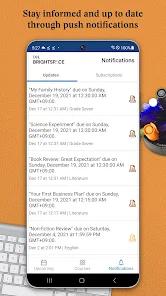
The app's push notification engine keeps students updated in real time. Users receive instant alerts when instructors update coursework, publish announcements, or release grades in the system. These alerts help students stay informed without needing to manually log into their school portal throughout the day.
However, the app relies on browser-redirected web views to complete major academic tasks. Core activities like submitting files, taking exams, or writing forum posts are handled by launching a browser window. While this approach ensures compatibility with different school configurations, it can sometimes feel disjointed. Additionally, user reviews note that synchronization issues can occasionally prevent upcoming assignments from showing up on the app's timeline.
Pros & Cons
At-a-Glance Workload Visualizations: Graphical timeline indicators help students spot dense study weeks and plan around upcoming assignments.
Real-Time Grading Updates: Push notifications provide instant alerts when grades or comments are posted in the LMS.
Offline Content Viewing: Students can download and read course documents, PDFs, and multimedia files without a data connection.
Secure Single Sign-On (SSO): Links with school authentication portals to protect user data security.
Custom Event Inputs: Students can add their own milestones and deadlines to customize their weekly planner.
Accessible Interface Design: The simplified layout is designed to be accessible to users who are less comfortable with technology.
Lightweight Storage Footprint: Maintains a lean installation profile, preserving device memory.
- ✕
Requires External Browser to Complete Tasks: Core features like quizzes and assignment uploads cannot be completed natively inside the app.
- ✕
Occasional Dashboard Sync Issues: Course timelines can sometimes fall out of sync, leading to missing deadlines on the dashboard.
- ✕
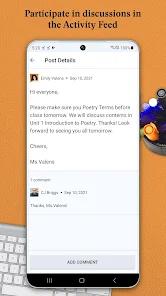
Limited Thread Discussion Formatting: The mobile discussion feed lacks formatting options, making it hard to write structured replies.
- ✕
Lacks Centralized Account Switching: Students enrolled at multiple schools must log out and back in to switch institutional profiles.
Download
 Get it on Google Play
  Get it on App Store
 FAQs
Can students take tests or upload assignments inside the Pulse application?
No, tasks that require file submissions or interactive testing must be completed by opening the course website in a web browser.
How does the workload graph calculate the academic effort index?
The visual timeline displays upcoming deadlines based on dates set by instructors, allowing students to see their busiest weeks at a glance.
Can students add personal study goals or deadlines to the calendar?
Yes, the application allows students to create custom, personal milestones to help manage their study schedule alongside school-wide deadlines.
Why are some courses missing from the dashboard?
This typically happens when instructors have not yet activated the course in the LMS, or if the school's D2L configuration has access restrictions.
Does the app protect student privacy and secure user credentials?
Yes, the app uses secure Single Sign-On (SSO) frameworks, meaning school login details are processed through the institution's official portal.
Hot Reviews
The layout is clean and intuitive. It is simple enough for older, non-traditional, or less tech-savvy students to start tracking schedules and grades on day one.
While the scheduling features are highly useful, users should verify deadlines on the main desktop portal. Occasionally, course sync issues can cause some assignments to be missed on the calendar.
The push notification system is a standout feature. Getting immediate notifications when grades are published makes tracking academic performance much easier.
Having a single feed for deadlines and announcements across multiple classes saves time and helps keep course schedules organized.