Draw Cartoons 2: Learn&Animate
Overview
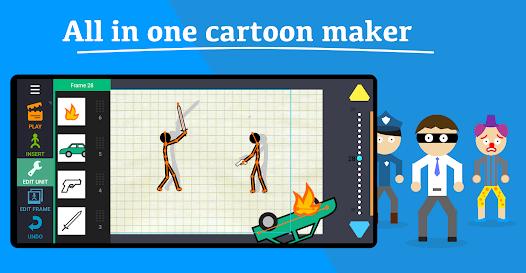
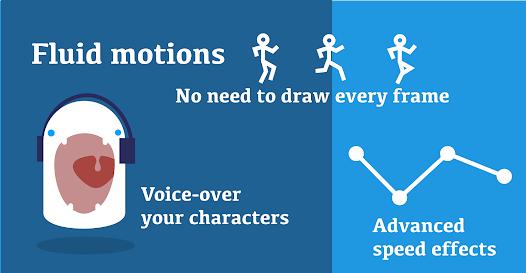
The mobile application Draw Cartoons 2: Learn&Animate is a 2D animation platform designed to make digital animation accessible on mobile touchscreens. It uses skeletal animation techniques and keyframe interpolation to bypass the traditional requirement of drawing every single frame by hand, allowing users to create smooth motion sequences relatively quickly.
Traditional frame-by-frame 2D animation requires high graphic skill and significant time. Draw Cartoons 2 simplifies this by using digital skeletons. Characters are structured as hierarchical rigs of visual components (limbs, torso, facial features) linked by control joints. When an animator manipulates a joint node (such as a wrist), the software uses forward kinematics to adjust the rest of the skeletal chain accordingly. This structure enables users to animate complex figures with drag-and-drop actions.
The platform's animation engine is built around motion tweening. The animator defines keyposes at specific frames, and the software's interpolation algorithms generate the intermediate frames (tweening) to create smooth, natural transitions. To help animators maintain structural consistency and transition timing across scenes, the app includes a customizable onion-skinning feature. It can sync single background track with basic voice overlays.
Key features of the creative toolkit include:
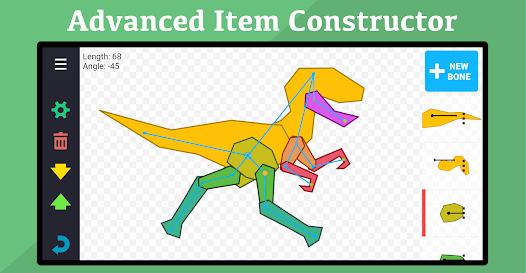
- The Item Constructor: A robust module that allows users to create custom characters and assets. Users can import external transparent PNGs, define joint locations, establish bone hierarchies, and build custom rigs.
- Cinematic Camera Control: A virtual camera system that allows for panning, zooming, and rotating, helping creators add visual depth and scale to their scenes.
- Velocity Curving (Easing): Allows adjusting keyframe interpolation rates to create dynamic, lifelike movements (such as weight-driven acceleration or sudden stops).
- Rig Merging (Attaching Props): Lets users attach external objects (like weapons or shields) directly to a character's skeleton, ensuring they move in sync during action sequences.
The application serves a diverse user base, including young animators, educators, and content creators. The basic version provides standard asset libraries and simple rig templates, while the premium upgrade unlocks unlimited video exports (including MP4 and GIF formats), advanced constructor controls, and an ad-free workspace.
Pros & Cons
Skeletal Rig Animation: The hierarchical bone system simplifies the animation process, allowing characters to be posed easily without redrawing every frame.
Automated Motion Tweening: Built-in interpolation algorithms generate smooth intermediate frames between custom keyposes, reducing manual labor.
Powerful Item Constructor: Allows users to build, rig, and save custom characters using imported graphic assets.
Dynamic Camera Control: Features flexible pan, zoom, and rotational adjustments to add cinematic elements to scenes.
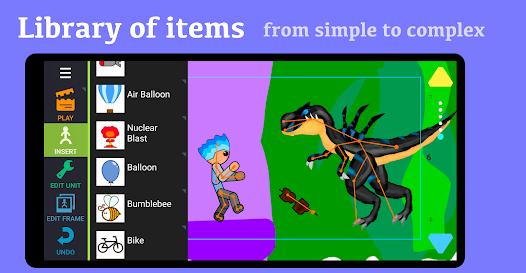
Large Pre-Made Asset Library: Includes a wide range of pre-built character models, weapons, and environmental backgrounds to help users start creating quickly.
- ✕
Intrusive Ad Integration: The free tier features frequent full-screen video ads that can disrupt creative focus.
- ✕
Imprecise Touch Interface: Precise node manipulation can be challenging on smaller mobile displays, occasionally leading to misregistered joint movements.
- ✕
Save Limitations in Free Tier: The standard version limits the number of custom assets users can save, restricting larger, more complex projects.
- ✕
Resolution Limits on Free Exports: High-definition video export and transparent PNG sequencing are locked behind premium options.
Download
 Get it on Google Play
  Get it on App Store
 FAQs
How does motion tweening work in the application?
Motion tweening automatically calculates the paths and joint angles of your character between your keyposes. By setting a starting pose in Frame 1 and a landing pose in Frame 10, the app generates the nine intermediate frames to create a smooth transition.
Can I animate hand-drawn characters within the app?
Yes. You can draw separate parts of a character on paper or in a graphic design app, import them as transparent PNG files, and link them together using the Item Constructor.
What file formats are available for exporting animations?
Animations can be exported as animated GIFs or high-definition MP4 videos. Transparent PNG sequences are also supported, allowing creators to import their projects into desktop video editors.
Why do limbs occasionally detach or warp during fast movements?
Unexpected warping often occurs if parent-child joint linkages are configured improperly. Ensuring correct structural hierarchy inside the Item Constructor will keep limbs from separating during fast action sequences.
Can I add music and voiceovers to my projects?
Yes, the application supports importing external audio files to use as background tracks. It also features a basic recording tool for adding voiceovers to characters.
Hot Reviews
The skeletal rig system is highly efficient. It makes generating short cartoon battles or animated sequences much faster than drawing every frame by hand.
The bone rigging tool is powerful, but managing fine adjustments on a mobile screen can be tricky. It can be easy to accidentally shift a character's structural hierarchy when trying to rotate small joints.
While the application is a fantastic creative tool, the frequency of full-screen video ads in the free version can be disruptive to the design workflow.
An excellent app for learning the fundamentals of animation. The Item Constructor allows you to bring almost any character idea to life with just a little patience and practice.