
Animation Desk–Cartoon & GIF
Overview
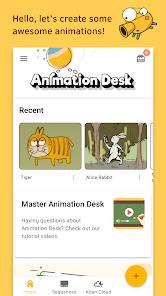
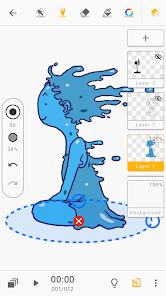
Animation Desk–Cartoon & GIF developed by Kdan Mobile Software Ltd., is a key player in mobile frame-by-frame 2D animation. Launched in 2016, the software is designed to bridge the gap between traditional hand-drawn animation techniques and modern digital workflows. It achieves this by emulating a physical light table (an animation desk), allowing users to draw sequential images on a layered virtual canvas with precise registration.
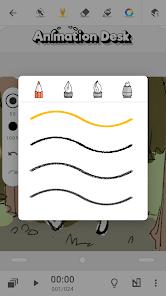
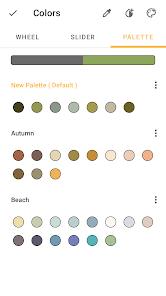
The application's core drawing engine is highly responsive, supporting a variety of pressure-sensitive drawing tools—such as pencils, crayons, fountain pens, and three distinct brush configurations. It features stylus optimization for precise line control when used with active styluses.
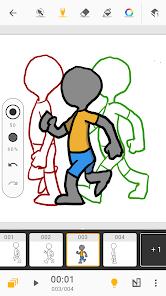
Onion skinning is a key feature here, overlaying adjacent frames with adjustable opacities so animators can accurately track motion and timing. The app natively supports project playback speeds from 3 to 24 frames per second (FPS), allowing users to easily test timing and animation smoothness. The app supports high-definition canvas rendering up to pixels, backed by an optimized layout timeline that maximizes active drawing space on both tablet and smartphone screens.
A key workflow feature is the "Stock Collection" system, which acts as a localized, reusable asset repository. Rather than redrawing repeating elements (like props or character sheets) in every project, creators can save graphic assets to this "scrapbook" and import them directly across different animation timelines, saving valuable production time.
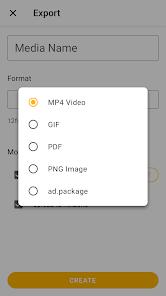
The platform has also adapted to shifting social and market trends. On May 31, 2024, Kdan Mobile retired its internal social sharing portal, AniZone, updating the user interface to focus primarily on direct local file exports and standard video container formats.
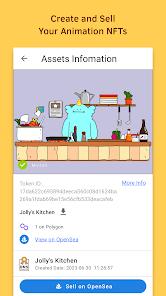
To offset this shift, the developers integrated a direct Web3 and NFT pipeline. This allows animators to generate verification proof and mint their animated sequences directly onto the OpenSea marketplace as NFTs, opening up new monetization pathways.
Pros & Cons
Traditional Light-Table Emulation: The user interface mimics the physical workflow of classical animators, making the transition to digital intuitive.
Responsive Multi-Frame Onion Skinning: Highly customizable overlays of preceding and succeeding frames allow for precise movement tracking.
Dynamic Asset Reusability: The Stock Collection tool acts as an efficient asset library, saving time when managing complex scenes.
Integrated Web3 and NFT Minting: Provides direct pipelines for creators to secure, verify, and sell their work on decentralized networks.
High-Resolution Canvas Buffering: Supports rendering up to pixels, preserving details during zoom and edit operations.
- ✕
Aggressive LayerCeiling Limitations: The baseline subscription tier severely restricts the number of active layers, limiting complex compositing.
- ✕
Restricted Audio Syncing: Audio track integration lacks robust multitrack scrubbing and is limited on older Android API levels.
- ✕
Manual Color Fill Workflows: The lack of a smart color-fill bucket tool forces animators to manually paint within closed vector bounds, slowing down coloring.
- ✕
Minimum Brush Scaling Limits: Brushes do not scale low enough for highly detailed, fine-line sketching on smaller device displays.
Download
 Get it on Google Play
  Get it on App Store
 FAQs
How are project directories migrated manually across device storage?
Users can access their files by opening a system file explorer, navigating to Android/data/com.kdanmobile.android.animationdeskcloud, and copying project files directly to a new directory or to the Pro version.
Why does the audio import feature fail on some older Android devices?
The native audio-to-timeline syncing engine is optimized specifically for Android API level 33 (Android 13) and higher, which can cause issues on older operating systems.
What are the maximum frame-rate capabilities of the timeline?
The timeline supports up to 24 FPS, ensuring compatibility with standard cinematic and traditional broadcast video formats.
Does the application support vector line stabilization?
No, the drawing engine is primarily raster-focused to emulate traditional physical sketchpads, meaning it lacks automated vector smoothing.
Hot Reviews
This program does an exceptional job of replicating the physical light-table experience. The onion skinning transitions are fluid, and drawing with a pressure-sensitive stylus feels highly responsive and precise.
While the drawing tools are solid, the strict layer limits on the base tier make complex scenes with separate backgrounds, midgrounds, and foregrounds difficult to organize.
The Stock Collection tool is a massive help. Being able to save and import pre-drawn props or character assets directly into a new project timeline saves hours of manual redrawing.
The timeline editor is great for visual drafting, but syncing sound is a struggle on older devices due to operating system compatibility limits.