
Facemoji AI Emoji Keyboard

Overview
Facemoji is a sophisticated third-party keyboard that represents the evolution of the iconic Japanese "Simeji" engine. While the original Simeji was the gold standard for Japanese input, Facemoji has expanded into a global personalization hub that emphasizes social identity, creative expression, and AI-driven utility.
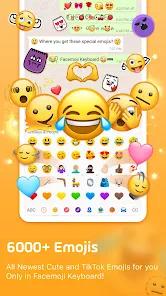
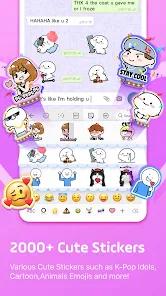
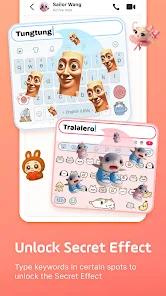
At its core, Facemoji leverages a massive linguistic engine featuring a cloud-based dictionary of over 2 million entries. This allows for remarkably accurate predictions of modern slang, anime terms, and niche buzzwords that standard keyboards often miss. The application's most distinctive feature is its "Genmoji-like" creator, which allows users to design custom emojis, stickers, and animated GIFs based on their own facial features. This moves the keyboard beyond a mere text-entry tool and into the realm of digital avatars.
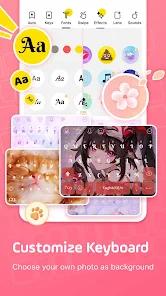
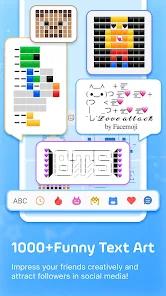
In-depth comparison with the original Simeji app reveals that Facemoji retains the "Mushroom" (Mash) button functionality—a classic Simeji feature that allows for the rapid insertion of Japanese-style Kaomoji (e.g., (ᴖ ·̫ ᴖ)). Furthermore, the app includes a robust "DIY Theme" engine, enabling users to create keyboard skins from personal photos or even short video clips.
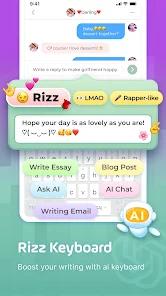
A critical second-order insight involves the app's recent pivot toward Generative AI. Features such as "AI Smart Reply" and automated sticker generation have been introduced to streamline social media interactions on platforms like TikTok and WhatsApp. However, this has led to user concerns regarding "AI slop" and the ethics of AI-generated art. Some users have noted that certain emoji designs appear to be generated from uncredited artistic works, sparking a debate on the trade-off between creative automation and intellectual property. Technically, the app manages these complex features while maintaining a surprisingly low latency, though some users report bugs with custom "typing sounds" on specific hardware configurations.
Pros & Cons
Infinite aesthetic flexibility with the ability to use personal videos and photos for keyboard skins.
Superior prediction engine for Japanese learners and native speakers, powered by a 2M-entry cloud dictionary.
Integrated "Genmoji" tool that rivals Apple's Memoji features for Android users.
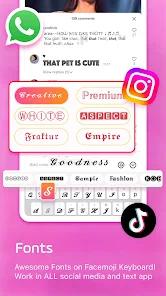
Massive repository of specialized fonts and symbols that do not require external conversion websites.
Fast-switching interface for rapid movement between emojis, symbols, and numeric pads.
"Bullet Reply" and AI tools that significantly speed up responses in high-frequency social chats.
Comprehensive support for Kaomoji rankings, making it easy to find the most popular Japanese emoticons.
- ✕
Intrusive AI features and suggestions that can clutter the interface for users seeking a simpler experience.
- ✕
Persistent bugs with haptic feedback and custom keypress sounds on certain devices.
- ✕
Privacy implications of "cloud-based" dictionary features that collect input data to improve predictions.
Download
 Get it on Google Play
  Get it on App Store
 FAQs
Is Facemoji the same as the original Simeji keyboard?
Facemoji (com.simejikeyboard) is the global, feature-heavy version, whereas the original Simeji (com.adamrocker.android.input.simeji) is more focused on traditional Japanese input and is the preferred choice for language purists.
Does this keyboard record my passwords or credit card numbers?
Android displays a standard warning for all third-party keyboards. Facemoji states that it encrypts data in transit and allows users to request data deletion, but caution is advised with any third-party IME.
How do I use my own video as a keyboard background?
In the "DIY" section of the app's theme store, you can select "Create New" and upload a video file from your gallery to use as an animated skin.
Why don't the typing sounds work on my Samsung device?
This is a known compatibility issue with Samsung's system-level sound management. Re-enabling "Touch Sounds" in Android settings often resolves this.
What is the "Mushroom" button?
Inherited from Simeji, the Mushroom button is a quick-access menu for third-party plug-ins, specialized dictionaries, and Kaomoji lists.
Hot Reviews
Users frequently praise the app for making "accessing symbols without looking them up" much easier, citing it as an indispensable tool for managing social media accounts.
A vocal segment of the user base has criticized the "AI slop" and the presence of AI-generated art that may involve uncredited sources, suggesting that the app’s quality has dipped in favor of trends.
Reviewers learning Japanese find the "cloud-based dictionary" to be a "godsend," noting that it accurately predicts kanji and slang that even Gboard fails to recognize.