
Termius - Modern SSH Client
Overview
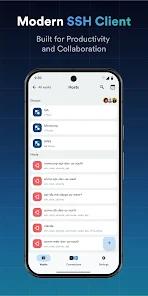
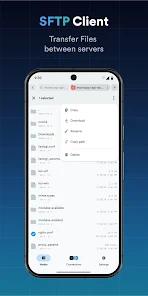
Within the ecosystem of enterprise remote system administration, the evolution of terminal emulators has transitioned from simple, single-instance console utilities to highly integrated, cross-platform cloud databases. Termius represents a shift in how systems engineers, DevOps professionals, and cloud architects interact with remote host environments. At its core, the product establishes secure connections via the Secure Shell (SSH) protocol, Mobile Shell (Mosh), Telnet, and Secure File Transfer Protocol (SFTP). The architectural value of the application lies in its capacity to streamline configuration data across multiple endpoints, mitigating the operational friction of re-entering IP addresses, port specifications, and access credentials.
To fully understand the protocol implementation within Termius, a close examination of Mosh integration is required. Mosh operates over UDP rather than the traditional TCP framework used by standard SSH. By utilizing UDP-based state synchronization, Mosh maintains robust connection stability during extreme packet loss, high latency, or sudden transitions between cellular and local network interfaces. Furthermore, Mosh implements client-side predictive echo, which immediately renders typed characters in the mobile interface instead of waiting for a round-trip network packet confirmation, vastly improving the user experience on cellular connections. Termius couples this protocol with a zero-knowledge, client-side encrypted vault, utilizing AES-256 encryption to replicate connection profiles across desktop and mobile devices safely.
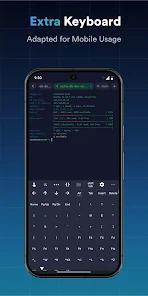
From a hardware integration standpoint, the application supports direct serial cable connections, enabling network administrators to configure switches and routers directly in data centers via physical USB-to-serial adapters. The mobile user interface is optimized with a specialized keyboard strip that exposes modifiers like Escape, Tab, Control, and arrow keys, which are typically absent from standard touch-screen keyboards. This is paired with custom touch gestures and device-shake actions to emulate complex legacy keyboard strokes.
However, technical evaluations reveal a peculiar latency anomaly: when establishing connections to hosts where Nushell is configured as the default login shell, the client experiences a consistent two-second startup delay. This performance bottleneck is completely absent when executing standard shells such as Bash or Zsh, indicating that the initial session handshake and terminal state negotiation routines within Termius may conflict with Nushell's initialization processes. Additionally, from a business perspective, Termius operates a rigid SaaS subscription monetization model. Key professional features, including proxy jump servers, key forwarding via agent forwarding, and cloud-synchronized credentials, are strictly locked behind recurring premium tiers, which has drawn pushback from independent practitioners who prefer perpetual license structures.
Pros & Cons
Unified Multi-Protocol Client: Consolidates SSH, Mosh, Telnet, Port Forwarding, and SFTP into a single mobile dashboard.
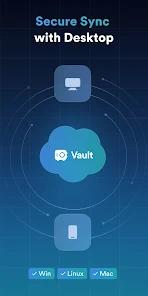
Encrypted Cross-Platform Sync: Utilizes a secure, client-side encrypted vault to synchronize connection profiles across unlimited devices.
Optimized Virtual Modifier Keys: Features a custom-built mobile keyboard row that exposes critical terminal navigation keys.
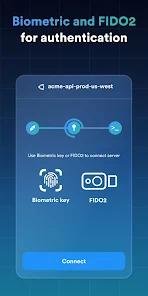
Biometric and Hardware MFA: Supports robust biometric access and hardware-based FIDO2 key authentication.
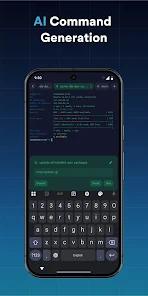
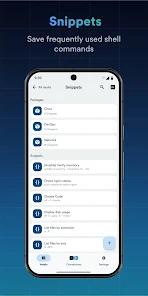
Cloud Snippet Automation: Enables automated execution of saved commands and scripts across multiple target hosts.
- ✕
High Subscription Cost: Lacks a perpetual pricing option, forcing single-seat administrators into a recurring subscription model.
- ✕
Latency with Modern Shells: Exhibits a reproducible two-second startup delay when handshaking with servers running Nushell.
- ✕
Advanced Feature Paywall: Locks vital administrative features, such as proxy jump servers and serial cable configurations, behind premium plans.
- ✕
Third-Party Data Sharing: Collects and shares app performance and location metrics under Google Play safety guidelines.
Download
 Get it on Google Play
  Get it on App Store
 FAQs
How does Mosh improve connection stability?
Mosh utilizes UDP to synchronize state between the client and server. Unlike TCP, which times out during connection breaks, Mosh allows the IP address of the device to change seamlessly without dropping the active shell session.
Is local network administration possible without cloud vault syncing?
Yes. The free Starter plan permits direct, local-only connections via SSH, Mosh, and Telnet without requiring account creation or cloud synchronization.
What ciphers are utilized to secure connections?
Termius supports modern cryptographic configurations, including ECDSA and ed25519 key authentication, alongside the chacha20-poly1305 cipher for transport-layer security.
Can pre-saved commands be executed on multiple sessions?
Yes. With the premium plan, saved shell scripts and snippets can be executed across multiple active server sessions simultaneously or used for automated command completions.
How are private keys protected when roaming?
The application supports SSH agent forwarding, allowing the client to authenticate remote servers without duplicating physical private keys across multiple endpoints.
Hot Reviews
The daily remote connectivity offered by this application is outstanding, but the absence of a non-subscription premium tier remains a major barrier for independent engineers who refuse recurring subscription software models.
When attempting to connect to machines running Nushell as the default shell on an Android tablet, a noticeable two-second latency occurs during startup, whereas traditional shells like Bash or Zsh load instantly.
The app is extremely reliable for managing remote infrastructure and IoT nodes on the go, offering a minimal user interface that makes entering commands and navigating directories straightforward.
The customized layout of the mobile keyboard, combined with smart physical gesture shortcuts to trigger key functions like Tab and Arrow keys, elevates the terminal experience to desktop-grade productivity.