
Jobber: Field Service Software


Overview
Jobber shows that the digitization of the blue-collar sector stands as a major operational trend in modern service commerce. It serves as a unified system for field service companies. Founded in 2011, the platform was developed to reduce the administrative burden of service professionals, allowing them to recapture billable hours. Today, the platform serves over 50 service industries—including HVAC, residential and commercial cleaning, landscaping, plumbing, roofing, and general contracting. It connects field technicians with office dispatchers, streamlining operations for businesses ranging from solo operators to multi-crew enterprises.
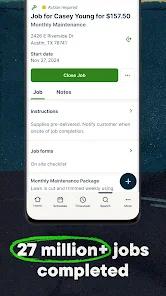
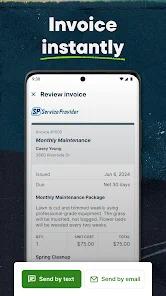
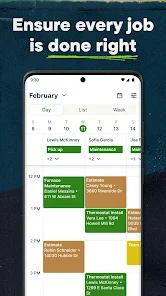
The mobile application consolidates key front-of-house and back-of-house functions into a single interface. On-site quoting and estimate generation allow technicians to build professional bids directly in front of the customer, increasing conversion rates through online approvals. Once a job is won, the platform’s scheduling and dispatching systems use drag-and-drop calendars to assign tasks based on live technician availability. The routing engine automatically designs optimized driving paths to minimize transit times and fuel costs. Upon job completion, the platform generates instant invoices that can be processed through a built-in transaction system operating on a Stripe backend. This transaction ecosystem speeds up cash flow by offering next-day payouts and automated client payment reminders. In addition, two-way integration with QuickBooks Online ensures that financial ledgers update automatically, preventing double-entry errors between field and office personnel.
To enhance operational efficiency, Jobber incorporates a specialized machine learning layer. This engine acts as an automated operational assistant, evaluating historical transaction cycles, drafting follow-up communication for open quotes, suggesting targeted marketing outreach for dormant customers during slow periods, and automating recurring administrative tasks.
Despite these capabilities, the generalist design of the software can introduce limitations for specialized trades. For example, pool service operations require specific chemical calculators and water-testing histories that a generalist field service management (FSM) platform cannot provide without manual customization. Furthermore, small service operations face pricing bottlenecks. Key features like real-time GPS tracking are restricted to higher subscription tiers, and lower plans enforce strict client caps, which can hinder organic growth. For a typical mid-sized crew, payment processing fees represent a notable transactional overhead.
This operational cost must be budgeted alongside the flat subscription fees, which scale considerably as teams transition from entry-level single-user plans to multi-crew packages.
Pros & Cons
Consolidates quotes, scheduling, dispatch, invoicing, and payment processing into a single, cohesive interface.
Employs automated route optimization and live scheduling to decrease travel times and fuel consumption.
Features a built-in assistant that automates client follow-ups and drafts marketing campaigns during off-peak seasons.
Provides automated, next-day payment processing via a Stripe-backed terminal with automated outstanding invoice reminders.
Offers a reliable, fast update cycle to ensure mobile stability, security, and consistent feature additions.
- ✕
Restricts real-time GPS tracking and technician mapping to expensive monthly premium plans.
- ✕
Imposes strict customer profile limits on entry-level subscription plans, creating unexpected operational hurdles for growing businesses.
- ✕
Lacks vertical-specific calculators and specialized reporting structures, such as water chemistry tools.
- ✕
Lacks a high-touch onboarding system for lower plans, requiring business owners to dedicate significant time to manual configuration.
Download


FAQs
Is Jobber a job board for finding blue-collar work?
No, the platform is not a job directory or job board. It is an enterprise field service management tool designed to help business owners manage scheduling, quoting, dispatching, and invoicing for their existing client base.
Can technicians operate the mobile application without an active internet connection?
Yes, the mobile application supports offline workflows, allowing field technicians to record notes, capture photos, and adjust schedules in areas with poor cellular service, with data syncing once a connection is restored.
Does the application support third-party credit card readers and payment processing?
Yes, the system supports major third-party processors including Square, Stripe, and PayPal Express, and also offers its own built-in payment system for streamlined mobile collections.
How does the system synchronize with existing accounting software?
The platform features native, automated integration with QuickBooks Online. This allows invoice values, payment collections, and customer details to flow directly into the accounting ledger without manual data entry.
What specific functions does the integrated Jobber AI perform?
The system's AI evaluates operational data to draft personalized customer communications, identify past clients for marketing outreach during slow periods, suggest optimal times for crew scheduling, and automate routine business tasks.
Hot Reviews
The application serves as a reliable on-the-go billing system for mobile technicians who spend their days away from a computer desk. The ability to generate, send, and collect on invoices directly from a smartphone at the job site provides strong operational utility.
While the software provides strong utility for micro-operations initially, businesses that begin to grow can run into strict customer profile limitations on lower-tier plans. Migrating databases to avoid expensive monthly upgrade costs can be a difficult process for expanding companies.
The drag-and-drop calendar and quick push notifications make dispatching crews simple. Transitioning scheduling tasks from manual spreadsheets to an interactive, real-time board saves significant time and improves communication between the office and field crews.
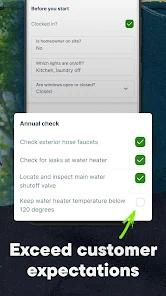
The recent integration of quick-access camera features directly within the visit and assessment screens allows technicians to document job conditions efficiently. Auto-saving these images to the device's local camera roll provides an extra layer of record keeping.