
Eventbrite App
Eventbrite is the best single app for discovering and booking the kinds of events that actually make a city worth living in — independent music, community workshops, food festivals — and nothing else comes close on supply. The fee creep on paid tickets is real, a checkout bug that rejects free registrations as 'Payment Declined' is genuinely embarrassing, and this app is strictly for attendees, not organizers.
- Regular event-goers — concert fans, workshop-seekers, festival attendees — who want one place to discover, book, and store tickets without bouncing between browser tabs and email confirmations
- People who follow specific local organizers or venues and want push notifications when new events are published
- Event organizers — this is strictly the attendee-side app; listing, managing, and scanning tickets at the door requires Eventbrite's separate organizer product
- Anyone primarily buying tickets to major stadium shows or needing a resale marketplace — Eventbrite's strength is independent and community-scale events, not arena tours or secondary-market inventory


Overview
For most people asking which app to use for finding something to do this weekend, there’s one honest answer: Eventbrite. Not because it’s flawless — we’ll get to the fees and the checkout bug that has been annoying users — but because nothing else matches its density of real, bookable local events across community workshops, independent music, food festivals, and evening classes. We’ve seen apps with cleaner interfaces and smoother checkout flows fail simply because they’re empty. Eventbrite is not empty, and that’s the baseline everything else has to be measured against.
One thing to name up front, because the reviews that don’t name it cause confusion: this is the attendee app. If you run events and want to list, promote, or manage them, you need Eventbrite’s separate organizer product — this app has no tools for that side of the relationship. Reviews that rail against missing organizer features are measuring the wrong thing. Judged for what it actually is — a consumer tool for discovering, booking, and carrying tickets — the picture is considerably more positive.
What the app is actually for
The core loop is simple and it works. Open the app, grant location permission, and the home feed populates with events near you. The algorithm is geo-targeted from the start, so rather than handing you a national calendar to filter down, it opens local and broadens from there. A set of category and filter tools lets you narrow by date, price range, and topic. Looking for something free this Saturday? Something involving food or crafts? Something a specific organizer is hosting? Each path is a few taps, and the filter system is more intuitive than most ticketing apps manage.
Where Eventbrite earns its market position is in the breadth of what’s listed. The platform dominates independent and community-scale events — the local pottery class, the neighbourhood jazz set, the weekend farmers’ market with a ticketed cooking demo — the kinds of listings that don’t show up on Ticketmaster and get buried or forgotten on Facebook. If your events life runs more toward small-venue concerts and curated workshops than stadium tours, Eventbrite’s index is genuinely hard to replace.
How ticketing works
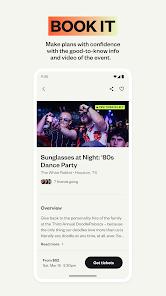
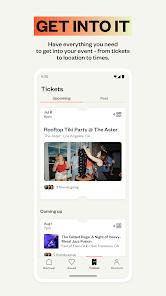
Once you’ve found an event, the purchase flow is quick for a first transaction and faster on repeat. The app stores payment credentials securely, and at checkout you can apply promotional codes or choose from tiered ticket options if the organizer has set them up. The digital ticket is generated as a barcode inside the app and — this matters on event day — stored locally so it’s accessible without a signal. Venue WiFi at smaller event spaces is notoriously unreliable; offline barcodes are the right call. Tickets can also be synced to Apple Wallet or Google Wallet for lock-screen access.
For free events, the registration flow requires no payment details at all, and Eventbrite takes no commission. That policy is meaningful: it keeps a large volume of hyperlocal, community-organised content on the platform that might otherwise go uncatalogued because organizers couldn’t justify the overhead. A lot of the app’s discovery value exists precisely because of the free-tier pipeline.
The social layer
Eventbrite has built out social features quietly enough that they’re easy to miss. Users can follow specific organizers and receive push notifications when a new event is published — genuinely useful if you’re a regular at a particular venue or workshop series and don’t want to keep manually checking. There’s also a contact-sync feature that shows which events people in your contact list are attending, functioning less like a social network and more like a lightweight coordination layer: you can see that a friend has RSVP’d to Saturday’s outdoor screening before you commit to going alone.
What real users report
The enthusiastic end of the review corpus says what you’d expect: the discovery tools are the draw. Attendees describe finding community events they would never have encountered otherwise — neighbourhood festivals, curated workshop series, independent live music — and praise the category filters as intuitive and genuinely time-saving. The recurring theme is that the app makes local life feel larger: there’s more happening in your area than you knew, and Eventbrite is surfacing it.
The frustrated end clusters around two problems, and both are credible and consistent enough to take seriously. The more embarrassing is a checkout bug that fires a “Payment Declined” error on free registrations — events where no payment is required at all. Reviewers describe the bug as repeatable across different events, not a one-time edge case. It’s a confusing failure mode: the system asks for nothing, then reports that your nonexistent payment was declined, and the registration doesn’t complete. For a company whose entire business model depends on completing registrations, this is the kind of gap that should be a P0 fix.
The second complaint is performance. Reviewers describe the transition from an event listing to the ticket-selection screen as noticeably sluggish — one account puts the lag at up to a minute. Navigation generally feels heavier than the interface warrants. A smaller number of users also report a sync issue: completed registrations that don’t appear in the app’s booking history, leaving users genuinely uncertain whether their ticket went through.
Where it genuinely frustrates
The fee structure is the most substantive systemic criticism, and unlike the bugs, it’s structural. For paid events, Eventbrite adds processing and service fees at checkout — a standard practice across the ticketing industry, but the cumulative amount can be high relative to the base price. Organizers can choose whether to absorb these or pass them to buyers; when they don’t absorb them, buyers see the full add-on at the final checkout screen, not earlier in the flow. It’s the number one complaint in reviews for a reason: a modest ticket can pick up a hefty add-on at the final screen — the kind of surprise that erodes goodwill even when users understand the mechanism.
The app also has no resale function. If you bought a ticket you can no longer use, there’s no peer-to-peer marketplace — unlike Ticketmaster or StubHub, where secondary-market tools are central to the product.
How it compares to alternatives
Meetup is the closest competitor for community events and competes well on the recurring-group side — hobby clubs, regular classes, social runs — but its paid subscription requirement for organizers appears to have thinned its listing supply compared to Eventbrite. For sheer discovery volume of one-off events, Eventbrite is ahead.
Facebook Events has reach by virtue of the platform’s scale, but the discovery experience has degraded as the algorithm has deprioritized events in the feed, and the ticketing integration for anything that requires payment is patchwork at best. For anyone who has already reduced their Facebook usage, it’s not a credible alternative.
Ticketmaster occupies a fundamentally different tier — major label tours, professional sports, arena concerts — and barely overlaps with Eventbrite’s territory. If your primary event type is stadium-scale, you’ll use both apps for different things rather than choosing between them.
The honest conclusion is that Eventbrite has no real head-to-head competitor for the specific territory it owns: independent and community-scale event discovery with integrated booking. The alternatives either have supply problems or serve a different segment entirely.
A note on version and scale
The app is at version 10.50.0, which signals active iteration rather than a product in maintenance mode. With over 220,000 Play Store ratings and 10 million installs, Eventbrite is operating at a scale that funds continued feature work, and the current feature set — offline tickets, Wallet sync, geo-targeted feeds, organizer following — reflects that investment. The bugs reviewers are hitting are credible and frustrating, but they land against a backdrop of an app that is clearly still being built, not abandoned. The performance issues in particular feel like the kind of technical debt that accumulates in a product growing faster than its infrastructure, rather than neglect.
The verdict
The “Payment Declined” bug on free registrations is embarrassing, the checkout transition is slower than it should be, and the fee transparency on paid tickets could be better — these are all real frictions from real users and they belong in an honest review. But none of them change the fundamental offer: this is the best mobile tool available for discovering and booking the events that make a city worth inhabiting. Attendees who want that coverage in one searchable feed will get it here, the offline ticket storage is a practical win on event day, and the organizer-following feature turns passive discovery into something more intentional.
Go in knowing that service fees will inflate paid tickets at checkout. Confirm your registration landed in the booking history before you assume the ticket is yours. And if you’re thinking about using this to list or run your own event — that’s a different Eventbrite product, and this one won’t be able to help you.
How We Evaluate
We judge every app on the same checklist: the problem it solves, how reliably it solves it, where real users hit friction, and which audience it genuinely serves. We do not claim hands-on device testing for this review. Our analysis draws on Play Store ratings and review themes, the app's documented feature set, user-reported issues across the review corpus, and the competitive landscape for event discovery and ticketing apps.
Pros & Cons
Simple event registration flows: Offers a streamlined registration flow with support for tiered ticket options and promotional codes.
Localized geo-targeted search tools: Uses precise location data to curate a relevant feed of local activities, supplemented by categorized search filters.
Wallet-integrated digital ticketing: Generates digital ticket barcodes that can be saved directly to the device or synced with mobile wallets.
Interactive social connection features: Allows users to easily follow organizers, import contact lists, and track events their friends are attending.
Cost-free registration tiers: Free-tier events do not carry commission fees, keeping community gatherings accessible.
- ✕
High service fee commissions: Processing and service fees added to paid ticket tiers can be quite high, heavily impacting organizer budgets and ticket buyers.
- ✕
Sluggish page load behaviors: The mobile interface suffers from noticeable latency, frequently taking up to a minute to transition from event views to ticket selection.
- ✕
Declined payment glitches on free items: Programmatic glitches can trigger "Payment Declined" errors even on free events where no transaction is required.
- ✕
Incomplete synchronization of booking history: Users report issues where completed registrations occasionally fail to sync with the app's internal history database.
Download


FAQs
Can Eventbrite manage complex, multi-track conference agendas?
No, Eventbrite is primarily designed as a straightforward ticketing platform. For complex events requiring multi-track scheduling and speaker profiles, specialized tools are recommended.
Does the application support direct ticket reselling?
Unlike Ticketmaster or StubHub, the standard Eventbrite client does not feature an integrated, peer-to-peer ticket reselling marketplace.
Are event tickets accessible in the app when offline?
Yes, once ticket booking is complete, the digital barcodes are stored locally within the app and can be scanned without an active network connection.
How does Eventbrite handle user data sharing?
When registering for an event, the app provides the entered registration details to the organizer to assist with event management, in compliance with privacy guidelines.
Can multiple Eventbrite accounts be logged in at the same time?
The app does not support concurrent multi-account logins, which can be inconvenient for users who maintain separate personal and professional profiles.
Hot Reviews
The discovery features are fantastic for finding unique local gatherings like neighborhood festivals, pottery workshops, and independent music sets. The category filters are intuitive and save significant search time.
The app frequently runs into checkout errors on free events, reporting a "Payment Declined" error when no payment is even required. This bug is frustrating and makes completing basic registrations difficult.
The interface feels sluggish, with frequent loading freezes when navigating to the checkout screen. Additionally, completed tickets sometimes fail to show up in the app's history database.
While the app is great for discovering independent events, the ticket fees are quite high. The cumulative service charges added at checkout significantly inflate the final price of tickets.