
Ticketmaster-Buy, Sell Tickets

Overview
The Android application Ticketmaster is the primary direct consumer portal for buying, selling, and managing event tickets across North America. As the official ticketing partner for major sports organizations, including the NFL, NBA, NHL, and USTA, this application handles millions of transactions for high-profile live events.
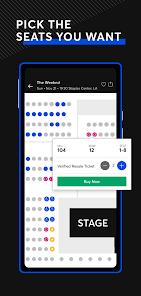
From a technical perspective, the app utilizes native Android frameworks, incorporating advanced animation libraries like Lottie and Rive to generate interactive, 3-D seating maps. This visual technology allows prospective buyers to see an on-screen preview of their field or stage view before completing their purchase.
To maintain platform security, prevent ticket scalping, and defend against automated bots, the app integrates the Google Play Integrity SDK. This framework verifies device and software authenticity during high-traffic on-sale events.
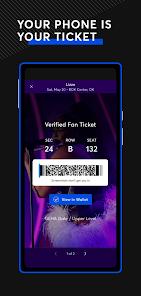
The application also secures mobile entry through its "Verified Tickets" technology, which produces dynamic barcodes that rotate at regular intervals to prevent the use of static screenshots or fraudulent duplicates. Users can also export these tickets directly to Google Wallet for streamlined offline access. it supports payment via PayPal, credit cards, and Klarna.
However, the user experience of this native application is often hampered by notable technical and integration flaws. One of the most common issues is the app's reliance on external browser redirects for account login. Instead of housing a secure authentication flow directly within the app, the interface redirects users to an external mobile browser. This redirect process is prone to errors, often resulting in loop failures, expired cookies, and user lockouts during high-demand sales events.
Additionally, the ticket delivery system can experience delays. Purchased tickets sometimes take days or weeks to appear in user accounts, which can prevent timely transfers or resales.
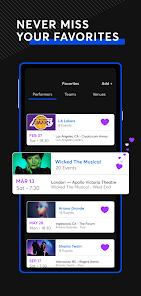
The interface is also limited in terms of user-customization, as it only allows fans to favorite entire teams or artists rather than tracking individual, localized event listings.
Pros & Cons
Primary Ticket Validation Support: Tickets purchased through the app are guaranteed authentic and direct-source verified, eliminating the risk of venue rejection.
Realistic 3-D Seating Previews: The interactive venue map uses clean 3-D visual models to let buyers preview the view from a specific section before purchasing.
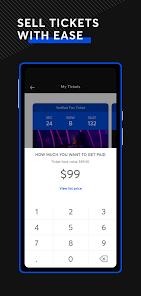
Integrated Secondary Resale Market: The application features a secure peer-to-peer marketplace where users can sell their verified tickets directly to other fans.
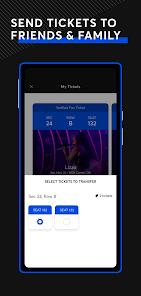
No-Fee Digital Seat Transfers: Users can transfer ownership of digital tickets to companions for free using a phone number or email.
Real-Time On-Sale Alerts: The app's notification system alerts users when their favorite artists or local venues schedule new tour dates.
Seamless Google Wallet Integration: Verified tickets can be exported to digital wallets, allowing users to scan into venues without launching the app.
- ✕
Friction-Prone Login Redirection: The app redirects users to external web browsers for authentication, which often causes login loops and crashes.
- ✕
Delayed Ticket Synchronization: Tickets can take a long time to populate in the user's account dashboard, delaying their ability to transfer or list them for resale.
- ✕
Frequent Session Disconnects: The application frequently logs users out automatically, requiring recurring security verification even when "Remember Me" is enabled.
- ✕
Inflexible Event Tracking: The system does not allow users to favorite and track individual localized events, limiting customization to broad artist or team catalogs.
Download


FAQs
Why does the application redirect logins to an external web browser?
The security framework uses external mobile browser redirects to run anti-bot checks and secure sessions, though this process can sometimes trigger loop failures.
What should I do if purchased tickets fail to appear in my account?
High server volume can delay ticket processing. If tickets do not appear within 24 hours, clearing the app's cache or logging in via a desktop browser can help refresh the profile.
Can I scan into a venue without an active cellular data connection?
To ensure entry on spotty networks, users should add their verified tickets to Google Wallet while connected to a stable network before arriving at the venue.
Are payment installment options supported during checkout?
Yes, the application supports payment plans via Klarna and PayPal for purchases that meet minimum transaction values.
Why does the navigation back-button sometimes return me directly to the home screen?
The app's navigation paths are tied to its main home layout, meaning that using the back button within nested search screens can clear your current path and return you to the dashboard.
Hot Reviews
The login process is incredibly frustrating. Instead of allowing a native sign-in, the app redirects to an external browser window that constantly freezes or drops the connection, locking you out of your account right as you try to access your tickets.
The app constantly logs users out automatically. Checking the "remember me" option does not work, and having to go through a full browser-based login process while standing in the venue entry line is incredibly stressful.
After buying tickets, they did not show up in my profile for over two weeks. This delay is highly frustrating if you need to transfer tickets to friends or list them on the resale market because of a change in plans.