WakeBox
Overview
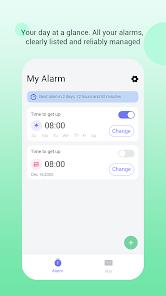
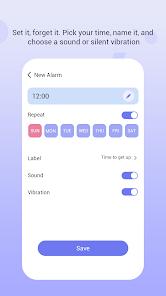
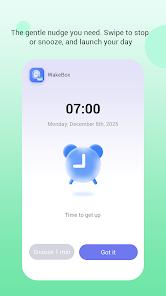
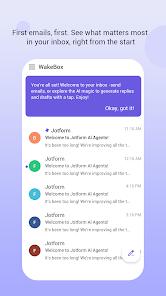
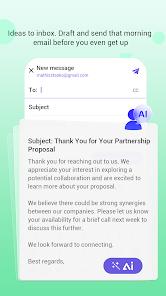
WakeBox released on April 14, 2026, is officially listed as a productivity utility developed by BLYTHEWOOD NY LLC. The application's core feature set includes a standard alarm engine that supports full-screen lock screen alerts, sound and vibration configurations, and custom recurring schedules. WakeBox also includes an embedded WebView portal that provides users with secure webmail authentication to access their email accounts directly within the application.
Despite its official description, WakeBox represents a highly controversial case study in mobile application distribution. In-depth analysis of user telemetry and play review history reveals a significant gap between the app's listed functions and its online marketing. WakeBox has been widely promoted on third-party ad networks as an "AI Picture Generator" or "AI Animation App". Users who download the app expecting AI image-generation tools are instead presented with a basic alarm clock.
Furthermore, upon initialization, the app aggressively prompts users to log into their email accounts within the embedded web portal, which is heavily populated with ad banners. This deceptive "bait-and-switch" model is designed to drive high-value traffic through ad-heavy WebViews. While the alarm engine itself is functional, it serves primarily as a wrapper for these monetization-focused WebViews.
This mismatch between marketing and functionality has led to low user satisfaction and multiple reports of deceptive practices, despite the app briefly achieving high visibility on store charts.
Pros & Cons
Full-Screen Alerts: Alarms display in full-screen on the lock screen, ensuring users do not miss wake-up events.
Low System Resource Overhead: The core alarm service runs efficiently in the background without draining battery life.
Simple Interface: The time selection and recurring schedules menu is clean, straightforward, and easy to configure.
Offline Operation: The alarm function operates entirely locally, working reliably without an active internet connection.
Built-In WebView Integration: Allows users to check their webmail accounts without switching to a separate browser.
Consistent Local Execution: The alarm trigger is highly stable and does not rely on cloud services to execute.
- ✕
Highly Misleading Marketing: The app is promoted as an AI image generator but functions only as an alarm clock.
- ✕
Aggressive Webmail Redirects: Pushes users toward logging into their email accounts inside ad-heavy WebViews.
- ✕
No Real AI Features: Completely lacks the image generation and translation tools shown in its external advertisements.
- ✕
Suspicious Data Permissions: Requests network access and browser integration that are unusually broad for a standard alarm app.
Download
 Get it on Google Play
  Get it on App Store
 FAQs
Does WakeBox contain any AI image generation features?
No, the app has no AI functionality; it is a standard alarm clock with an embedded web viewer.
Is it safe to log into my email through the app's WebView?
The app uses standard WebView protocols, but entering credentials in non-system browsers carries security risks.
Why is WakeBox marketed as an AI application?
This is a deceptive user acquisition tactic designed to inflate app downloads and direct users to ad-heavy portals.
Will the alarm trigger if my device is on silent mode?
Under standard configurations, the app is designed to bypass silent mode and output sound, though system limitations may vary.
Who is the developer of WakeBox?
The application is developed by BLYTHEWOOD NY LLC, a company registered in New York.
Hot Reviews
The online ads presented this app as an advanced AI image creation tool. However, downloading it reveals it is nothing more than a basic alarm clock with an email portal.
Upon launching the application, it immediately attempts to access and display email accounts. This focus on email logins is highly unusual and intrusive for a simple alarm clock.
While the marketing is highly misleading, the actual alarm clock function works reliably. It triggers full-screen alerts even when the device is locked.
The embedded web viewer is filled with aggressive popups and ad banners, making it difficult to navigate the interface without accidentally clicking on ads.