Raising Cane's Chicken Fingers
Overview
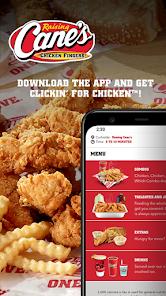
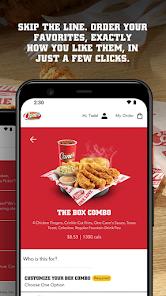
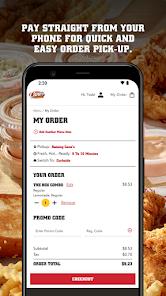
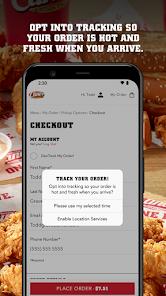
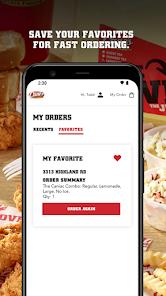
The Raising Cane's mobile application is a dedicated commerce platform designed around a highly focused menu of chicken finger meals. To keep ordering fast and simple, the user interface avoids complex menus, allowing users to quickly navigate to signature combo meals like the "Box Combo" or "Caniac Combo". The checkout system is similarly streamlined, featuring a "Favorites" section where users can save their preferred menu configurations for fast reordering.
To manage loyalty incentives, the app integrates with the "Caniac Club". However, the onboarding process is unusually complex compared to modern digital-first platforms. Instead of allowing users to sign up entirely within the app, the Caniac Club requires them to first visit a physical restaurant, ask an employee for a physical plastic club card, and then manually input that card number on the web or in-app portal to link the accounts.
This multi-step registration process introduces significant friction, which can limit digital customer acquisition. Furthermore, membership rewards are distributed exclusively through email notifications. To receive and redeem these promotions, users must remain opted in to marketing emails, meaning the app acts as a basic scanner rather than an independent loyalty platform.
Operational limitations also impact the app's overall utility. In many locations, mobile orders are excluded from the standard drive-thru pickup queue, forcing users to use dedicated curbside parking spaces. During busy lunch or dinner rushes, drive-thru lanes are often prioritized, meaning mobile customers may wait longer for their orders than traditional drive-thru customers.
Additionally, the platform has faced security concerns, with user reviews highlighting unauthorized out-of-state transactions. While the app offers optional two-step verification, its payment gateway does not require real-time card verification checks, making it vulnerable to card-testing and credential-stuffing exploits.
Pros & Cons
Streamlined Menu Navigation: The focused menu catalog allows users to quickly select and configure combos with minimal screen transitions.
Convenient Single-Click Reordering: Easily save custom meal configurations to a favorites list for fast checkout.
Optional Two-Step Security Verification: Offers multi-factor authentication to help secure user credentials and payment methods.
High-Value Promotional BOGO Deals: The loyalty program regularly features generous member promotions, such as Father's Day BOGO events.
Accurate GPS Store Locator: The built-in map reliably displays store operating hours, local menus, and holiday schedules.
- ✕
Complex Physical Card Onboarding Process: Signing up requires obtaining a physical card in-store before online registration can be completed.
- ✕
Highly Restrictive Pick-Up Workflows: Many stores exclude mobile orders from the drive-thru lane, forcing users into slow curbside pickup queues.
- ✕
In-App Server and Connection Glitches: The ordering flow can freeze during peak hours, displaying a spinning animation that requires a manual app restart.
- ✕
Weak Fraud Prevention Checks: The app lacks robust device validation, making accounts vulnerable to unauthorized payment activity if login credentials are compromised.
Download


FAQs
What is the step-by-step process for joining the Caniac Club?
Users must visit a participating location to pick up a physical card, navigate to the club website, register the card number, verify their email address, and link the card to their app profile.
Can a user redeem Caniac Club offers without opting in to marketing emails?
No, the loyalty program requires users to remain opted in to promotional emails to activate and view their rewards.
Can a customer's loyalty account be retrieved using a phone number at the register?
No, the store POS system cannot look up accounts by phone number or email; customers must present a physical card or scan their in-app QR code.
Are drive-thru pickups supported for mobile orders?
Drive-thru mobile pickup support varies by location. Many participating stores require mobile users to use designated curbside pickup spaces instead.
What should a user do if they experience checkout freezes?
If the app freezes on a loading screen, users should restart the app, check their internet connection, or complete their order through the mobile website.
Hot Reviews
The enrollment flow requires a physical card from a restaurant before digital features can be used. This design adds unnecessary friction compared to modern, digital-first loyalty apps.
The curbside pickup system is often slow and inefficient, with drive-thru orders prioritized over parked mobile customers. This defeats the purpose of ordering ahead to save time.
The platform has experienced security issues, with several users reporting fraudulent out-of-state orders placed on their accounts. The app lacks robust transaction checks to prevent unauthorized payment card usage.