
Peacock TV: Stream TV & Movies
Peacock is the rare streamer that pairs marquee live sports with a deep bench of comfort-TV classics, and for NFL Sundays and The Office it's genuinely hard to replace. The caveat is central to the pitch: ads run even on the mid-tier paid plan, the ad system can feel aggressive when you rewind, and resume-across-devices is unreliable — so budget for a paid tier and a few rough edges.
- US viewers who want live NFL Sunday Night Football, Premier League, Big Ten, and Olympic-family events under one subscription alongside on-demand shows
- Fans of legacy NBCUniversal TV — The Office 'Superfan' cuts, Yellowstone, SNL, The Voice — plus Telemundo Spanish-language content and lean-back 'Peacock Channels'
- Anyone outside the US and its territories — the service is regionally locked and will not work abroad
- Viewers expecting an ad-free experience on the mid 'Premium' tier, or multi-device watchers who need reliable resume — both are documented pain points
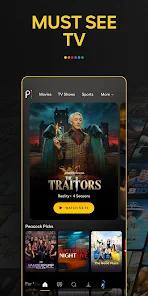


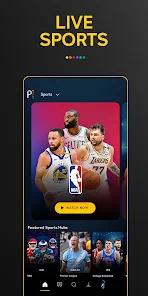

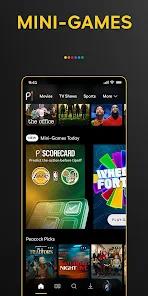
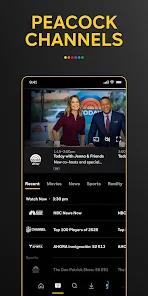

Overview
The verdict up front
Peacock is at its best on a Sunday afternoon with a football game on and, twenty minutes later, an old episode of The Office queued up behind it — the mix of live sports and comfort television is the whole reason the app earns a place on your home screen. As NBCUniversal’s US streaming service, it sits at a 4.5 average across roughly 493,000 Play Store ratings with 50M+ installs, and the loyalty behind those numbers is real. But we’d stop short of a clean recommendation, because Peacock carries a monetization reality it doesn’t advertise loudly: ads run even on the mid-tier paid plan, the ad system can feel punishing when you rewind, and the app has a documented habit of losing your place across devices. Know what you’re buying and it’s a strong pick; expect a polished, ad-free, resume-anywhere experience and it isn’t quite that.
What it actually is
Peacock is a three-tier streaming service, and understanding the tiers is the whole game — the differences aren’t cosmetic.
The entry point is Peacock Select at $7.99/month — an ad-supported plan that replaced the old free tier. Above it is Peacock Premium, which unlocks the full library but, crucially, still includes ads. At the top is Peacock Premium Plus at $16.99/month, which strips out most ads, adds offline downloads, and throws in a 24/7 local NBC live stream. Both Premium tiers carry the live-sports package — NFL, Premier League, major college football — so choosing between them comes down to how many ads you’ll tolerate and whether you need offline viewing.
The content strategy is two-headed: high-stakes live sports on one side, legacy NBC comfort TV on the other. The sports slate is the headline draw — Sunday Night Football, Premier League soccer, Big Ten football, and the 2026 Winter Paralympics — with select live events and movies in 4K for Premium subscribers. On the library side, Peacock is the exclusive home for the “Superfan” episodes of The Office, full seasons of Yellowstone, and current-season network hits like The Voice and SNL. Universal and Focus theatrical releases land relatively soon after their cinema runs, giving the movie catalog a steadier refresh than most legacy-TV libraries manage.
Two more features round it out. Peacock Channels is a lean-back, cable-like experience — 24/7 curated streams you drop into without picking anything. And there’s robust Telemundo Spanish-language content, plus multiple user profiles for households sharing one account. The sports-plus-library hybrid is what sets it apart from the field.
Where it works
The live sports are the anchor, and the reason a large share of subscribers stay. Putting Sunday Night Football, Premier League, Big Ten, and Olympic-family events behind one subscription is a real convenience — the kind of exclusive, appointment-viewing content a pure on-demand rival simply can’t match.
The legacy library is the other half of the appeal, and where the loyalty runs deepest. The documented review themes are blunt about it: despite the app’s technical flaws, many users stay for what they describe as an unmatched catalog of NBC classics and exclusive live sports. The Office “Superfan” episodes are a genuine exclusive — extended versions you can’t stream elsewhere — and with Yellowstone, SNL, and The Voice alongside, Peacock has a comfort-TV depth that’s hard to replicate.
We’d also credit the breadth beyond the marquee names. Peacock Channels is a smart answer to decision fatigue — the no-input format is the closest thing to flipping on cable. The Telemundo content makes it a legitimate option for Spanish-language households in a way many competitors treat as an afterthought. And Premium Plus offline downloads are a concrete perk for commuting or travel. Add multiple profiles, and the package is more rounded than the sports-and-classics pitch suggests.
The monetization reality — the honest part
Here’s the part that deserves plain language, because it’s the single most important thing to know before subscribing: ads run even on the paid “Premium” tier. Paying for Premium removes neither the commercial breaks nor the interruptions — you’re buying the full library and live sports, but the ad load stays. Only Premium Plus, at $16.99/month, removes most ads. If your mental model is “I paid, so the ads stop,” Peacock will not match it, and that gap is the caveat we’d want subscribers to hear first.
More pointed than the frequency is how the ads are delivered. The documented review themes describe the ad system as aggressive, and the specific complaint is telling: rewinding or fast-forwarding can trigger a fresh set of commercials. Users report being penalized with an additional block of ads — roughly a couple of minutes — simply for rewinding to a scene they missed. That turns an ordinary playback action into a cost, and it’s one of the loudest recurring frustrations in the feedback.
The second structural problem is reliability, not monetization: the app is reported to fail to reliably save viewing progress across devices. The recurring theme is an app that loses your place, forcing you to restart an episode or manually scrub to find where you left off. For a service built partly on binge-watching a deep library, that’s real friction, and it shows up consistently enough to treat as structural rather than occasional.
Finally, two more caveats. The interface is frequently reported as non-intuitive — navigation and layout come up as a recurring source of friction rather than a strength. And the service is strictly regional: it works only in the US and its territories and does not function abroad, ruling it out for viewers and travelers outside that footprint. None of these is disqualifying alone, but together they sketch a clear picture: a strong content library wrapped in an ad-and-UX experience that asks for patience.
A recency note
This is an actively maintained app, not one coasting on old goodwill. The Play listing shows an update on March 26, 2026, and the content slate keeps moving — current-season SNL and The Voice, the 2026 Winter Paralympics, and a steady flow of Universal and Focus theatrical titles point to a service fed regularly rather than running down a fixed catalog. The 4.5 average across roughly 493,000 ratings suggests broad satisfaction even amid the interface and ad complaints. The nuance worth flagging: the pain points we’ve named read as long-running themes in the review history, not recent regressions, so we wouldn’t count on the next update quietly resolving them.
How it compares
Ads on a paid streaming tier are, to be fair, no longer unusual — the industry has broadly normalized an ad-supported cheaper plan, and Peacock is far from alone. Where its structure stands out is that ads persist on the mid Premium tier, not just the cheapest one, so the ad-free experience sits a full step higher, at Premium Plus, than a first-timer might assume.
The more useful comparison is on strategy. Against a pure on-demand service — a catalog you browse and binge with no live component — Peacock’s differentiator is the live-sports hybrid. If your viewing includes NFL Sundays, Premier League weekends, or Olympic-family events, a library-only competitor can’t stand in for Peacock; the live rights are the moat. Conversely, if you never touch live sports, Peacock’s rougher interface, its ads on the paid tier, and its resume problems become harder to overlook — you’d be paying for a hybrid whose defining half you don’t use. The honest read: the further your habits drift from the sports-and-comfort-TV profile, the more the trade-offs weigh.
Who it’s not for
Skip Peacock if you live outside the US and its territories — the regional lock is absolute, and the app will not work for you abroad. Skip it too if an ad-free experience on a mid-priced paid plan is non-negotiable: Premium keeps the ads, and the only near-ad-free option is the $16.99 Premium Plus tier. If you watch across several devices and need your place saved reliably, the documented progress-loss problem will frustrate you — this is one of the most consistent complaints, not an edge case. And if a non-intuitive interface genuinely wears on you, Peacock’s navigation is a recurring gripe rather than a strength, so go in with tempered expectations on polish.
Our take
Peacock earns its loyalty honestly: the live-sports slate is a genuine differentiator, the NBC comfort-TV library — Office “Superfan” cuts, Yellowstone, SNL, The Voice — is deep and partly exclusive, and touches like Peacock Channels, Telemundo, and Premium Plus downloads round out a fuller package than the headline pitch suggests. For a US viewer who wants football on Sunday and familiar shows the rest of the week, it’s an easy service to keep. The trade is equally clear: ads run on the mid Premium tier, the ad system can feel aggressive when you rewind, resume-across-devices is unreliable, and the interface asks for patience. Go in knowing you’ll likely want a paid tier — possibly the top one for a near-ad-free experience — and Peacock delivers a strong, sports-forward package with a handful of rough edges.
How We Evaluate
We judge every app on the same checklist: what it actually delivers, how honest the pitch is, where real users get burned, and who should walk away. We did not hands-on test Peacock; instead we read across its Play Store material, recent user reviews, its rating history, and Peacock's public reputation as NBCUniversal's US streaming service. Where we name a downside — the ads on the paid tier, the aggressive ad delivery on rewind, the progress-saving problems — it traces to a signal in that material, not to our own playback.
Pros & Cons
Extensive live sports coverage including NFL, Premier League, and Olympic events.
Unrivaled library of classic NBC comedies and current-season network television.
The "Peacock Channels" feature provides a 24/7 curated viewing experience that requires no user input.
Supports multiple user profiles, making it a viable choice for large households.
Includes a robust selection of Spanish-language content from Telemundo.
"Premium Plus" tier allows for offline downloads, ideal for commuting or travel.
Frequently features new theatrical releases from Universal and Focus Features shortly after cinema debut.
- ✕
Ads are present even on the basic "Premium" paid tier, which many users find frustrating.
- ✕
The ad-delivery mechanism can be overly aggressive, particularly when fast-forwarding or rewinding.
- ✕
User interface is often reported as less intuitive.
- ✕
Regional restrictions limit use strictly to the United States and its territories.
Download


FAQs
Is Peacock free?
The original free tier has been replaced by "Peacock Select" ($7.99/mo), though limited-time trials are often available.
Can I watch live sports on Peacock?
Yes, both Premium tiers include live coverage of the NFL, Premier League, and major college sports.
How do I cancel my subscription?
Users can cancel at any time through the account settings within the mobile app or on the website.
Does Peacock work outside the US?
No, the service is currently restricted to the United States and its territories.
What is Premium Plus?
This $16.99 tier removes most ads, allows for offline downloads, and includes a 24/7 stream of your local NBC station.
Does the app support 4K?
Yes, select live events and movies are available in 4K for Premium subscribers.
Hot Reviews
Many recent reviews highlight that the app often "loses progress" on shows, forcing users to restart episodes or manually search for their last watched position.
A major point of contention is the ad-delivery system; users report being "punished" with additional 2-minute ads simply for trying to rewind to a missed scene.
Despite technical flaws, many users stick with the service for its "unmatched" collection of NBC classics and exclusive live sporting events.