Xbox
Overview
The transition from isolated gaming consoles to connected home entertainment ecosystems has changed how players manage their games. The XBOX app represents an official ecosystem companion developed by Microsoft Corporation. Initially launched during the Xbox One console generation to serve as a companion second screen, it has since evolved into the modern, consolidated "Xbox" app.
Technically, the app connects to the console using local network protocols and secure cloud-based APIs. When connected to the same Wi-Fi subnet, the application uses low-latency socket connections to let users control system menus directly from their mobile screen. This integration bypasses the slow process of typing with a controller, enabling the phone's native keyboard to input text on the console for quick searches and messaging.
The app's features are split across local hardware control and remote cloud services:
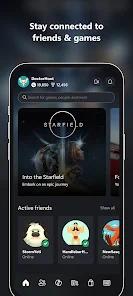
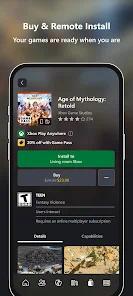
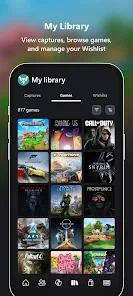
- Remote Library Management: Users can browse the Xbox catalog and initiate remote game downloads. This sends commands via cloud servers to start background installations on the home console.
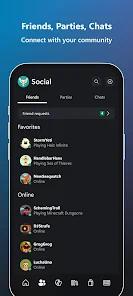
- Social Communications: Integrates cross-platform text and voice chat networks, allowing mobile users to connect with friends playing on console or PC.
- DVR Content Integration: Provides direct access to captured screenshots and video clips saved on the console, making it easy to download and share them on social media.
While game streaming tools project high-definition video frames, this companion utility focuses on system management, social connectivity, and account customization. This specialized toolset makes it an essential hub for keeping players connected to their gaming profile even when they are away from their console.
Pros & Cons
Simplifies system navigation and text entry compared to traditional controllers.
Allows remote purchasing and queuing of game installations from any location.
Supports high-quality voice and text chat across Xbox consoles and PCs.
Enables quick access, editing, and sharing of recorded game clips and screenshots.
Features a clean, highly optimized user interface that is easy to navigate.
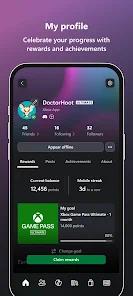
Simplifies profile customization and achievement tracking on the go.
- ✕
Occasional connection drops can happen when pairing with older consoles over local Wi-Fi.
- ✕
Lacks a native platform user-review section within the mobile game library pages.
- ✕
Heavy feature updates can cause interface slowdowns on older mobile devices.
Download
 Get it on Google Play
  Get it on App Store
 FAQs
Can this application stream games directly to my mobile device?
The main app focuses on system management and social features. High-end game streaming requires the separate Xbox Remote Play or Cloud Gaming tools.
How do I pair the app with my Xbox console?
Make sure both devices are on the same Wi-Fi network. The app should detect your console automatically, but you can also connect manually by entering your console's IP address.
Can I manage storage space on my console using this app?
Yes, the app allows you to remotely uninstall games and manage storage space to free up space.
Is an active Xbox Network profile required to use the app?
Yes, you must sign in with a registered Microsoft account linked to an Xbox profile to access social features and remote downloads.
Why are game reviews missing from the app's store pages?
The companion app is optimized for fast purchases and remote queuing. Detailed community reviews must be viewed through the official website.
Hot Reviews
Users appreciate the app's smooth performance when browsing sales, comparing game versions, and queuing remote downloads.
Reviewers frequently highlight the virtual keyboard, noting it makes typing messages and search queries much faster than using a controller.
Some users find it inconvenient that they cannot read community reviews directly in the app, requiring them to switch to a web browser.