
Microsoft Family Safety
Overview
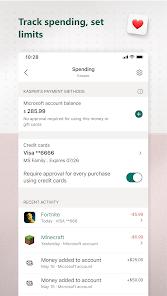
Microsoft Family Safety is a comprehensive digital wellbeing platform designed to protect families across Android, Windows, and Xbox ecosystems. Functionally, the app acts as a centralized dashboard where parents can monitor, manage, and facilitate healthy digital habits for their children. It deconstructs the traditional "locking" approach to parental controls by offering a dialogue-driven system: children can request more screen time, and parents can approve it remotely via a push notification.
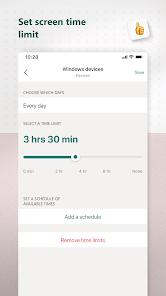
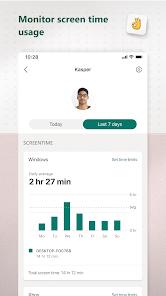
A deep analysis of the application reveals its "Activity Reporting" as its core engine. The app provides detailed logs of screen time and web usage, which are synthesized into a weekly email summary. This data allows families to have evidence-based conversations about their online habits. For the Android environment, the app uses "App and Game Limits" that are shared across platforms. For instance, if a child is limited to 1 hour of Roblox, that limit is enforced collectively across their phone, PC, and Xbox console. Furthermore, the app includes "Content Filters" that work in conjunction with Microsoft Edge to block inappropriate websites and ensure "Kid-Friendly" search results through Bing.
Deep insights into Family Safety suggest it is an "Ecosystem Multiplier." Its value is highest for families already using Windows and Xbox, as it is the only app that can manage hardware-level limits on those devices from a mobile phone. However, the application has faced criticism for its "Circular UI" and technical friction. For example, if a device is locked, the child's request for more time may sometimes fail to transmit if the internet filter is too aggressive. Despite these challenges, its integration of location-sharing (without selling data to third parties) and platform-agnostic screen time management makes it a vital tool for the modern, multi-device household.
Pros & Cons
Provides unparalleled unified control over Xbox, Windows, and Android devices, a feature set no other free app offers.
Weekly activity reports are highly detailed and provide an excellent starting point for discussing digital habits with children.
Content filters are effective at creating a strictly "kid-friendly" environment when paired with Microsoft Edge.
The location-sharing feature is reliable and does not sell your family's data to third-party data brokers.
The "Request for More Time" feature allows for flexible, remote parenting without needing to physically hold the child's device.
- ✕
The user interface is often described as non-intuitive, with some settings buried under multiple "circular" links.
- ✕
Web filtering is strictly limited to Microsoft Edge; parents must block other browsers for the system to be effective.
- ✕
Recent reviews report technical bugs where screen time is not accurately tracked, occasionally showing "0 minutes" despite hours of use.
Download


FAQs
Does this app work on iPhones?
The management app works on iOS, and you can monitor Android, Windows, and Xbox devices from it.
Can I block specific apps like YouTube?
Yes, you can set specific time limits for any app or block it entirely on Android, Xbox, and Windows platforms.
Do I need a Microsoft 365 subscription?
The core features are free. A Microsoft 365 Family subscription adds premium features like location alerts and geofencing.
How do I approve more screen time?
When your child sends a request, you will receive a notification on your phone. You can approve it for 15 mins, 1 hour, or more with one tap.
Does this track what my child searches for?
Yes, the activity reports can show you the terms your child has searched for on Bing through the Edge browser.
Hot Reviews
Parents frequently note that this is the "only way" to effectively manage gaming time on Xbox without a constant struggle. The ability to set "school time" schedules is a highly praised feature.
Critics often point to the app's complexity, stating that it can be "awkward and buggy" at times. Users have mentioned that finding the "Give more time" button can sometimes fail due to sync issues.
Users appreciate Microsoft’s commitment to not selling location data, contrasting it with other free safety apps that may monetize family movement patterns.