
Gallery
Overview
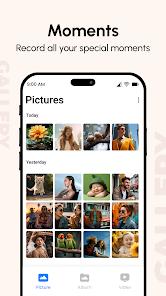
Gallery is a robust media management tool designed for Android users who require more sophisticated organization, editing, and privacy features than those offered by stock gallery applications. The app distinguishes itself by focusing on a 100% private, offline-first approach to media management, ensuring that sensitive data is never synced to external clouds without explicit user action. The core functional architecture of Gallery Pro is divided into four main pillars: Intelligent Organization, Integrated Media Editing, Private Vault Security, and Data Recovery.
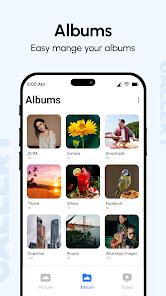
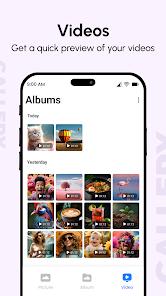
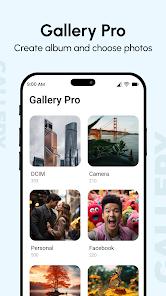
The Intelligent Organization system automatically categorizes media into albums based on time, location, and file type (e.g., Camera, Screenshots, Videos, Favorites). It supports a vast range of formats, from standard JPEGs and MP4s to more advanced files like RAW, SVG, and 360-degree panoramic photos. The "Smart Memories" feature takes this further by grouping photos by year and location, effectively creating a "storytelling" album that requires zero manual effort from the user.
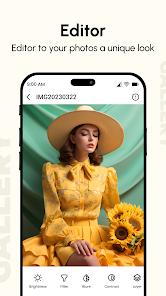
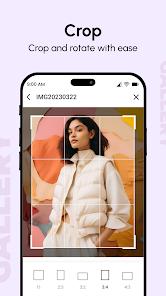
The Integrated Media Editor is surprisingly deep for a utility app. It allows for standard cropping and rotating but also includes professional-grade adjustments for contrast, saturation, shadows, and exposure. Users can also apply artistic filters, add text, or use a draw/mosaic tool to redact sensitive information in screenshots—though some users have noted the lack of a traditional paintbrush in certain versions.
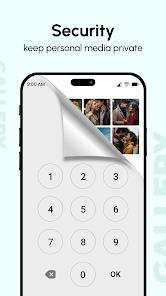
Security is handled via the "Private Photo Vault," which moves selected media into an encrypted local directory protected by a PIN, pattern, or fingerprint. This feature is critical for users who frequently share their devices, as it allows for a "Hide it Pro" experience where sensitive files are invisible to the main gallery. Finally, the "Recycle Bin" provides a safety net by auto-saving deleted files, allowing for quick recovery of accidentally removed precious memories.
Pros & Cons
Privacy-Centric Offline Design: Operates without internet access, ensuring all media and metadata remain on the device for maximum privacy.
Extensive File Format Support: Handles everything from standard photos to professional RAW files and vector SVGs.
Robust Security Vault: Excellent implementation of hidden, password-protected folders for sensitive images and videos.
Comprehensive Media Recovery: The integrated Recycle Bin serves as a reliable fail-safe for accidental deletions.
Advanced Metadata Access: Provides detailed EXIF and location data, useful for photographers tracking their work.
High Customizability: Users can adjust grid counts, column views, and switch between light and dark modes easily.
- ✕
Intrusive Advertisement Placement: Free versions are often cluttered with ads that can degrade the user experience and slow down navigation. To unlock advanced functions and remove ads, you'll need to pay to upgrade to Pro version in this app.
- ✕
Fragmented File Handling: Some users report difficulties in choosing specific file sources or overwriting edited images without creating duplicates.
- ✕
Responsive Issues with Large Libraries: In some hardware configurations, high-resolution thumbnails may load slowly or appear blurry initially.
Download
 Get it on Google Play
  Get it on App Store
 FAQs
How do I hide photos in the private vault?
Select the photos you wish to secure, tap the options menu, and choose "Add to Private Space" or "Hide." You will be prompted to set a PIN or password.
Does Gallery Pro backup my photos to the cloud?
No, the app is designed for local management. If you need cloud backup, you would need to use a separate service like Google Drive or Proton Drive.
Can I recover a video I deleted by mistake?
Yes, if you have not emptied the Recycle Bin, you can navigate to it and restore the video to its original album.
What kind of editing tools are included?
The app includes tools to crop, rotate, resize, adjust brightness/contrast, apply filters, and add basic drawings or text.
Is it compatible with SD cards?
Yes, Gallery Pro supports viewing and managing media stored on external SD cards, including moving and copying files between storages.
Hot Reviews
Many users describe the app as the "safest place" for sensitive files, praising the hidden vault for its ease of use during device sharing.
A common theme among critical reviews is that the app sometimes "devotes more resources to ads than photos," making it difficult to use without an ad blocker.
Fans of the app appreciate its "minimalist" and "logical layout," noting that it makes finding specific moments much faster than stock apps.
While many find the editor "plentiful," some power users have expressed frustration over the lack of a "Save As" function or specific brushes.