
Cxxdroid - C/C++ compiler IDE
Overview
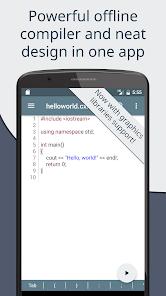
Cxxdroid is an offline integrated development environment (IDE) designed by IIEC for writing, compiling, and testing C and C++ code directly on Android devices. Unlike simple code editors that rely on external cloud servers, Cxxdroid compiles programs entirely locally. This makes it a highly capable, self-contained tool for computer science students, software engineers, and mobile developers.
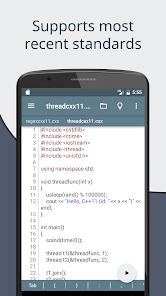
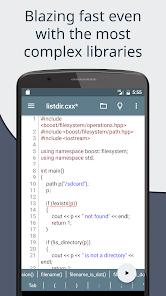
The technical core of the application uses native Clang and LLVM compiler architectures. This design compiles standard C and C++ code directly on the device’s ARM processor, supporting advanced features such as inline assembly language (using Clang syntax). To optimize performance for mobile hardware, the IDE features an intelligent compiler cache. This system reduces build times significantly—improving speeds up to three times on average and making the compilation of heavy template structures like the Boost library much more efficient.
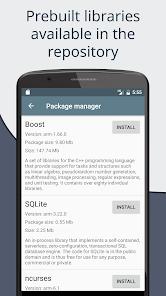
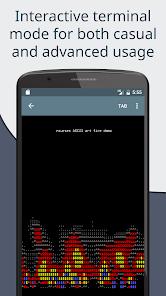
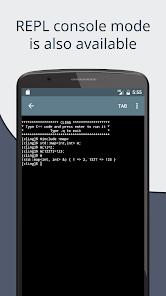
A unique feature of this IDE is its interactive Read-Eval-Print Loop (REPL) interpreter mode. Powered by CERN Cling, the REPL allows developers to write and run C++ code snippets on the fly, providing immediate feedback without requiring a full program compilation. Additionally, the app features an integrated terminal emulator and a dedicated package manager. This manager accesses custom repositories of prebuilt library binaries, letting users install and link popular libraries like SQLite, Boost, SDL2, and SFML with a single tap.
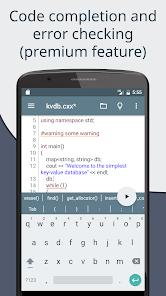
The editor interface includes several key tools designed to make mobile coding more efficient. These include real-time syntax checking, auto-indentation, multiple interface themes, and tabbed file navigation. To simplify touch typing, the editor features an extended virtual keyboard bar populated with frequently used programming characters such as brackets, braces, and punctuation marks. The app also includes single-tap integration with Pastebin, making it easy to share code snippets for collaboration or debugging.
Pros & Cons
Completely Offline Compiler: Compiles and runs programs entirely on the device without requiring an active internet connection.
Dedicated Package Manager: Simplifies library installation with prebuilt binaries for Boost, SQLite, SDL2, and SFML.
Fast LLVM/Clang Core: Optimizes compile speeds using advanced local caching designed for mobile hardware.
Interactive REPL Mode: Uses CERN Cling to evaluate isolated C++ code snippets instantly for fast prototyping.
Extended Symbol Keyboard: Adds a customizable virtual keyboard row for quick access to brackets, semi-colons, and other code symbols.
- ✕
Paywalled Editor Features: Gates essential features like code auto-prediction and advanced syntax analysis behind a premium subscription.
- ✕
Simplified Debugging Tools: Lacks the advanced, interactive step-by-step debugging interfaces found in desktop IDEs.
- ✕
Large Installation Footprint: Requires a minimum of 150MB to 200MB of internal storage, which grows significantly when installing heavy libraries.
- ✕
Inability to Export standalone APKs: Runs compiled binaries within its own sandbox terminal rather than generating independent, shareable installer files.
Download
 Get it on Google Play
  Get it on App Store
 FAQs
Does the application require internet access to compile code?
No, the Clang toolchain runs locally on the device’s processor, enabling full compilation and execution offline.
Which visual graphics libraries are supported?
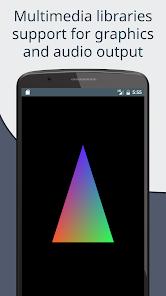
The built-in package manager includes prebuilt configurations for popular graphics libraries including SDL2, SFML, and Allegro.
What are the storage recommendations for using libraries?
While the base app requires about 150MB of internal storage, keeping 200MB to 500MB of free space is highly recommended when using heavy libraries like Boost.
Are code completion and syntax analysis available?
Yes, but advanced features like real-time code predictions and deep diagnostic analysis are exclusive to the Premium version.
Does the compiler support standard C/C++ libraries?
Yes, the Clang compiler natively supports standard C and C++ headers, standard libraries, and inline assembly language.
Hot Reviews
The local compiler is highly reliable, compiling and running complex algorithms quickly. It is an exceptional resource for testing ideas on the go without carrying a laptop.
The integrated package manager makes installing SQLite and SDL2 incredibly simple, saving developers from the typical manual configuration headaches.
The base editor works well, but restricting structural code predictions and auto-completion to the paid version makes typing on a touch screen much slower for beginners.