
QPython+ - Python for Android
Overview
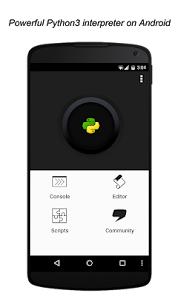
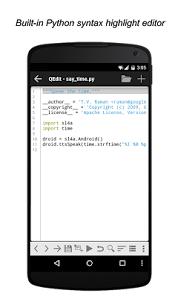
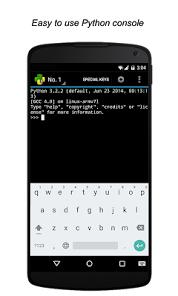
QPython+ is a versatile Python development environment designed to run natively on the Android operating system. Designed for students, educators, and professional developers, the platform packages a complete Python interpreter, an interactive console, an internal code editor (QEditor), and the Scripting Layer for Android (QSL4A) library into a single mobile environment. This setup enables developers to execute standard Python scripts on Android while gaining programmatic access to physical hardware sensors, GPS modules, camera inputs, and system actions.
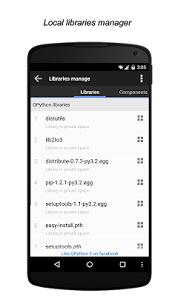
The platform's technical architecture is built to support advanced software engineering tasks. QPython+ provides built-in package management via pip, allowing users to install and manage third-party libraries directly from the Python Package Index (PyPI). The integration of libraries like NumPy, SciPy, and Matplotlib allows users to execute complex mathematical analysis, mathematical operations, and coordinate graphing without relying on cloud servers. For data scientists and academic researchers, QPython+ integrates full Jupyter Notebook compatibility (QNotebook) to run, edit, and visualize data science notebooks directly within a mobile browser interface.
Recent system updates to version 3.9 have modernized the platform with Generative AI extensions but have also introduced user interface changes. The integration of updated Android security and permission frameworks has altered local directory access paths, creating file management friction for long-time users. Additionally, the launch process now defaults to a multi-window layout, which some developers find overly complex compared to older, single-screen designs.
The development branches of QPython highlights its adaptive positioning between consumer app stores and specialized developer requirements.
Pros & Cons
Comprehensive Scripting Layer for Android (SL4A): Provides developer tools to write scripts that interact with native hardware elements such as Bluetooth, sensors, and GPS.
Robust Scientific and Web Stack Libraries: Pre-configures environments for Django, Flask, NumPy, and Scikit-learn, making it a capable local sandbox.
Integrated Jupyter Notebook Execution: Allows data analysts to run and view interactive notebooks offline via the built-in QNotebook module.
No Third-Party Cloud Dependencies: Runs code on local device runtimes, ensuring developer data privacy and removing the need for internet access.
Flexible Editor Configurations: Supports third-party code editors, allowing developers to link their preferred workspace.
Zero Declared Tracker Activity: Play Store declarations confirm the app does not share telemetry or track user activity.
Broad Version Compatibility: Remains optimized across older and newer Android operating system kernels.
- ✕
File Persistence and Autosave Issues: The built-in editor sometimes experiences autosave lapses, occasionally resulting in lost code changes.
- ✕
Complex File System Permissions: Strict Android directory sandboxing makes it difficult to read and write to external SD cards.
- ✕
Complex Multi-Window Interface: Launching the application opens multiple interface windows, which can complicate quick script execution.
- ✕
Steep Learning Curve for Beginners: The platform’s advanced features and technical terminal can be intimidating for students new to coding.
Download
 Get it on Google Play
  Get it on App Store
 FAQs
Is it possible to install and compile external C-extension packages in QPython+?
Many standard packages can be installed via pip, but libraries that require local compilation during installation may fail unless precompiled wheels are available.
How does the application manage storage permissions on modern Android versions?
QPython+ complies with newer Android scoped storage policies. This changes how files are accessed and requires scripts to use specific local app directories for read and write permissions.
Can QPython+ be used to run Python applications in the background?
Yes, scripts can be initiated as background services via the SL4A layer, allowing for local automation tasks, sensor logging, and simple web server hosting.
What is the primary difference between the QPython 3S and 3L application branches?
The "S" branch contains standard permission settings for access to system features, whereas the "L" branch is built to meet strict Google Play Store security requirements.
Can graphical user interfaces be constructed natively within QPython+?
Yes, the application supports basic graphical outputs and web-based control interfaces by combining local Flask or Django web frameworks with web view renderings.
Hot Reviews
The platform provides a highly capable local terminal environment. The console is responsive, and the ability to process external files within scripts makes it a valuable utility for remote administrative tasks.
Recent updates to security permissions have changed how the app accesses local directories. This has made it more difficult to quickly open and run scripts stored in external folders.
Recent interface updates can make launching the app feel cluttered. Spawning three workspace views instead of a clean, single editor increases the steps needed to run simple tests.
The editor is highly functional, but users have reported occasional code loss when switching apps. Adding a manual save step before minimizing is recommended to avoid losing progress.