
Wells Fargo Mobile®



Overview
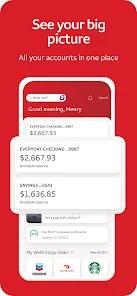
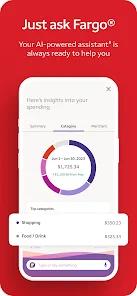
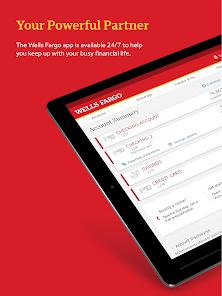
The Wells Fargo Mobile application serves as a comprehensive financial command center for millions of users in the United States. Architectural priorities for this app are focused on security, speed, and proactive financial intelligence. A standout feature of the current version is "Fargo," a built-in virtual assistant that uses AI to answer banking questions, provide spending insights, and help users navigate complex features through natural language processing. This shift toward AI-first banking allows users to manage their accounts with greater autonomy, reducing the need for physical branch visits.
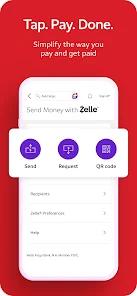
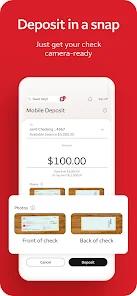
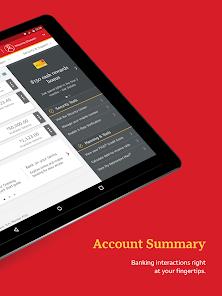
From a functional standpoint, the app integrates the "Zelle" network, allowing for near-instant money transfers to friends and family without third-party intermediaries. The mobile deposit feature remains a critical utility, utilizing the device's camera to process checks securely on the go. For security, Wells Fargo employs multi-factor authentication and real-time account alerts that notify users of low balances, large transactions, or potential fraud. The app also facilitates the opening of new credit, savings, and investment accounts directly within the mobile interface, reflecting the bank's transition toward a fully digital service model.
Despite its high utility, the application requires a sophisticated level of user trust. It collects significant data types, including location, financial info, and personal identifiers, to comply with federal banking regulations and provide personalized security. Recent updates have focused on streamlining the navigation bar and improving the "Fargo" assistant's accuracy, ensuring that the app remains a competitive leader against fintech startups and legacy rivals alike.
Pros & Cons
Integrated "Fargo" AI assistant provides high-level financial insights and rapid answers to everyday banking queries.
Seamless "Zelle" integration allows for fast, secure peer-to-peer transfers with zero additional fees.
Highly efficient "Mobile Deposit" feature enables secure check processing without the need to visit an ATM or branch.
Real-time customizable alerts keep users informed of every account movement, significantly enhancing fraud prevention.
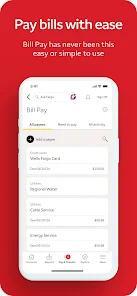
All-in-one management includes bill pay, internal transfers, and the ability to open new accounts in minutes.
Sophisticated security protocols, including biometric login (Fingerprint/Face ID), ensure that financial data remains protected.
Comprehensive spending analysis tools help users visualize their budget and identify potential savings.
- ✕
Technical maintenance periods can occasionally limit access to account data during late-night or early-morning windows.
- ✕
The vast number of features can lead to a slightly complex user interface for individuals who only require basic balance checks.
- ✕
Requires a high-speed internet connection for advanced features like Mobile Deposit and AI assistant interactions.
Download


FAQs
How do I send money with Zelle?
Simply select "Transfer and Pay," choose Zelle, and enter the recipient's phone number or email; the funds are usually available in minutes.
What can the "Fargo" assistant do?
Fargo can search for specific transactions, tell you your current balance, set up alerts, and even provide advice on spending trends.
Is Mobile Deposit secure?
Yes, check images are encrypted during transit and are never stored on your phone's camera roll.
Can I pay my bills through the app?
Yes, the app features a full bill pay suite where you can manage one-time or recurring payments to thousands of companies.
How do I update my contact information?
You can manage your profile, phone number, and mailing address directly within the "Menu" or "Profile" settings.
Hot Reviews
Users frequently praise "Fargo," stating that the virtual assistant makes searching for old checks or understanding their monthly spend feel significantly more intuitive.
The mobile check deposit system is often cited as the fastest in the industry, with users noting that funds are often available much sooner than expected.
Some critical feedback suggests that during peak times (like payday), the app can experience slow loading times when accessing transaction history.